Note
Go to the end to download the full example code.
Padding
This example demonstrates the qtcad.builder.Builder.pad_group operation.
Initialization
2D Padding
The pad_group works on 2D and 3D groups. We will now demonstrate
the former. We use circular shapes here as they better demonstrate
the effects of growth parameters on curved surfaces.
from qtcad.builder import Circle

circle_1 = Circle(name="gate_1").centered().translated(-2, 0)
circle_2 = Circle(name="gate_2").centered().translated(2, 0)

gate_mask_2d = Mask("gates")
gate_mask_2d.add_shape(circle_1)
gate_mask_2d.add_shape(circle_2)

builder_2d = (
    Builder(name="padding demo 2d")
    .set_mesh_size(10)
    .add_mask(gate_mask_2d)
    .group_from_mask()
    .add_surface()
)
INFO     Creating a surface from shape 0 with name      _builder.py:2599
         'gates' from mask 'gates' at z=0
INFO     Creating new physical group of dimension 2     _builder.py:2679
         with name 'gates'
INFO     Creating a surface from shape 1 with name      _builder.py:2599
         'gates' from mask 'gates' at z=0
At this point we have two circular 2D “gates”
builder_2d.view(
    surfaces=True,
    volume_labels=False,
    save="figs/before_padding_2d.svg",
)
           INFO     Saving figure                                  _builder.py:1994

<qtcad.builder.builder.Builder object at 0x7ff520ffd310>
Now we add padding around the 2D gates. The grow_accuracy and
grow_complexity arguments can be used to control the algorithm
used to grow the shapes.
- Builder.pad_group(group: str | list[str] | Callable[[PhysicalGroup], bool], thickness: float, padding_suffix: str = '_padding', noclip: bool = False, grow_complexity: float = 10.0, grow_accuracy: int = 100, min_curve_nodes: int = 20) Self
[🏗️ Operation] Add a padding layer of
thicknessaround the volumes in volume group with namegroup_name. The newly created padding volume will be namedgroup_name + padding_suffixand clipped horizontally by the currently selected shapes unlessnoclipisTrue.- Parameters:
group – The group(s) to pad. See
get_groupfor details on the allowed types.thickness – The padding thickness.
padding_suffix – Suffix to append to the group name for the new volume.
noclip – If
True, no horizontal clipping will occur. Default isFalse.grow_complexity – See
grow().grow_accuracy – See
grow().min_curve_nodes – See
grow().
First, we can pad both shapes at once by referencing the mask group:
builder_2d.pad_group(
    "gates",
    2,
    noclip=True,
    grow_complexity=5,
)
[14:50:35] INFO     Padding Physical Group 'gates' of dimension 2   _builder.py:486
                    with a layer of thickness 2
           INFO     Growing surface (2, 3)...                      _builder.py:3674
           INFO     Growing surface (2, 4)...                      _builder.py:3674
           INFO     Creating new physical group of dimension 2     _builder.py:2679
                    with name 'gates_padding'
           INFO     Identifying potential intersections...        fragmenter.py:290
           INFO     Fragmenting...                                fragmenter.py:320
           INFO     Restored z coordinate to 0                     _builder.py:3721

<qtcad.builder.builder.Builder object at 0x7ff520ffd310>
Viewing the result for padding both shapes at once
builder_2d.view(
    surfaces=True,
    volume_labels=False,
    save="figs/final_2d_grouped.svg",
)
           INFO     Saving figure                                  _builder.py:1994

<qtcad.builder.builder.Builder object at 0x7ff520ffd310>
Padding Shapes Individually
We will now pad the shapes individually to demonstrate the effect of the control parameters.
Higher
grow_complexityleads to more complex grown shapes (more facets), but increases runtime (increasing the complexity of the resulting CAD model).Higher
grow_accuracyincreases the precision of the grown shapes, also at the cost of runtime.
We demonstrate this by comparing three circles:
circle_1 = Circle(name="gate_1").centered().translated(-4, 0)
circle_2 = Circle(name="gate_2").centered().translated(0, 0)
circle_3 = Circle(name="gate_3").centered().translated(4, 0)

gate_mask_indiv = Mask("gates_indiv")
gate_mask_indiv.add_shape(circle_1)
gate_mask_indiv.add_shape(circle_2)
gate_mask_indiv.add_shape(circle_3)

builder_indiv = Builder(name="padding demo 2d individual")
(builder_indiv.add_mask(gate_mask_indiv).group_from_shape().add_surface())
[14:50:36] INFO     Creating a surface from shape 0 with name      _builder.py:2599
                    'gate_1' from mask 'gates_indiv' at z=0
           INFO     Creating new physical group of dimension 2     _builder.py:2679
                    with name 'gate_1'
           INFO     Creating a surface from shape 1 with name      _builder.py:2599
                    'gate_2' from mask 'gates_indiv' at z=0
           INFO     Creating new physical group of dimension 2     _builder.py:2679
                    with name 'gate_2'
           INFO     Creating a surface from shape 2 with name      _builder.py:2599
                    'gate_3' from mask 'gates_indiv' at z=0
           INFO     Creating new physical group of dimension 2     _builder.py:2679
                    with name 'gate_3'

<qtcad.builder.builder.Builder object at 0x7ff52105f390>
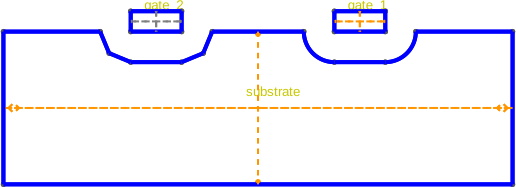
Now we apply padding with different parameters:
gate_1: Low complexity (2) but high accuracy (1000). This results in a coarse, polygonal padding (few facets).gate_2: High complexity (20) but low accuracy (1). This may lead to geometric artifacts or imprecision.gate_3: High complexity (20) and high accuracy (1000). This results in a smooth, accurate circular padding.
(
    builder_indiv.pad_group(
        "gate_1", 1, noclip=True, grow_complexity=0.05, grow_accuracy=1000
    )
    .pad_group("gate_2", 1, noclip=True, grow_complexity=20, grow_accuracy=1)
    .pad_group("gate_3", 1, noclip=True, grow_complexity=20, grow_accuracy=1000)
)
           INFO     Padding Physical Group 'gate_1' of dimension 2  _builder.py:486
                    with a layer of thickness 1
           INFO     Growing surface (2, 4)...                      _builder.py:3674
           INFO     Creating new physical group of dimension 2     _builder.py:2679
                    with name 'gate_1_padding'
           INFO     Identifying potential intersections...        fragmenter.py:290
           INFO     Fragmenting...                                fragmenter.py:320
           INFO     Restored z coordinate to 0                     _builder.py:3721
           INFO     Padding Physical Group 'gate_2' of dimension 2  _builder.py:486
                    with a layer of thickness 1
           INFO     Growing surface (2, 7)...                      _builder.py:3674
           INFO     Creating new physical group of dimension 2     _builder.py:2679
                    with name 'gate_2_padding'
           INFO     Identifying potential intersections...        fragmenter.py:290
           INFO     Fragmenting...                                fragmenter.py:320
           INFO     Restored z coordinate to 0                     _builder.py:3721
           INFO     Padding Physical Group 'gate_3' of dimension 2  _builder.py:486
                    with a layer of thickness 1
           INFO     Growing surface (2, 10)...                     _builder.py:3674
           INFO     Creating new physical group of dimension 2     _builder.py:2679
                    with name 'gate_3_padding'
           INFO     Identifying potential intersections...        fragmenter.py:290
           INFO     Fragmenting...                                fragmenter.py:320
           INFO     Restored z coordinate to 0                     _builder.py:3721

<qtcad.builder.builder.Builder object at 0x7ff52105f390>
Viewing the result of individual padding
builder_indiv.view(
    surfaces=True, volume_labels=False, save="figs/final_2d_individual.svg"
)
           INFO     Saving figure                                  _builder.py:1994

<qtcad.builder.builder.Builder object at 0x7ff52105f390>
3D Padding
Setting up the shapes
Here we define the device substrate shape (a simple box)…
substrate = Polygon.box(10, 10, name="substrate").centered()
… and the two “gates”
gate_1 = Polygon.box(10, 1, name="gate_1").centered().translated(0, -2)
gate_2 = gate_1.translated(0, 4).named("gate_2")
Finally we assemble them into masks
box_mask = Mask("substrate")
box_mask.add_shape(substrate)
gate_mask = Mask("gates")
gate_mask.add_shape(gate_1)
gate_mask.add_shape(gate_2)
Polygon(name='gate_2', id=1, hull=[(-5, 1.5), (-5, 2.5), (5, 2.5), (5, 1.5)], holes=[])
Generating the geometry
builder = Builder(name="padding demo")

(
    builder.set_mesh_size(10)
    .add_mask(box_mask)
    .add_mask(gate_mask)
    .group_from_shape()
    .use_mask("substrate")
    .use_shape("substrate")
    .extrude(3)
    .use_mask("gates")
    .extrude(0.4)
)
[14:50:38] INFO     Using mask 'substrate' (implicitly selecting    _builder.py:827
                    shapes [Polygon 0 'substrate'])
           INFO     Selected shapes: [Polygon 0 'substrate']        _builder.py:880
           INFO     Extruding shape 0 from mask 'substrate' with   _builder.py:2895
                    name 'substrate' by 3 at z=0
           INFO     Creating new physical group of dimension 2     _builder.py:2679
                    with name 'substrate_bottom'
           INFO     Creating new physical group of dimension 2     _builder.py:2679
                    with name 'substrate_side'
           INFO     Creating new physical group of dimension 2     _builder.py:2679
                    with name 'substrate_top'
           INFO     Creating new physical group of dimension 3     _builder.py:2679
                    with name 'substrate'
           INFO     Setting z-coordinate to 3                       _builder.py:929
           INFO     Using mask 'gates' (implicitly selecting shapes _builder.py:827
                    [Polygon 0 'substrate'])
           INFO     Extruding shape 0 from mask 'gates' with name  _builder.py:2895
                    'gate_1' by 0.4 at z=3
           INFO     Creating new physical group of dimension 2     _builder.py:2679
                    with name 'gate_1_bottom'
           INFO     Creating new physical group of dimension 2     _builder.py:2679
                    with name 'gate_1_side'
           INFO     Creating new physical group of dimension 2     _builder.py:2679
                    with name 'gate_1_top'
           INFO     Creating new physical group of dimension 3     _builder.py:2679
                    with name 'gate_1'
           INFO     Extruding shape 1 from mask 'gates' with name  _builder.py:2895
                    'gate_2' by 0.4 at z=3
           INFO     Creating new physical group of dimension 2     _builder.py:2679
                    with name 'gate_2_bottom'
           INFO     Creating new physical group of dimension 2     _builder.py:2679
                    with name 'gate_2_side'
           INFO     Creating new physical group of dimension 2     _builder.py:2679
                    with name 'gate_2_top'
           INFO     Creating new physical group of dimension 3     _builder.py:2679
                    with name 'gate_2'
           INFO     Identifying potential intersections...        fragmenter.py:290
           INFO     Fragmenting...                                fragmenter.py:320
           INFO     Setting z-coordinate to 3.4                     _builder.py:929

<qtcad.builder.builder.Builder object at 0x7ff52105fc50>
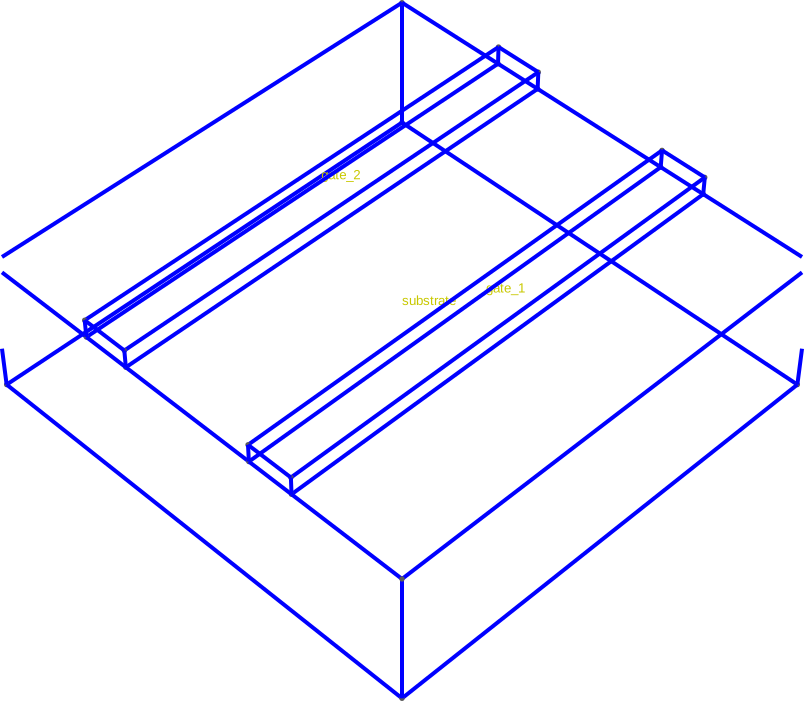
At this point we have two “gates” on top of a “substrate”
builder.view(
    surfaces=False,
    volume_labels=True,
    angles=(-45, 0, 45),
    save="figs/before_padding.svg",
)
           INFO     Saving figure                                  _builder.py:1994

<qtcad.builder.builder.Builder object at 0x7ff52105fc50>
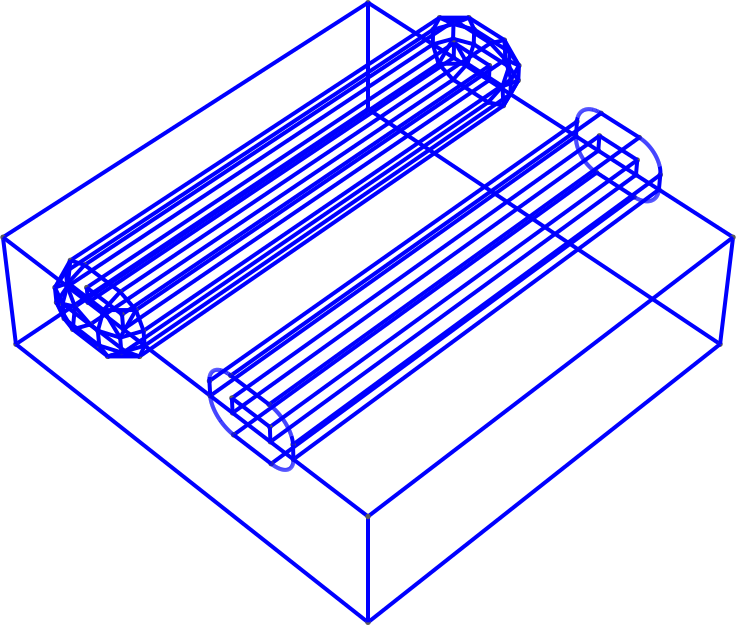
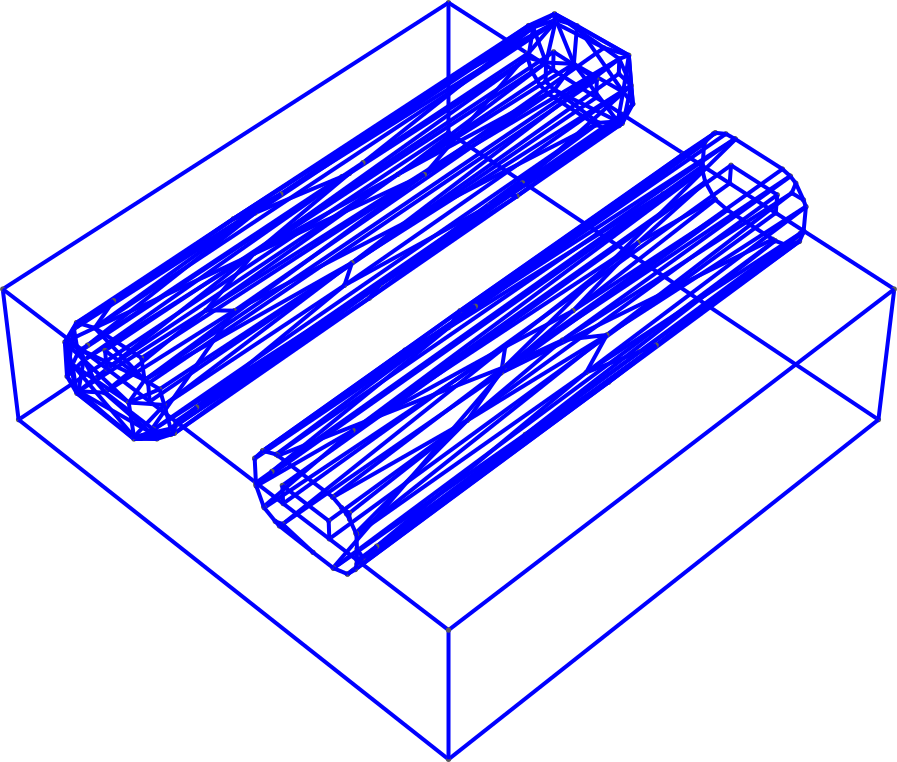
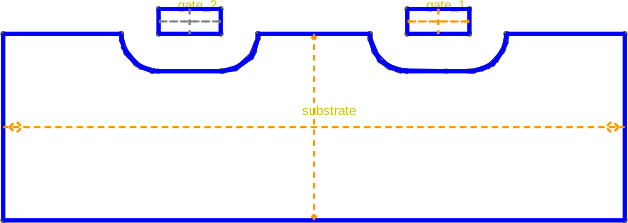
Now we add padding around those gates. The first padding will not be clipped, whereas the padding around the second gate will be clipped by the substrate shape we selected beforehand.
(
    builder.use_mask("substrate")
    .use_shape("substrate")
    .pad_group("gate_1", 0.6, noclip=False)
    .pad_group("gate_2", 0.6, noclip=True)
)
           INFO     Using mask 'substrate' (implicitly selecting    _builder.py:827
                    shapes [Polygon 0 'substrate'])
           INFO     Selected shapes: [Polygon 0 'substrate']        _builder.py:880
           INFO     Padding Physical Group 'gate_1' of dimension 3  _builder.py:486
                    with a layer of thickness 0.6 (clipping with
                    shapes with shapes: [Polygon 0 'substrate'])
           INFO     Growing volume (3, 5)...                       _builder.py:3464
[14:50:39] INFO     Creating new physical group of dimension 2     _builder.py:2679
                    with name 'gate_1_padding_bottom'
           INFO     Creating new physical group of dimension 2     _builder.py:2679
                    with name 'gate_1_padding_side'
           INFO     Creating new physical group of dimension 2     _builder.py:2679
                    with name 'gate_1_padding_top'
           INFO     Creating new physical group of dimension 3     _builder.py:2679
                    with name 'gate_1_padding'
           INFO     Identifying potential intersections...        fragmenter.py:290
           INFO     Fragmenting...                                fragmenter.py:320
           INFO     Padding Physical Group 'gate_2' of dimension 3  _builder.py:486
                    with a layer of thickness 0.6
           INFO     Growing volume (3, 10)...                      _builder.py:3464
           INFO     Creating new physical group of dimension 2     _builder.py:2679
                    with name 'gate_2_padding_bottom'
           INFO     Creating new physical group of dimension 2     _builder.py:2679
                    with name 'gate_2_padding_side'
           INFO     Creating new physical group of dimension 2     _builder.py:2679
                    with name 'gate_2_padding_top'
           INFO     Creating new physical group of dimension 3     _builder.py:2679
                    with name 'gate_2_padding'
           INFO     Identifying potential intersections...        fragmenter.py:290
           INFO     Fragmenting...                                fragmenter.py:320

<qtcad.builder.builder.Builder object at 0x7ff52105fc50>
Viewing the result
builder.view(surfaces=False, angles=(-45, 0, 45), save="figs/final.svg")
           INFO     Saving figure                                  _builder.py:1994

<qtcad.builder.builder.Builder object at 0x7ff52105fc50>
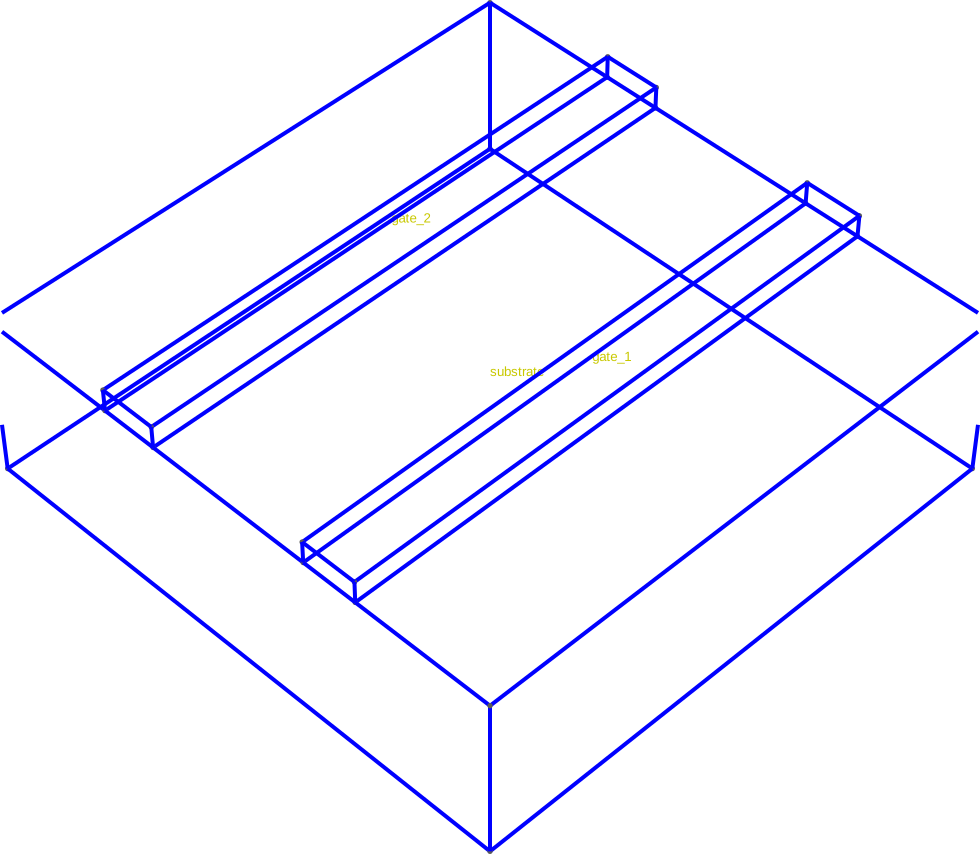
Hiding the padding volume
builder.view(
    True,
    groups=["gate_1", "gate_2", "substrate"],
    surfaces=True,
    volume_labels=True,
    angles=(-90, 0, 90),
    orthographic=True,
    save="figs/padding_removed.svg",
)
[14:50:40] INFO     Saving figure                                  _builder.py:1994

<qtcad.builder.builder.Builder object at 0x7ff52105fc50>
Total running time of the script: (0 minutes 6.896 seconds)