Note
Go to the end to download the full example code.
Cutting and etching
This example demonstrates the qtcad.builder.Builder.cut and
qtcad.builder.Builder.etch operations, as well as how to save and
restore the z-coordinate.
Initialization
Initializing the Builder
Below, we initialize a new instance of qtcad.builder.Builder and
define a couple of simple shapes we are going to use in the following.
footprint = Polygon.box(10, 10, name="base").centered()
circle = Polygon.regular(10, 1.8, name="circ").centered()
thin = Polygon.box(10, 0.4, name="thin").centered()

box_mask = Mask("footprint")
box_mask.add_shape(footprint)
box_mask.add_shape(circle)
box_mask.add_shape(thin)

builder = Builder().add_mask(box_mask)
builder.print_mask_tree()
Layout
└── Mask 0 "footprint"
    ├── 0  Polygon  "base" (4)
    ├── 1  Polygon  "circ" (10)
    └── 2  Polygon  "thin" (4)

<qtcad.builder.builder.Builder object at 0x7ff521513b10>
Base geometry
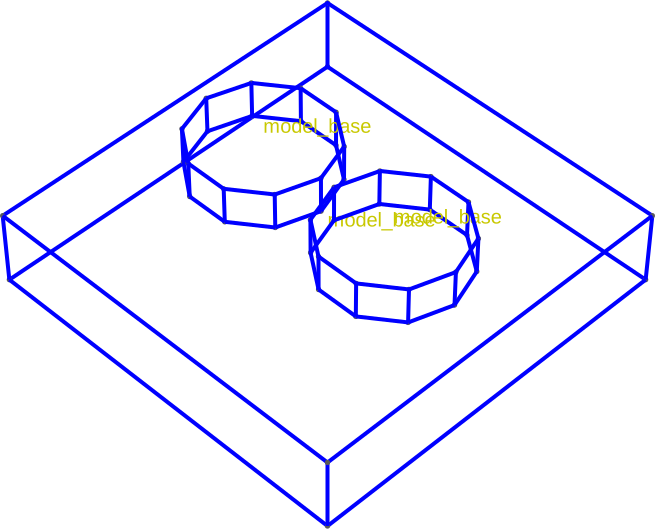
Next, select the generate a geometry with an uneven surface. We use
qtcad.builder.Builder.set_group_name to tell the Builder
to assign all subsequently created entities to the physical group
"model_base". We also use qtcad.builder.Builder.copy_shape to
create two translated versions of the circle shape. Using
qtcad.builder.Builder.save_z and qtcad.builder.Builder.set_z we
can save and restore the z-coordinate of the top of the "base"
volume.
builder = (
    builder.set_group_name("model_base")
    .set_mesh_size(10)
    .use_mask("footprint")
    .use_shape("base")
    .extrude(2)
    .save_z("box_top")
    .use_shape("circ")
    .copy_shape(translate=(0, 2))
    .extrude(1)
    .set_z("box_top")
    .copy_shape(translate=(0, -4))
    .extrude(1)
)
[14:50:31] INFO     Using mask 'footprint' (implicitly selecting    _builder.py:827
                    shapes [Polygon 0 'base', Polygon 2 'thin',
                    Polygon 1 'circ'])
           INFO     Selected shapes: [Polygon 0 'base']             _builder.py:880
           INFO     Extruding shape 0 from mask 'footprint' with   _builder.py:2895
                    name 'base' by 2 at z=0
           INFO     Creating new physical group of dimension 2     _builder.py:2679
                    with name 'model_base_bottom'
           INFO     Creating new physical group of dimension 2     _builder.py:2679
                    with name 'model_base_side'
           INFO     Creating new physical group of dimension 2     _builder.py:2679
                    with name 'model_base_top'
           INFO     Creating new physical group of dimension 3     _builder.py:2679
                    with name 'model_base'
           INFO     Setting z-coordinate to 2                       _builder.py:929
           INFO     Selected shapes: [Polygon 1 'circ']             _builder.py:880
           INFO     Extruding shape 3 from mask 'footprint' with   _builder.py:2895
                    name 'circ' by 1 at z=2
           INFO     Identifying potential intersections...        fragmenter.py:290
           INFO     Fragmenting...                                fragmenter.py:320
           INFO     Setting z-coordinate to 3                       _builder.py:929
           INFO     Setting z-coordinate to 2                       _builder.py:929
           INFO     Extruding shape 4 from mask 'footprint' with   _builder.py:2895
                    name 'circ' by 1 at z=2
           INFO     Identifying potential intersections...        fragmenter.py:290
           INFO     Fragmenting...                                fragmenter.py:320
           INFO     Setting z-coordinate to 3                       _builder.py:929
As promised, all volumes share the same physical group:
builder.view(
    surfaces=False,
    volume_labels=True,
    angles=(-45, 0, 45),
    save="figs/cut_base.svg",
    font_size=15,
    zoom=0.8,
)
           INFO     Saving figure                                  _builder.py:1994

<qtcad.builder.builder.Builder object at 0x7ff521513b10>
Cutting
- Builder.cut(depth: float, noclip: bool = False) Self
[🏗️ Operation] Cut the currently selected shape(s) into the model up from the current z coordinate down by
depthlength units. Ifnoclip=True, the cutting is performed on the whole model rather than clipped by the selected shapes.See also
etchwhich follows the contours of the top surface.- Parameters:
depth – The distance by which to etch the selected shapes down into the model.
noclip – Whether to cut the shape without horizontally clipping to the current shapes.
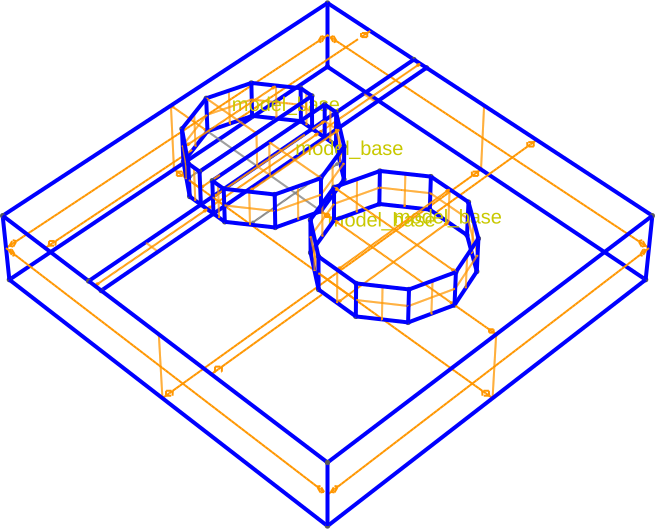
Next we will make a cut of depth 1 through the first tube shape.
builder.group_from_shape().use_shape("thin").copy_shape(
    name="cut", translate=(0, 2)
).cut(1)
           INFO     Selected shapes: [Polygon 2 'thin']             _builder.py:880
           INFO     Cutting shape 5 with name 'cut' by 1 at z=3     _builder.py:540
           INFO     Extruding shape 5 from mask 'footprint' with   _builder.py:2895
                    name 'cut' by -1 at z=3
           INFO     Creating new physical group of dimension 2     _builder.py:2679
                    with name 'cut_bottom'
           INFO     Creating new physical group of dimension 2     _builder.py:2679
                    with name 'cut_side'
           INFO     Creating new physical group of dimension 2     _builder.py:2679
                    with name 'cut_top'
           INFO     Creating new physical group of dimension 3     _builder.py:2679
                    with name 'cut'
           INFO     Identifying potential intersections...        fragmenter.py:290
           INFO     Fragmenting...                                fragmenter.py:320
           INFO     Setting z-coordinate to 2                       _builder.py:929

<qtcad.builder.builder.Builder object at 0x7ff521513b10>
The cut operation effectively extrudes the currently selected shape(s) downwards and then removes the intersection with existing geometry.
builder.view(
    surfaces=True,
    volume_labels=True,
    surface_labels=False,
    angles=(-45, 0, 45),
    save="figs/cut_result.svg",
    font_size=15,
    zoom=0.8,
)
           INFO     Saving figure                                  _builder.py:1994

<qtcad.builder.builder.Builder object at 0x7ff521513b10>
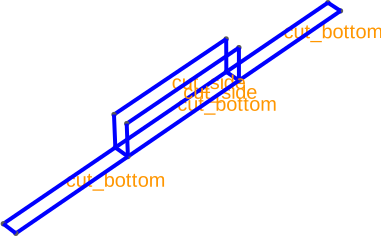
The created surfaces are labeled base on the current naming mode (see Selection of shapes and naming modes).
builder.view(
    surfaces=False,
    volume_labels=False,
    surface_labels=True,
    angles=(-45, 0, 45),
    save="figs/cut_surfs.svg",
    font_size=15,
    zoom=0.8,
    groups=["cut_bottom", "cut_side"],
)
[14:50:33] INFO     Saving figure                                  _builder.py:1994

<qtcad.builder.builder.Builder object at 0x7ff521513b10>
Etching
- Builder.etch(depth: float, noclip: bool = False) Self
[🏗️ Operation] Etch the currently selected shape(s) into the model up from the current z coordinate down by
depthlength units. This is done by cutting into each top surface. IfnoclipisTrue, then the surface is not clipped to the currently selected shapes.See also
cut,depositandgrow.- Parameters:
depth – The distance by which to etch the selected shapes down into the model. Must be positive.
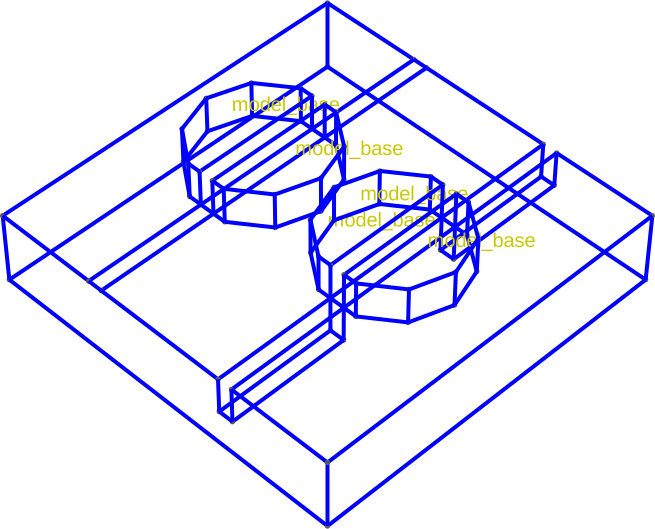
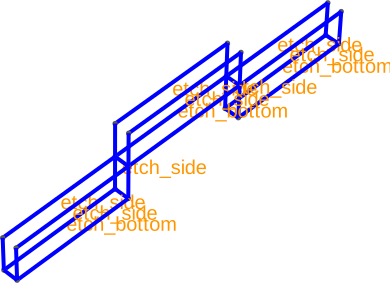
In contrast to cutting, etching follows the contour of the top surface.
builder.use_shape("thin").copy_shape(name="etch", translate=(0, -2)).etch(1)

builder.view(
    surfaces=False,
    volume_labels=True,
    surface_labels=False,
    angles=(-45, 0, 45),
    save="figs/etch_result.svg",
    font_size=15,
    zoom=0.8,
)
           INFO     Selected shapes: [Polygon 2 'thin']             _builder.py:880
           INFO     Etching shape 6 with name 'etch' by 1           _builder.py:572
           INFO     Creating new physical group of dimension 2     _builder.py:2679
                    with name 'etch_bottom'
           INFO     Creating new physical group of dimension 2     _builder.py:2679
                    with name 'etch_side'
           INFO     Creating new physical group of dimension 2     _builder.py:2679
                    with name 'etch_top'
           INFO     Creating new physical group of dimension 3     _builder.py:2679
                    with name 'etch'
           INFO     Identifying potential intersections...        fragmenter.py:290
           INFO     Fragmenting...                                fragmenter.py:320
           INFO     Saving figure                                  _builder.py:1994

<qtcad.builder.builder.Builder object at 0x7ff521513b10>
Again the resulting surfaces are named accordingly.
builder.view(
    surfaces=False,
    volume_labels=False,
    surface_labels=True,
    angles=(-45, 0, 45),
    save="figs/etch_surfs.svg",
    font_size=15,
    zoom=0.8,
    groups=["etch_bottom", "etch_side"],
)
[14:50:34] INFO     Saving figure                                  _builder.py:1994

<qtcad.builder.builder.Builder object at 0x7ff521513b10>
Total running time of the script: (0 minutes 3.377 seconds)