Note
Go to the end to download the full example code.
Rotating and translating the model
This example shows how to rotate the model around a specified axis and point. To allow adding shapes in other planes than the default x-y plane. We also demonstrate how to translate the model.
Rotation
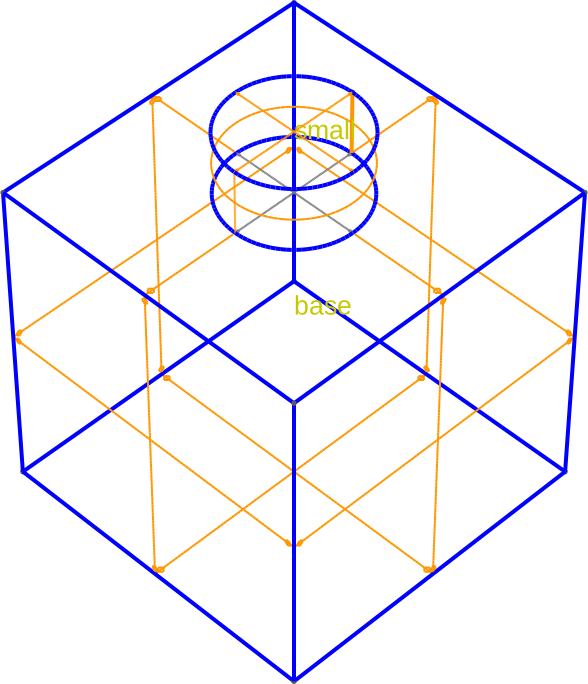
First we create a mask with two shapes, a large base and a smaller shape on top of it.
footprint = Polygon.box(10, 10, name="base").centered()
small = Circle(name="small", center=(0, 0), radius=2)

example_mask = Mask("footprint")
example_mask.add_shape(footprint)
example_mask.add_shape(small)
Circle(name='small', id=1, radius=2, center=(0, 0))
We create a Builder with this mask, extrude the base shape and then extrude the smaller shape on top of it.
builder = (
    Builder()
    .add_mask(example_mask)
    .use_shape("base")
    .extrude(10)
    .use_shape("small")
    .extrude(2)
    .view(
        volume_labels=True,
        surfaces=True,
        angles=(-45, 0, 45),
        save="figs/unrotated_model.svg",
        font_size=20,
        zoom=0.7,
    )
)
[14:50:27] INFO     Selected shapes: [Polygon 0 'base']             _builder.py:880
           INFO     Extruding shape 0 from mask 'footprint' with   _builder.py:2895
                    name 'base' by 10 at z=0
           INFO     Creating new physical group of dimension 2     _builder.py:2679
                    with name 'base_bottom'
           INFO     Creating new physical group of dimension 2     _builder.py:2679
                    with name 'base_side'
           INFO     Creating new physical group of dimension 2     _builder.py:2679
                    with name 'base_top'
           INFO     Creating new physical group of dimension 3     _builder.py:2679
                    with name 'base'
           INFO     Setting z-coordinate to 10                      _builder.py:929
           INFO     Selected shapes: [Circle 1 'small']             _builder.py:880
           INFO     Extruding shape 1 from mask 'footprint' with   _builder.py:2895
                    name 'small' by 2 at z=10
           INFO     Creating new physical group of dimension 2     _builder.py:2679
                    with name 'small_bottom'
           INFO     Creating new physical group of dimension 2     _builder.py:2679
                    with name 'small_side'
           INFO     Creating new physical group of dimension 2     _builder.py:2679
                    with name 'small_top'
           INFO     Creating new physical group of dimension 3     _builder.py:2679
                    with name 'small'
           INFO     Identifying potential intersections...        fragmenter.py:290
           INFO     Fragmenting...                                fragmenter.py:320
           INFO     Setting z-coordinate to 12                      _builder.py:929
           INFO     Saving figure                                  _builder.py:1994
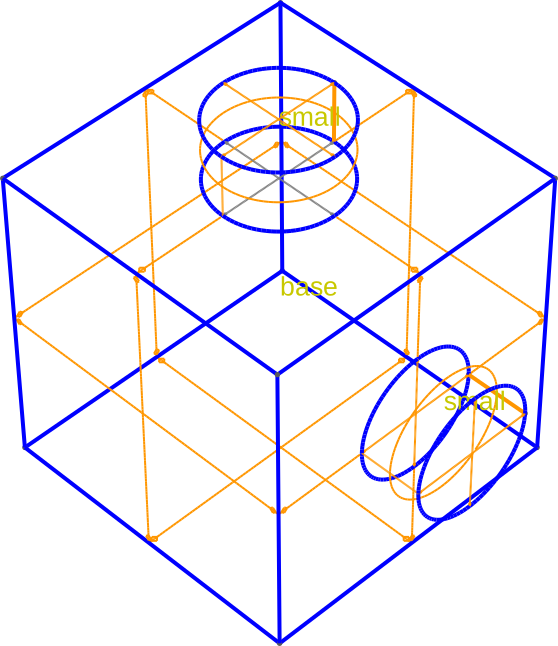
Now, we rotate the model 90 degrees around the x axis, using the base shape as the point to rotate around. We then extrude the small shape again on top of the rotated base shape.
builder.rotate_model(angle=90, axis=Direction.x, around="base").extrude(2).view(
    volume_labels=True,
    angles=(-45, 0, 45),
    save="figs/rotated_model.svg",
    font_size=20,
    zoom=0.8,
    surfaces=True,
)
           INFO     Rotating model around [1. 0. 0.] based at       _builder.py:670
                    [-4.19775326e-16 -1.88331090e-17
                    5.00000000e+00] by 90 degrees
           INFO     New z-coordinate after rotation is 10.0         _builder.py:679
           INFO     Extruding shape 1 from mask 'footprint' with   _builder.py:2895
                    name 'small' by 2 at z=10.0
           INFO     Identifying potential intersections...        fragmenter.py:290
           INFO     Fragmenting...                                fragmenter.py:320
           INFO     Setting z-coordinate to 12.0                    _builder.py:929
           INFO     Saving figure                                  _builder.py:1994

<qtcad.builder.builder.Builder object at 0x7ff52105fc50>
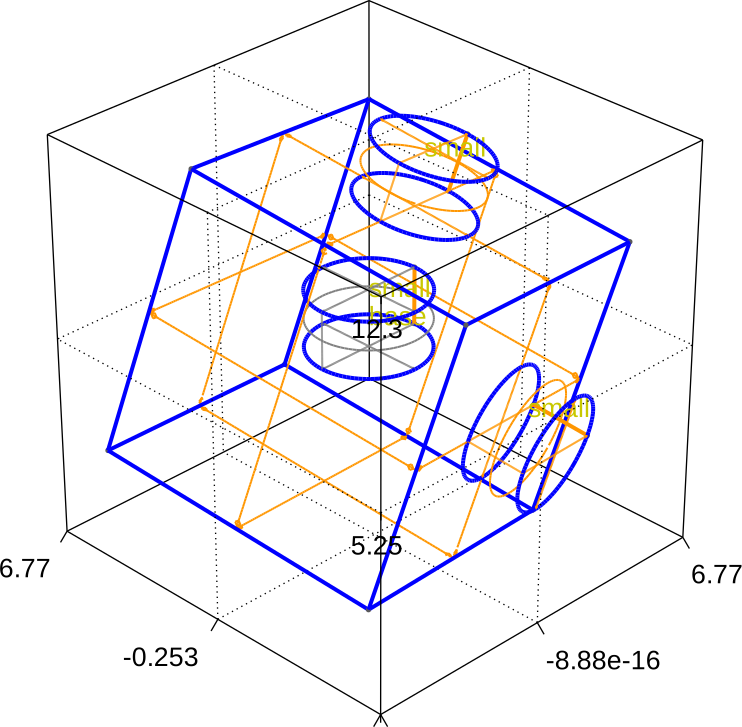
Finally, we rotate the model 20 degrees around a tilted axis defined by the vector (1, 1, 1), again using the base shape as the point to rotate around. We then extrude the small shape in the middle of the rotated base shape.
builder.rotate_model(angle=20, axis=[1, 1, 1], around="base").set_z(5).extrude(2).view(
    volume_labels=True,
    angles=(-60, 0, 45),
    save="figs/rotated_model_arbitrary_axis.svg",
    font_size=20,
    zoom=0.8,
    surfaces=True,
    axes=3,
)
[14:50:28] INFO     Rotating model around [1. 1. 1.] based at       _builder.py:670
                    [-8.34887715e-17 -6.82121026e-16
                    5.00000000e+00] by 20 degrees
           INFO     Could not find any points nearby to snap to.   _builder.py:2376
                    Falling back to bounding box value...
           INFO     New z-coordinate after rotation is              _builder.py:679
                    12.27996891767327
           INFO     Setting z-coordinate to 5                       _builder.py:929
           INFO     Extruding shape 1 from mask 'footprint' with   _builder.py:2895
                    name 'small' by 2 at z=5
           INFO     Identifying potential intersections...        fragmenter.py:290
           INFO     Fragmenting...                                fragmenter.py:320
           INFO     Setting z-coordinate to 7                       _builder.py:929
           INFO     Saving figure                                  _builder.py:1994

<qtcad.builder.builder.Builder object at 0x7ff52105fc50>
Translation
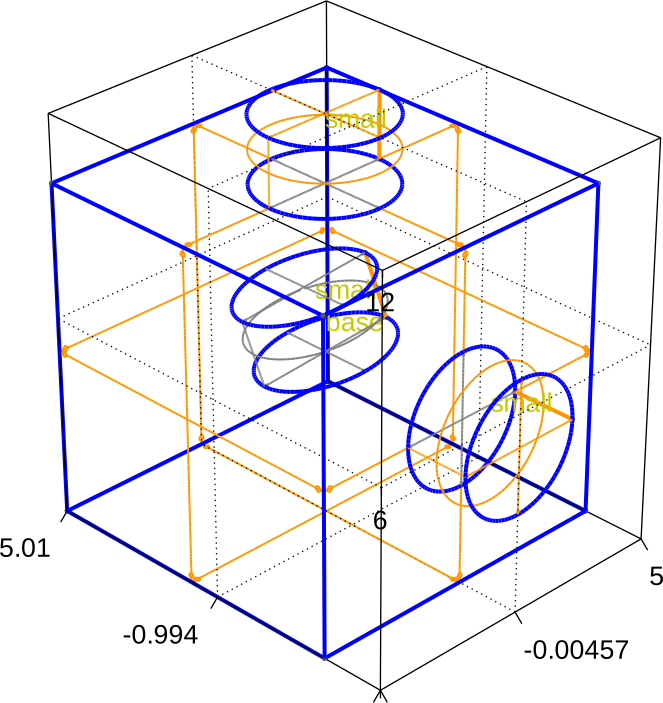
We can also translate the model. As an example, we first undo the previous rotation.
builder.rotate_model(angle=-20, axis=[1, 1, 1], around="base").view(
    volume_labels=True,
    angles=(-60, 0, 45),
    save="figs/befro_rotation.svg",
    font_size=20,
    zoom=0.8,
    surfaces=True,
    axes=3,
)
[14:50:29] INFO     Rotating model around [1. 1. 1.] based at [     _builder.py:670
                    5.19313470e-16 -9.63690918e-16  4.97421932e+00]
                    by -20 degrees
           INFO     New z-coordinate after rotation is              _builder.py:679
                    11.998963489820566
           INFO     Saving figure                                  _builder.py:1994

<qtcad.builder.builder.Builder object at 0x7ff52105fc50>
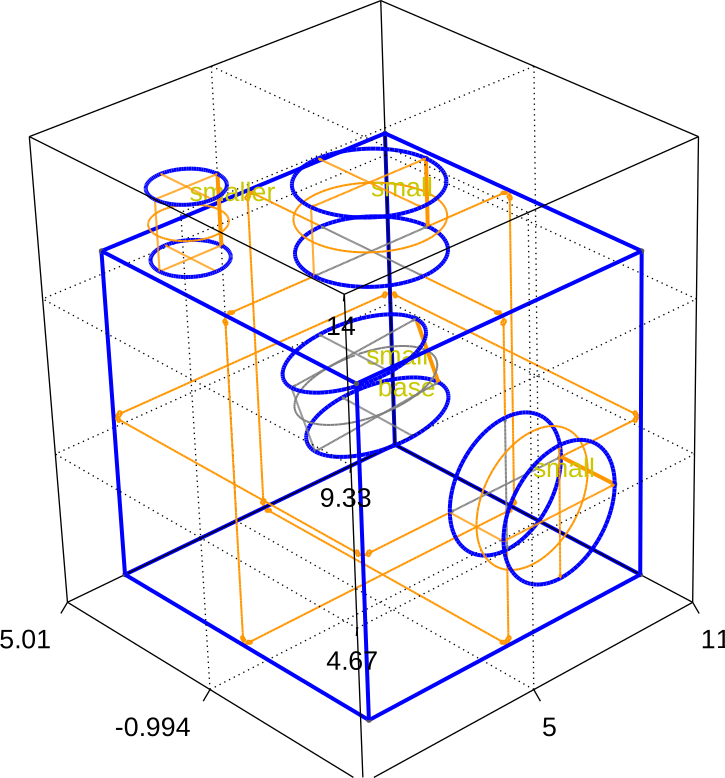
Then, we translate the model 5 units in the x direction and then extrude a scaled down version of the circle on top of the translated base shape.
builder.translate_model((6, 0, 0)).use_shape("small").copy_shape(
    scale=0.5, name="smaller"
).extrude(2).view(
    volume_labels=True,
    angles=(-60, 0, 45),
    save="figs/translated_model.svg",
    font_size=20,
    zoom=0.8,
    surfaces=True,
    axes=3,
)
[14:50:30] INFO     Translating model by [6. 0. 0.]                 _builder.py:591
           INFO     Selected shapes: [Circle 1 'small']             _builder.py:880
           INFO     Extruding shape 2 from mask 'footprint' with   _builder.py:2895
                    name 'smaller' by 2 at z=11.998963489820566
           INFO     Creating new physical group of dimension 2     _builder.py:2679
                    with name 'smaller_bottom'
           INFO     Creating new physical group of dimension 2     _builder.py:2679
                    with name 'smaller_side'
           INFO     Creating new physical group of dimension 2     _builder.py:2679
                    with name 'smaller_top'
           INFO     Creating new physical group of dimension 3     _builder.py:2679
                    with name 'smaller'
           INFO     Identifying potential intersections...        fragmenter.py:290
           INFO     Setting z-coordinate to 13.998963489820566      _builder.py:929
           INFO     Saving figure                                  _builder.py:1994

<qtcad.builder.builder.Builder object at 0x7ff52105fc50>
Total running time of the script: (0 minutes 4.128 seconds)