Note
Go to the end to download the full example code.
Tolerances
In this example, we demonstrate how geometry tolerances can affect meshing.
First we create a mask with three shapes: a large base rectangle and two smaller rectangles that touch each other.
base = Polygon.box(10, 10).centered()
insert_left = Polygon.box(4, 4).centered().translated(-2, 0)
insert_right = insert_left.translated(4, 0).auto_name()

mask = Mask("shapes", shapes=[base, insert_left, insert_right])
[14:50:26] INFO     Auto-named Polygon instance to 'base'              masks.py:240
           INFO     Auto-named Polygon instance to 'insert_left'       masks.py:240
           INFO     Auto-named Polygon instance to 'insert_right'      masks.py:240
Next we define a function that creates a mesh with a given geometry tolerance and a gap between the two smaller rectangles.
def test_tolerances(tol, gap):
    builder = (
        Builder()
        .set_geometry_tolerance(tol)
        .add_mask(mask)
        .use_shape("base")
        .add_surface()
        .use_shape("insert_left")
        .add_surface()
        .use_shape("insert_right")
        .copy_shape("insert_right_gapped", translate=(gap, 0))
        .add_surface()
        .mesh(2, show_gmsh_output=True)
    )

    entities = set(builder.get_all_entities(0))

    print("Points:", entities)
    return builder, entities
We can now create two meshes, one with tight tolerances and one with loose tolerances. We visualize the meshes and print the points in each case.
In the case where the tolerance is smaller than the gap between the two smaller rectangles, the two rectangles are treated as separate entities and the mesh reflects that.
builder, tight_points = test_tolerances(tol=1e-4, gap=1e-2)
builder.view(
    surface_labels=True,
    save="figs/tolerances_tight.svg",  # caption: With tight tolerances the two touching lines are separated by an invisible gap;
)
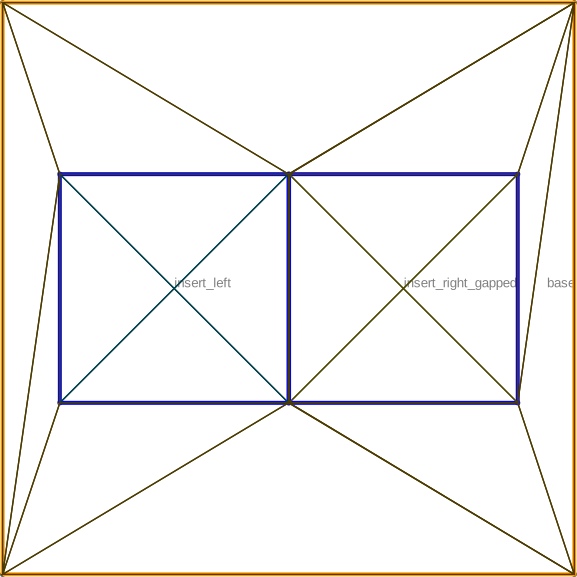
Fig. 7 With tight tolerances the two touching lines are separated by an invisible gap
           INFO     Selected shapes: [Polygon 0 'base']             _builder.py:880
           INFO     Creating a surface from shape 0 with name      _builder.py:2599
                    'base' from mask 'shapes' at z=0
           INFO     Creating new physical group of dimension 2     _builder.py:2679
                    with name 'base'
           INFO     Selected shapes: [Polygon 1 'insert_left']      _builder.py:880
           INFO     Creating a surface from shape 1 with name      _builder.py:2599
                    'insert_left' from mask 'shapes' at z=0
           INFO     Creating new physical group of dimension 2     _builder.py:2679
                    with name 'insert_left'
           INFO     Identifying potential intersections...        fragmenter.py:290
           INFO     Fragmenting...                                fragmenter.py:320
           INFO     Selected shapes: [Polygon 2 'insert_right']     _builder.py:880
           INFO     Creating a surface from shape 3 with name      _builder.py:2599
                    'insert_right_gapped' from mask 'shapes' at
                    z=0
           INFO     Creating new physical group of dimension 2     _builder.py:2679
                    with name 'insert_right_gapped'
           INFO     Identifying potential intersections...        fragmenter.py:290
           INFO     Fragmenting...                                fragmenter.py:320
           INFO     Preparing to mesh                              _builder.py:1587
           INFO     Detecting appropriate random factor            _builder.py:3867
           INFO     Increased random factor from 1e-09 to          _builder.py:3885
                    1.4802974253785605e-08
           INFO     Random factor is now appropriate               _builder.py:3891
           INFO     Meshing                                        _builder.py:1603
Points: {(0, 1), (0, 7), (0, 4), (0, 10), (0, 3), (0, 9), (0, 6), (0, 12), (0, 2), (0, 5), (0, 8), (0, 11)}
           INFO     Saving figure                                  _builder.py:1994

<qtcad.builder.builder.Builder object at 0x7ff5215139d0>
In the case where the tolerance is larger than the gap, the two rectangles are merged into a single entity and again the mesh reflects that.
builder, loose_points = test_tolerances(tol=1e-1, gap=1e-2)
builder.view(
    surface_labels=True,
    save="figs/tolerances_loose.svg",  # caption: With loose tolerances the two touching lines are merged into one.;
)
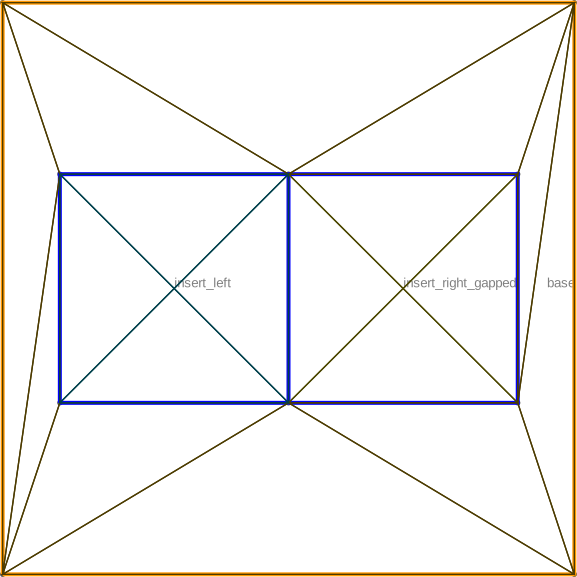
Fig. 8 With loose tolerances the two touching lines are merged into one.
           INFO     Selected shapes: [Polygon 0 'base']             _builder.py:880
           INFO     Creating a surface from shape 0 with name      _builder.py:2599
                    'base' from mask 'shapes' at z=0
           INFO     Creating new physical group of dimension 2     _builder.py:2679
                    with name 'base'
           INFO     Selected shapes: [Polygon 1 'insert_left']      _builder.py:880
           INFO     Creating a surface from shape 1 with name      _builder.py:2599
                    'insert_left' from mask 'shapes' at z=0
           INFO     Creating new physical group of dimension 2     _builder.py:2679
                    with name 'insert_left'
           INFO     Identifying potential intersections...        fragmenter.py:290
           INFO     Fragmenting...                                fragmenter.py:320
           INFO     Selected shapes: [Polygon 2 'insert_right']     _builder.py:880
           INFO     Creating a surface from shape 3 with name      _builder.py:2599
                    'insert_right_gapped' from mask 'shapes' at
                    z=0
           INFO     Creating new physical group of dimension 2     _builder.py:2679
                    with name 'insert_right_gapped'
           INFO     Identifying potential intersections...        fragmenter.py:290
           INFO     Fragmenting...                                fragmenter.py:320
           INFO     Preparing to mesh                              _builder.py:1587
           INFO     Detecting appropriate random factor            _builder.py:3867
           INFO     Random factor is now appropriate               _builder.py:3891
           INFO     Meshing                                        _builder.py:1603
Points: {(0, 1), (0, 7), (0, 4), (0, 10), (0, 3), (0, 9), (0, 6), (0, 12), (0, 2), (0, 5), (0, 8), (0, 11)}
           INFO     Saving figure                                  _builder.py:1994

<qtcad.builder.builder.Builder object at 0x7ff521511f90>
Finally, we can see the difference in points between the two meshes. The tighter mesh has two extra points:
print(tight_points - loose_points)
set()
Total running time of the script: (0 minutes 0.986 seconds)