Note
Go to the end to download the full example code.
Defining and Importing Shapes
This example shows how to manually define two-dimensional shapes, how to import shapes from OASIS layout files, and how to modify shapes.
Imports
Masks
A Mask is simply a collection of
two-dimensional shapes with a name and a numerical id. Grouping shapes
together in a mask is useful if those shapes will often be used
together. For example in the Adding the gate surfaces section in the
Gated Quantum Dot tutorial we put all the gate surfaces into one mask
and then added them all together.
- class Mask(name: str | None, shapes: list[~qtcad.builder.masks.Shape] = <factory>, id: int = -1)
A collection of multiple
Shapeinstances.- Parameters:
name – Optional name of the mask.
shapes – Shapes in the mask (optional, default is an empty list).
index – Index of the mask. (optional, will be overwritten by
qtcad.builder.Builderif-1)
As we see above, we could specify the shapes upon the creation of
the mask. Or we could add them later on using
Mask.add_shape and Mask.add_shapes.
Let us define a mask that will contain the footprint of our device.
example_mask = Mask(name="example")
Note that we don’t provide an id as Builder will
take care of assigning a unique one.
Shapes
All shapes are subclasses of the Shape class which provides a
common set of properties (such as a name), as well as transformations.
- class Shape(name: str | None = '__unset')
An abstract class representing a shape.
- auto_name() Self
Automatically set the name of this shape by inspecting the stack trace and looking for an assignment to a variable of this type. If no such assignment can be found, the name is not set.
- property bbox: tuple[float, float, float, float]
Returns: The bounding box of the shape as a four-tuple
(x_min, y_min, x_max, y_max).
- centered() Shape
- Returns:
A copy of this shape centered at its barycenter. The result includes all sub-shapes with similar transformations.
- property complexity
Returns: A measure of the complexity of the shape.
- id: int = -1
The index of the shape.
Automatically assigned by
qtcad.builder.masks.Mask.
- name: str | None = '__unset'
The name of the shape.
If no name is specified, it will be automatically assigned by inspecting the stack trace and looking for an assignment to a variable of this type. See also
Shape.auto_name.
- rotated(angle: float, center: tuple[float, float] | None = None) Shape
- Returns:
A copy of this shape rotated by
angledegrees aroundcenteror around its barycenter ifcenterisNone.
- scaled(factor: float, factor_y: None | float = None) Shape
- Returns:
A copy of this shape scaled by
factor.If
factor_yis given, the shape is scaled byfactorin the x direction and byfactor_yin the y direction.
- transform(translate: tuple[float, float] = (0.0, 0.0), rotate: float | tuple[float, tuple[float, float] | None] = 0.0, scale: float = 1, center: bool = False, name: str | None = '__unset', transformer: Callable[[Shape], Shape] | None = None) Shape
Apply a series of transformations to this shape and return the resulting shape.
- Parameters:
translate – A tuple
(dx, dy)specifying the translation in x and y direction. Seeqtcad.builder.Shape.translated().rotate – The rotation angle in degrees. If a tuple (angle, center) is given, the shape is rotated by
angledegrees aroundcenter. IfcenterisNone, the shape is rotated around its barycenter. Seeqtcad.builder.Shape.rotated().scale – The scaling factor. See
qtcad.builder.Shape.scaled().center – Whether to center the shape at its barycenter. See
qtcad.builder.Shape.centered().name – The name of the new shape. If
"__unset", the name will be copied from the original shape. IfNone, the new shape will be unnamed. Seeqtcad.builder.Shape.named(). transformer: An optional callable that takes a shape and returns a transformed shape. This is applied last.
Polygons
A Polygon is simply a collection of hull
points (the outline of the polygon) with optional holes:
- class Polygon(name: str | None = '__unset', hull: list[tuple[float, float]] = <factory>, holes: list[~qtcad.builder.masks.Polygon] = <factory>)
A polygon with an hull (outline) defined by the points
hullandholesthat are themselves polygons.
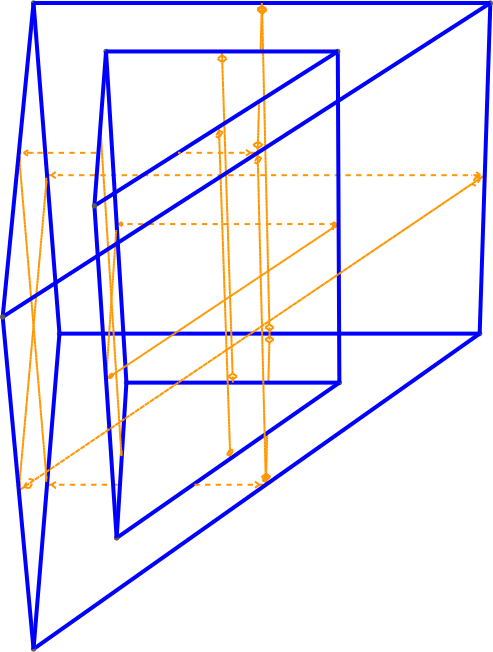
For the most basic form of usage we can create a polygon just by supplying points:
[14:51:36] INFO Auto-named Polygon instance to 'hole' masks.py:240
The above creates a polygon named “hole”, which just happens to be a
triangle. We can then take this polygon as the template to create a
bigger triangle with the “hole” shape as a hole. For convenience we
used the Shape.centered method to center the polygon.
We used the two-argument form of Shape.scaled() to scale the
shape non-uniformly along the x and y axes.
triangle = Polygon(hull=hole.scaled(2.5, 1.5).hull, holes=[hole])
INFO Auto-named Polygon instance to 'triangle' masks.py:240
Note that triangle was automatically named based on the name of the variable it was assigned to above.
We can then add our shape to the example mask and load that mask into
a qtcad.builder.Builder instance. As a demonstration, we extrude a
surface based on that shape:
example_mask.add_shape(triangle)

Builder().add_mask(example_mask).extrude(2).view(
    surfaces=True,
    volume_labels=False,
    angles=(-45, 0, 0),
    save="figs/triangle_hole.svg",
    zoom=0.8,
)
           INFO     Extruding shape 0 from mask 'example' with     _builder.py:2895
                    name 'triangle' by 2 at z=0
           INFO     Creating new physical group of dimension 2     _builder.py:2679
                    with name 'triangle_bottom'
           INFO     Creating new physical group of dimension 2     _builder.py:2679
                    with name 'triangle_side'
           INFO     Creating new physical group of dimension 2     _builder.py:2679
                    with name 'triangle_top'
           INFO     Creating new physical group of dimension 3     _builder.py:2679
                    with name 'triangle'
           INFO     Setting z-coordinate to 2                       _builder.py:929
           INFO     Saving figure                                  _builder.py:1994

<qtcad.builder.builder.Builder object at 0x7ff52105fd90>
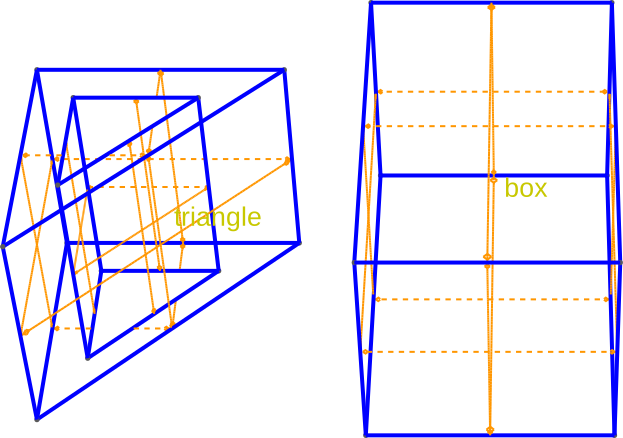
There are several constructors available to create special polygons.
First, there is the method qtcad.builder.Polygon.box:
- box(width: float, height: float, *args, **kwargs) Polygon
Create a polygon box with width
widthand height theheightwith the lower left corner at (0, 0). The rest arguments and keywords are passed on the constructor ofqtcad.builder.masks.Polygon.
box = Polygon.box(2, 3).centered().translated(3, 0)
example_mask.add_shape(box)

Builder().add_mask(example_mask).extrude(2).view(
    surfaces=True,
    volume_labels=True,
    angles=(-45, 0, 0),
    save="figs/triangle_and_box.svg",
    font_size=20,
)
[14:51:37] INFO     Auto-named Polygon instance to 'box'               masks.py:240
           INFO     Extruding shape 1 from mask 'example' with     _builder.py:2895
                    name 'box' by 2 at z=0
           INFO     Creating new physical group of dimension 2     _builder.py:2679
                    with name 'box_bottom'
           INFO     Creating new physical group of dimension 2     _builder.py:2679
                    with name 'box_side'
           INFO     Creating new physical group of dimension 2     _builder.py:2679
                    with name 'box_top'
           INFO     Creating new physical group of dimension 3     _builder.py:2679
                    with name 'box'
           INFO     Extruding shape 0 from mask 'example' with     _builder.py:2895
                    name 'triangle' by 2 at z=0
           INFO     Creating new physical group of dimension 2     _builder.py:2679
                    with name 'triangle_bottom'
           INFO     Creating new physical group of dimension 2     _builder.py:2679
                    with name 'triangle_side'
           INFO     Creating new physical group of dimension 2     _builder.py:2679
                    with name 'triangle_top'
           INFO     Creating new physical group of dimension 3     _builder.py:2679
                    with name 'triangle'
           INFO     Setting z-coordinate to 2                       _builder.py:929
           INFO     Saving figure                                  _builder.py:1994

<qtcad.builder.builder.Builder object at 0x7ff520ffd950>
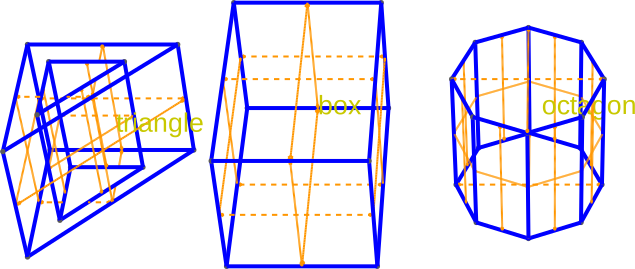
To approximate circles (or create regular polygons) ~qtcad.builder.Polygon.regular can be used:
- regular(num_segments: int, radius: float = 1, *args, **kwargs) Polygon
Create a regular polygon (n-gon) that approximates a circle with
num_segmentsand radiusradius.The rest arguments are passed to the constructor for
qtcad.builder.masks.Polygon.
octagon = Polygon.regular(num_segments=8, radius=1).translated(6, 0)
example_mask.add_shape(octagon)

Builder().add_mask(example_mask).extrude(2).view(
    surfaces=True,
    volume_labels=True,
    angles=(-45, 0, 0),
    save="figs/triangle_and_box_and_octa.svg",
    font_size=20,
)
           INFO     Auto-named Polygon instance to 'octagon'           masks.py:240
           INFO     Extruding shape 1 from mask 'example' with     _builder.py:2895
                    name 'box' by 2 at z=0
           INFO     Creating new physical group of dimension 2     _builder.py:2679
                    with name 'box_bottom'
           INFO     Creating new physical group of dimension 2     _builder.py:2679
                    with name 'box_side'
           INFO     Creating new physical group of dimension 2     _builder.py:2679
                    with name 'box_top'
           INFO     Creating new physical group of dimension 3     _builder.py:2679
                    with name 'box'
           INFO     Extruding shape 0 from mask 'example' with     _builder.py:2895
                    name 'triangle' by 2 at z=0
           INFO     Creating new physical group of dimension 2     _builder.py:2679
                    with name 'triangle_bottom'
           INFO     Creating new physical group of dimension 2     _builder.py:2679
                    with name 'triangle_side'
           INFO     Creating new physical group of dimension 2     _builder.py:2679
                    with name 'triangle_top'
           INFO     Creating new physical group of dimension 3     _builder.py:2679
                    with name 'triangle'
           INFO     Extruding shape 2 from mask 'example' with     _builder.py:2895
                    name 'octagon' by 2 at z=0
           INFO     Creating new physical group of dimension 2     _builder.py:2679
                    with name 'octagon_bottom'
           INFO     Creating new physical group of dimension 2     _builder.py:2679
                    with name 'octagon_side'
           INFO     Creating new physical group of dimension 2     _builder.py:2679
                    with name 'octagon_top'
           INFO     Creating new physical group of dimension 3     _builder.py:2679
                    with name 'octagon'
           INFO     Setting z-coordinate to 2                       _builder.py:929
           INFO     Saving figure                                  _builder.py:1994

<qtcad.builder.builder.Builder object at 0x7ff52105fd90>
Circles
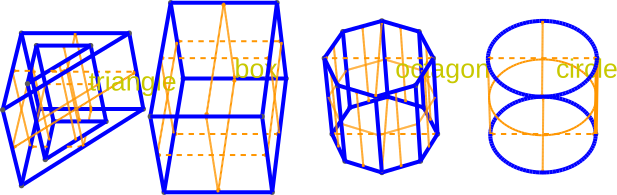
A Circle is defined by a barycenter and a radius:
circle = Circle(center=(9, 0), radius=1)
example_mask.add_shape(circle)
Builder().add_mask(example_mask).extrude(2).view(
    surfaces=True,
    volume_labels=True,
    angles=(-45, 0, 0),
    save="figs/triangle_and_box_and_octa_and_circle.svg",
    font_size=20,
)
[14:51:38] INFO     Auto-named Circle instance to 'circle'             masks.py:240
           INFO     Extruding shape 3 from mask 'example' with     _builder.py:2895
                    name 'circle' by 2 at z=0
           INFO     Creating new physical group of dimension 2     _builder.py:2679
                    with name 'circle_bottom'
           INFO     Creating new physical group of dimension 2     _builder.py:2679
                    with name 'circle_side'
           INFO     Creating new physical group of dimension 2     _builder.py:2679
                    with name 'circle_top'
           INFO     Creating new physical group of dimension 3     _builder.py:2679
                    with name 'circle'
           INFO     Extruding shape 1 from mask 'example' with     _builder.py:2895
                    name 'box' by 2 at z=0
           INFO     Creating new physical group of dimension 2     _builder.py:2679
                    with name 'box_bottom'
           INFO     Creating new physical group of dimension 2     _builder.py:2679
                    with name 'box_side'
           INFO     Creating new physical group of dimension 2     _builder.py:2679
                    with name 'box_top'
           INFO     Creating new physical group of dimension 3     _builder.py:2679
                    with name 'box'
           INFO     Extruding shape 0 from mask 'example' with     _builder.py:2895
                    name 'triangle' by 2 at z=0
           INFO     Creating new physical group of dimension 2     _builder.py:2679
                    with name 'triangle_bottom'
           INFO     Creating new physical group of dimension 2     _builder.py:2679
                    with name 'triangle_side'
           INFO     Creating new physical group of dimension 2     _builder.py:2679
                    with name 'triangle_top'
           INFO     Creating new physical group of dimension 3     _builder.py:2679
                    with name 'triangle'
           INFO     Extruding shape 2 from mask 'example' with     _builder.py:2895
                    name 'octagon' by 2 at z=0
           INFO     Creating new physical group of dimension 2     _builder.py:2679
                    with name 'octagon_bottom'
           INFO     Creating new physical group of dimension 2     _builder.py:2679
                    with name 'octagon_side'
           INFO     Creating new physical group of dimension 2     _builder.py:2679
                    with name 'octagon_top'
           INFO     Creating new physical group of dimension 3     _builder.py:2679
                    with name 'octagon'
           INFO     Setting z-coordinate to 2                       _builder.py:929
           INFO     Saving figure                                  _builder.py:1994

<qtcad.builder.builder.Builder object at 0x7ff52105f9d0>
Importing shapes from OASIS layouts
Shapes can also be imported from OASIS layout files. Layers in OASIS
files are mapped to Mask objects. To load oasis files, we use
the load_layout() method:
- Builder.load_layout(file_path: str | Path, cell_name: str | None = None, name_property: str = 'name', plot_when_fail: bool = False, cache: bool = True, path_tolerance: float | None = None) Self
[⚡ Utility] Read the cell named
cell_name(default is the top cell) from aGDSor anOASISfilefile_pathand parse its structure. Each layer will become aMaskappropriately named and the ID from the layout file (provided there are no conflicting IDs) containing polygons for each shape found in the layer. The name of each shape is taken from the user propertyname_property. The length units in the file are assumed to be10**length_unit_exponentmeters (default is nanometres).- Parameters:
file_path – The path to the
GDSorOASISfile.cell_name – The name of the cell that the device is specified in. If
None, use the top cell.name_property – The user property that contains the name of a shape.
plot_when_fail – Whether to show debugging plots when the parsing of the imported shapes fails. Currently these plots will show polygons whose hull and holes cannot be differentiated.
path_tolerance – Tolerance used when converting paths to polygons (smaller = more points).
The example layout we are loading
here contains two layers in a cell named “fancycell”. The first one
contains triangle and the second one boxes.
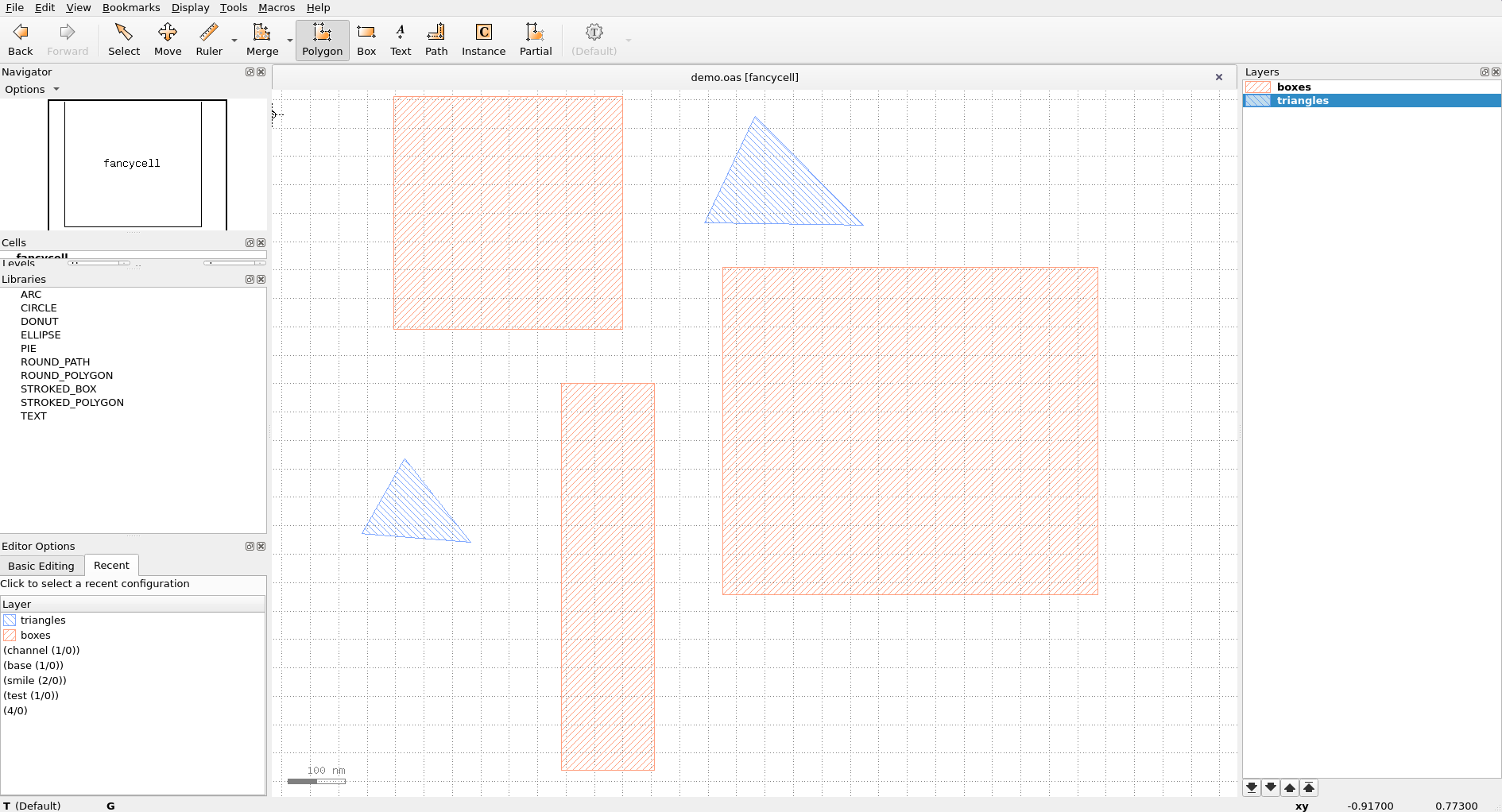
Fig. 17 The layout in KLayout.
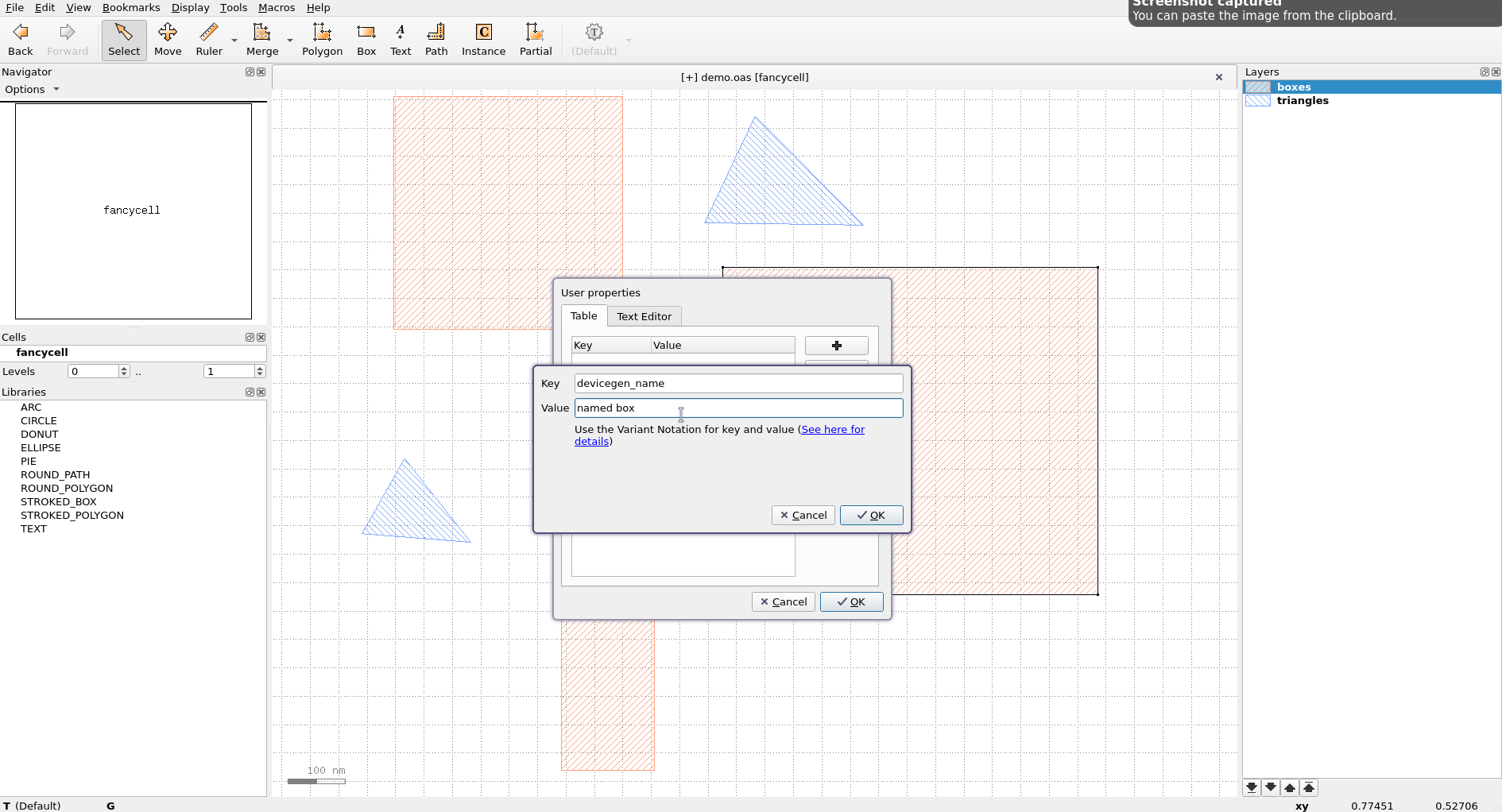
A subset of the shapes are named by setting the "builder_name"
custom property.
[14:51:40] INFO     Loading layout from cache                           misc.py:266
                    /home/hiro/.cache/qtcad/builder/layout_939139348f1b
                    786868928d5e2314dfd65c2b1ef062641b7dbfcc1e120444116
                    f_fancycell_name_None_-9.pkl
           INFO     Adding mask 'boxes' from cache                     masks.py:776
           INFO     Adding mask 'triangles' from cache                 masks.py:776
Layout
├── Mask 1 "boxes"
│   ├── 0  Polygon  (4)
│   ├── 1  Polygon  "named box" (4)
│   └── 2  Polygon  "another box" (4)
└── Mask 2 "triangles"
    ├── 0  Polygon  (3)
    └── 1  Polygon  "named triangle" (4)
As can be seen above, we loaded the two layers into appropriately named masks, each containing their requisite shapes.
builder.use_mask("triangles").extrude(100).view(
    surfaces=False,
    volume_labels=True,
    angles=(-45, 0, 0),
    save="figs/oasis_triangles.svg",
    font_size=20,
)
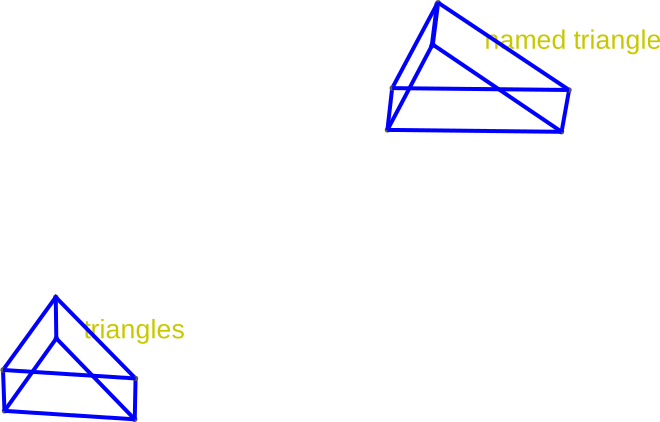
           INFO     Using mask 'triangles' (implicitly selecting    _builder.py:827
                    shapes [Polygon 0, Polygon 1 'named triangle'])
           INFO     Extruding shape 0 from mask 'triangles' with   _builder.py:2895
                    name 'None' by 100 at z=0
           INFO     Creating new physical group of dimension 2     _builder.py:2679
                    with name 'triangles_bottom'
           INFO     Creating new physical group of dimension 2     _builder.py:2679
                    with name 'triangles_side'
           INFO     Creating new physical group of dimension 2     _builder.py:2679
                    with name 'triangles_top'
           INFO     Creating new physical group of dimension 3     _builder.py:2679
                    with name 'triangles'
           INFO     Extruding shape 1 from mask 'triangles' with   _builder.py:2895
                    name 'named triangle' by 100 at z=0
           INFO     Creating new physical group of dimension 2     _builder.py:2679
                    with name 'named triangle_bottom'
           INFO     Creating new physical group of dimension 2     _builder.py:2679
                    with name 'named triangle_side'
           INFO     Creating new physical group of dimension 2     _builder.py:2679
                    with name 'named triangle_top'
           INFO     Creating new physical group of dimension 3     _builder.py:2679
                    with name 'named triangle'
           INFO     Setting z-coordinate to 100                     _builder.py:929
           INFO     Saving figure                                  _builder.py:1994

<qtcad.builder.builder.Builder object at 0x7ff52105f390>
The unnamed shapes are given default names based on the mask name. Similarly, we can extrude the boxes:
builder.use_mask("boxes").set_z(0).extrude(200).view(
    surfaces=False,
    volume_labels=True,
    angles=(-45, 0, 0),
    save="figs/oasis_boxes.svg",
    font_size=20,
)
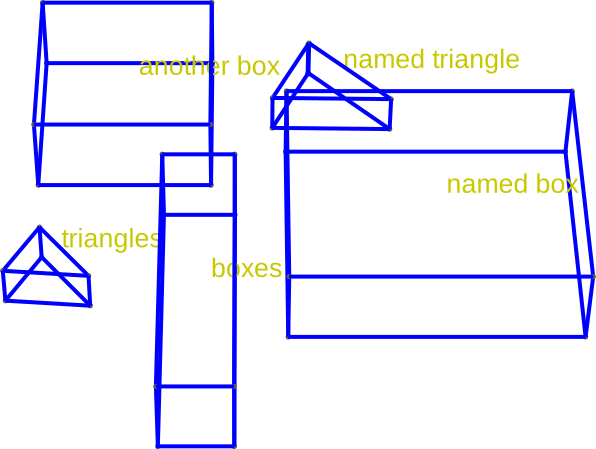
           INFO     Using mask 'boxes' (implicitly selecting shapes _builder.py:827
                    [Polygon 0, Polygon 1 'named box', Polygon 2
                    'another box'])
           INFO     Setting z-coordinate to 0                       _builder.py:929
           INFO     Extruding shape 0 from mask 'boxes' with name  _builder.py:2895
                    'None' by 200 at z=0
           INFO     Creating new physical group of dimension 2     _builder.py:2679
                    with name 'boxes_bottom'
           INFO     Creating new physical group of dimension 2     _builder.py:2679
                    with name 'boxes_side'
           INFO     Creating new physical group of dimension 2     _builder.py:2679
                    with name 'boxes_top'
           INFO     Creating new physical group of dimension 3     _builder.py:2679
                    with name 'boxes'
           INFO     Extruding shape 1 from mask 'boxes' with name  _builder.py:2895
                    'named box' by 200 at z=0
           INFO     Creating new physical group of dimension 2     _builder.py:2679
                    with name 'named box_bottom'
           INFO     Creating new physical group of dimension 2     _builder.py:2679
                    with name 'named box_side'
           INFO     Creating new physical group of dimension 2     _builder.py:2679
                    with name 'named box_top'
           INFO     Creating new physical group of dimension 3     _builder.py:2679
                    with name 'named box'
           INFO     Extruding shape 2 from mask 'boxes' with name  _builder.py:2895
                    'another box' by 200 at z=0
           INFO     Creating new physical group of dimension 2     _builder.py:2679
                    with name 'another box_bottom'
           INFO     Creating new physical group of dimension 2     _builder.py:2679
                    with name 'another box_side'
           INFO     Creating new physical group of dimension 2     _builder.py:2679
                    with name 'another box_top'
           INFO     Creating new physical group of dimension 3     _builder.py:2679
                    with name 'another box'
           INFO     Identifying potential intersections...        fragmenter.py:290
           INFO     Setting z-coordinate to 200                     _builder.py:929
           INFO     Saving figure                                  _builder.py:1994

<qtcad.builder.builder.Builder object at 0x7ff52105f390>
We can also select multiple masks together using a list argument
in qtcad.builder.Builder.use_mask:
- Builder.use_mask(mask: int | str | Mask | Callable[[Mask], bool] | list[int | str | Mask | Callable[[Mask], bool]]) Self
[🔧 Modifier] Switch to use another mask as the working one. The
maskparameter can be either the ID or name of a mask or a function taking a mask and returningTrueif the mask is to be selected. A list of the above can also be provided (seeMaskContainer.get_mask). If multiple masks are selected, they are merged into a temporary mask.This operation also selects all shapes in the mask (see also
use_shape).- Parameters:
mask – Name or identifier (index) of the mask.
builder.use_mask(["triangles", "boxes"]).view_shapes(
    save="figs/boxes_and_triangles.svg",
    font_size=20,
)
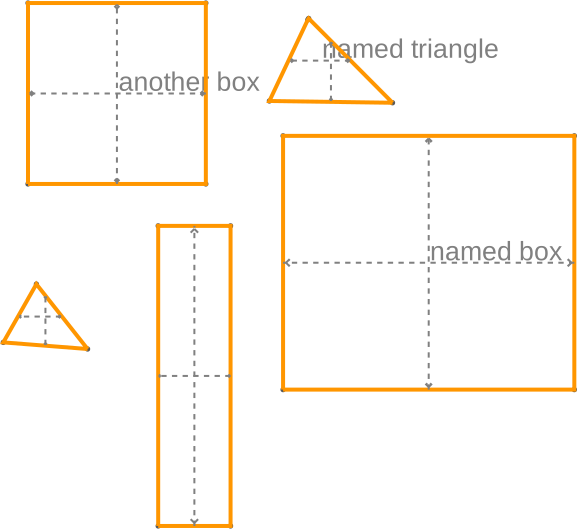
           INFO     Using mask 'triangles-boxes' (implicitly        _builder.py:827
                    selecting shapes [Polygon 0, Polygon 1 'named
                    triangle', Polygon 2, Polygon 3 'named box',
                    Polygon 4 'another box'])
           INFO     Viewing shapes: [Polygon 0, Polygon 1 'named   _builder.py:2055
                    triangle', Polygon 2, Polygon 3 'named box',
                    Polygon 4 'another box'] using a temporary
                    builder instance

<qtcad.builder.builder.Builder object at 0x7ff52105f390>
Modifying shapes loaded into qtcad.builder.Builder
Using qtcad.builder.Builder.copy_shape, we can copy shapes
within a mask or add it to another one. While copy can also apply
arbitrary transformations to the shapes.
- Builder.copy_shape(name: str | None = '__unset', to_mask: int | str | None = None, translate: tuple[float, float] = (0, 0), rotate: float = 0, scale: float = 1, transformer: Callable[[Shape], Shape] | None = None) Self
[⚡ Utility] Copy the currently active shapes (see
use_shapes,use_mask), apply transformations (translation, rotation, scaling, …) to them and select the copies. The copies will be added to the current mask or to the mask specified byto_mask(which does not have to exist yet). See alsoMaskContainer.copy_shapes()andShape.transform().- Parameters:
name – The name of the new shape. If
"__unset", the name will be copied from the original shape. IfNone, the new shape will be unnamed. SeeShape.named. If multiple shapes are copied, an index is appended to the name. E.g.,"my_shape_0". Usetransformerto modify the names in a more flexible way.to_mask – If specified, the copied shapes will be added to the mask with this name or index. Otherwise, they will be added to the current mask. If the specified mask does not exist and
stris provided, a new mask will be created with this name.translate – Translation vector in the x-y plane to apply to the copied shapes. See
Shape.translated().rotate – The rotation angle in degrees around the barycenter of the selected shapes. If a tuple
(angle, center)is given, the selected shapes are rotated aroundcenter(which may beNonein which case the shapes are rotated about their individual barycenters). See alsoShape.rotated().scale – Scaling factor to apply to the copied shapes. See
Shape.scaled().transformer – A callable that takes a shape and returns a modified shape. It is applied after the above transformations. This can be used to apply arbitrary transformations to the copied shapes. See
Shape.transform. This might be useful to rename the shapes.
As a demonstration, let us copy the box shape we created above, rename, translate, scale it down and rotate it. We can then extrude the new shape and visualize the result.
builder = (
    Builder()
    .add_mask(example_mask)
    .use_shape("box")
    .extrude(1)
    .copy_shape(
        name="copied_box",
        translate=(3, 0),
        scale=0.5,
        rotate=20,
        transformer=lambda shape: shape.named("box_this_is_applied_last"),
    )
    .print_mask_tree()
    .extrude(1)
    .view(
        surfaces=True,
        volume_labels=True,
        angles=(-45, 0, 0),
        save="figs/transformed.svg",
        font_size=20,
    )
)
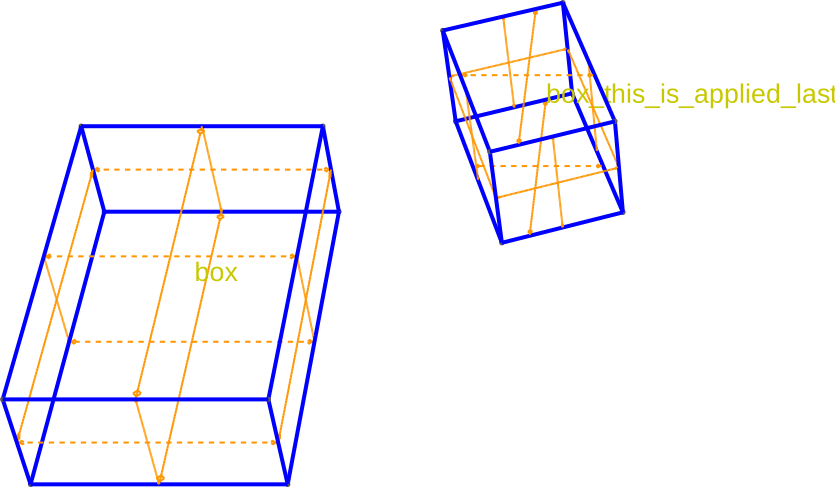
[14:51:41] INFO     Selected shapes: [Polygon 1 'box']              _builder.py:880
           INFO     Extruding shape 1 from mask 'example' with     _builder.py:2895
                    name 'box' by 1 at z=0
           INFO     Creating new physical group of dimension 2     _builder.py:2679
                    with name 'box_bottom'
           INFO     Creating new physical group of dimension 2     _builder.py:2679
                    with name 'box_side'
           INFO     Creating new physical group of dimension 2     _builder.py:2679
                    with name 'box_top'
           INFO     Creating new physical group of dimension 3     _builder.py:2679
                    with name 'box'
           INFO     Setting z-coordinate to 1                       _builder.py:929
Layout
└── Mask 0 "example"
    ├── 0  Polygon  "triangle" (6)
    ├── 1  Polygon  "box" (4)
    ├── 2  Polygon  "octagon" (8)
    ├── 3  Circle  "circle" (1)
    └── 4  Polygon  "box_this_is_applied_last" (4)
           INFO     Extruding shape 4 from mask 'example' with     _builder.py:2895
                    name 'box_this_is_applied_last' by 1 at z=1
           INFO     Creating new physical group of dimension 2     _builder.py:2679
                    with name 'box_this_is_applied_last_bottom'
           INFO     Creating new physical group of dimension 2     _builder.py:2679
                    with name 'box_this_is_applied_last_side'
           INFO     Creating new physical group of dimension 2     _builder.py:2679
                    with name 'box_this_is_applied_last_top'
           INFO     Creating new physical group of dimension 3     _builder.py:2679
                    with name 'box_this_is_applied_last'
           INFO     Identifying potential intersections...        fragmenter.py:290
           INFO     Setting z-coordinate to 2                       _builder.py:929
           INFO     Saving figure                                  _builder.py:1994
We can also remove them from the current mask using
qtcad.builder.Builder.remove_shapes:
- Builder.remove_shapes() Self
[⚡ Utility] Remove the currently selected shapes from the current mask. Selects all the shapes left in the current mask.
Here we remove the shape we just copied (copying selects the copied shapes).
builder.remove_shapes().print_mask_tree()


# By passing a function to :any:`qtcad.builder.Builder.use_shapes` we can
# filter the shapes we want to use.

builder.use_shapes(
    lambda shape: shape.name is not None and "box" in shape.name
).remove_shapes().print_mask_tree()
[14:51:42] INFO     Removing shape 4 'box_this_is_applied_last' from   masks.py:694
                    mask 0 'example'.
Layout
└── Mask 0 "example"
    ├── 0  Polygon  "triangle" (6)
    ├── 1  Polygon  "box" (4)
    ├── 2  Polygon  "octagon" (8)
    └── 3  Circle  "circle" (1)
           INFO     Selected shapes: [Polygon 1 'box']              _builder.py:880
           INFO     Removing shape 1 'box' from mask 0 'example'.      masks.py:694
Layout
└── Mask 0 "example"
    ├── 0  Polygon  "triangle" (6)
    ├── 1  Polygon  "octagon" (8)
    └── 2  Circle  "circle" (1)

<qtcad.builder.builder.Builder object at 0x7ff52105fd90>
We can create new masks. For example we can select shapes and copy them to a new mask.
- Builder.copy_shape(name: str | None = '__unset', to_mask: int | str | None = None, translate: tuple[float, float] = (0, 0), rotate: float = 0, scale: float = 1, transformer: Callable[[Shape], Shape] | None = None) Self
[⚡ Utility] Copy the currently active shapes (see
use_shapes,use_mask), apply transformations (translation, rotation, scaling, …) to them and select the copies. The copies will be added to the current mask or to the mask specified byto_mask(which does not have to exist yet). See alsoMaskContainer.copy_shapes()andShape.transform().- Parameters:
name – The name of the new shape. If
"__unset", the name will be copied from the original shape. IfNone, the new shape will be unnamed. SeeShape.named. If multiple shapes are copied, an index is appended to the name. E.g.,"my_shape_0". Usetransformerto modify the names in a more flexible way.to_mask – If specified, the copied shapes will be added to the mask with this name or index. Otherwise, they will be added to the current mask. If the specified mask does not exist and
stris provided, a new mask will be created with this name.translate – Translation vector in the x-y plane to apply to the copied shapes. See
Shape.translated().rotate – The rotation angle in degrees around the barycenter of the selected shapes. If a tuple
(angle, center)is given, the selected shapes are rotated aroundcenter(which may beNonein which case the shapes are rotated about their individual barycenters). See alsoShape.rotated().scale – Scaling factor to apply to the copied shapes. See
Shape.scaled().transformer – A callable that takes a shape and returns a modified shape. It is applied after the above transformations. This can be used to apply arbitrary transformations to the copied shapes. See
Shape.transform. This might be useful to rename the shapes.
(builder.use_shape("triangle").copy_shape(to_mask="only_triangle").print_mask_tree())
           INFO     Selected shapes: [Polygon 0 'triangle']         _builder.py:880
Layout
├── Mask 0 "example"
│   ├── 0  Polygon  "triangle" (6)
│   ├── 1  Polygon  "octagon" (8)
│   └── 2  Circle  "circle" (1)
└── Mask 1 "only_triangle"
    └── 0  Polygon  "triangle" (6)

<qtcad.builder.builder.Builder object at 0x7ff52105fd90>
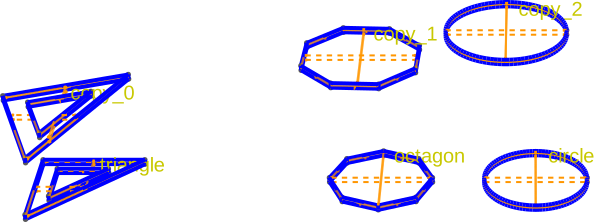
Using qtcad.builder.Builder.copy_mask, we can also copy entire
masks. Below, we copy the “example” mask to a new mask
“example_copy”, applying some transformations in the process:
- Builder.copy_mask(new_name: str, **kwargs) Self
[⚡ Utility] Copy current mask to an empty mask named
new_name, set the current mask to this newly created one and select all shapes in the new mask.For the keyword arguments see
copy_shape. This method is equivalent touse_mask(current_mask).copy_shape(to_mask=new_name, **kwargs).
Note that the same effect could have been achieved by using
qtcad.builder.Builder.use_mask followed by
qtcad.builder.Builder.copy_shape.
example_mask = Mask(name="example")
example_mask.add_shapes([triangle, octagon, circle])

Builder().add_mask(example_mask).use_mask("example").extrude(0.1).copy_mask(
    "example_copy", scale=1.2, name="copy", rotate=20, translate=(0, 1)
).print_mask_tree().set_z(2).extrude(0.1).view(
    surfaces=True,
    volume_labels=True,
    angles=(-60, 0, 0),
    save="figs/copied_mask.svg",
    font_size=15,
)
           INFO     Using mask 'example' (implicitly selecting      _builder.py:827
                    shapes [Circle 2 'circle', Polygon 0
                    'triangle', Polygon 1 'octagon'])
           INFO     Extruding shape 2 from mask 'example' with     _builder.py:2895
                    name 'circle' by 0.1 at z=0
           INFO     Creating new physical group of dimension 2     _builder.py:2679
                    with name 'circle_bottom'
           INFO     Creating new physical group of dimension 2     _builder.py:2679
                    with name 'circle_side'
           INFO     Creating new physical group of dimension 2     _builder.py:2679
                    with name 'circle_top'
           INFO     Creating new physical group of dimension 3     _builder.py:2679
                    with name 'circle'
           INFO     Extruding shape 0 from mask 'example' with     _builder.py:2895
                    name 'triangle' by 0.1 at z=0
           INFO     Creating new physical group of dimension 2     _builder.py:2679
                    with name 'triangle_bottom'
           INFO     Creating new physical group of dimension 2     _builder.py:2679
                    with name 'triangle_side'
           INFO     Creating new physical group of dimension 2     _builder.py:2679
                    with name 'triangle_top'
           INFO     Creating new physical group of dimension 3     _builder.py:2679
                    with name 'triangle'
           INFO     Extruding shape 1 from mask 'example' with     _builder.py:2895
                    name 'octagon' by 0.1 at z=0
           INFO     Creating new physical group of dimension 2     _builder.py:2679
                    with name 'octagon_bottom'
           INFO     Creating new physical group of dimension 2     _builder.py:2679
                    with name 'octagon_side'
           INFO     Creating new physical group of dimension 2     _builder.py:2679
                    with name 'octagon_top'
           INFO     Creating new physical group of dimension 3     _builder.py:2679
                    with name 'octagon'
           INFO     Setting z-coordinate to 0.1                     _builder.py:929
Layout
├── Mask 0 "example"
│   ├── 0  Polygon  "triangle" (6)
│   ├── 1  Polygon  "octagon" (8)
│   └── 2  Circle  "circle" (1)
└── Mask 1 "example_copy"
    ├── 0  Circle  "copy_0" (1)
    ├── 1  Polygon  "copy_1" (6)
    └── 2  Polygon  "copy_2" (8)
           INFO     Setting z-coordinate to 2                       _builder.py:929
           INFO     Extruding shape 0 from mask 'example_copy'     _builder.py:2895
                    with name 'copy_0' by 0.1 at z=2
           INFO     Creating new physical group of dimension 2     _builder.py:2679
                    with name 'copy_0_bottom'
           INFO     Creating new physical group of dimension 2     _builder.py:2679
                    with name 'copy_0_side'
           INFO     Creating new physical group of dimension 2     _builder.py:2679
                    with name 'copy_0_top'
           INFO     Creating new physical group of dimension 3     _builder.py:2679
                    with name 'copy_0'
           INFO     Extruding shape 1 from mask 'example_copy'     _builder.py:2895
                    with name 'copy_1' by 0.1 at z=2
           INFO     Creating new physical group of dimension 2     _builder.py:2679
                    with name 'copy_1_bottom'
           INFO     Creating new physical group of dimension 2     _builder.py:2679
                    with name 'copy_1_side'
           INFO     Creating new physical group of dimension 2     _builder.py:2679
                    with name 'copy_1_top'
           INFO     Creating new physical group of dimension 3     _builder.py:2679
                    with name 'copy_1'
           INFO     Extruding shape 2 from mask 'example_copy'     _builder.py:2895
                    with name 'copy_2' by 0.1 at z=2
           INFO     Creating new physical group of dimension 2     _builder.py:2679
                    with name 'copy_2_bottom'
           INFO     Creating new physical group of dimension 2     _builder.py:2679
                    with name 'copy_2_side'
           INFO     Creating new physical group of dimension 2     _builder.py:2679
                    with name 'copy_2_top'
           INFO     Creating new physical group of dimension 3     _builder.py:2679
                    with name 'copy_2'
           INFO     Identifying potential intersections...        fragmenter.py:290
           INFO     Setting z-coordinate to 2.1                     _builder.py:929
           INFO     Saving figure                                  _builder.py:1994

<qtcad.builder.builder.Builder object at 0x7ff52105f390>
Note, that the names of the copied shapes have been automatically disambiguated by appending numbered suffixes.
Total running time of the script: (0 minutes 7.081 seconds)