Note
Go to the end to download the full example code.
Mesh size modes
In this example we explore ways to control the mesh size.
Initializing the Builder
Below, we initialize a new instance of qtcad.builder.Builder and
define a couple of simple shapes we are going to use in the following.
from qtcad.builder import Builder, Polygon, Mask, Circle, MeshAlgorithm3D

box = Polygon.box(10, 10).centered()
partially_overlapping = box.translated(6, 0).auto_name()
circle = Circle(radius=2.5).translated(-2, 0)

mask = Mask("shapes", shapes=[box, partially_overlapping, circle])
[14:50:49] INFO     Auto-named Polygon instance to 'box'               masks.py:240
           INFO     Auto-named Polygon instance to                     masks.py:240
                    'partially_overlapping'
           INFO     Auto-named Circle instance to 'circle'             masks.py:240
Next, we define a function that we will use to create the same geometry, but with different mesh size modes.
The geometry consists of two boxes that are partially overlapping and a cylinder completely inside the first box. The cylinder has the finest mesh size, the left box has a medium mesh size, and the right box has the coarsest mesh size.
We use qtcad.builder.Builder.set_mesh_size to set the mesh size for
the subsequent extrusions. We also use
qtcad.builder.Builder.overlay_mode to be able to easily identify
overlapping regions of the geometry later on.
- Builder.set_mesh_size(size: float) Self
[🔧 Modifier] Set the local mesh size for elements added after this point in units set by the
length_unit_exponent(seeBuilder). Note that the mesh size may be chosen smaller due toset_min_elements.- Parameters:
size – The new mesh characteristic length.
def make_geometry(gen: Builder):
    """
    Create a geometry with two boxes that are partially overlapping and a cylinder
    completely inside the first box.

    The cylinder has the finest mesh size, the left box has a medium mesh size, and
    the right box has the coarsest mesh size.
    """
    return (
        gen.add_mask(mask)
        .overlay_mode()
        .use_shape("box")
        .set_mesh_size(1)
        .extrude(10)
        .use_shape("partially_overlapping")
        .set_z(0)
        .set_mesh_size(20)
        .extrude(10)
        .set_z(4)
        .use_shape("circle")
        .set_mesh_size(0.1)
        .extrude(2)
        .mesh(algorithm3d=MeshAlgorithm3D.HXT, check_connectivity=False)
    )
Overriding the mesh size (default)
In override mode, each newly created volume will use the mesh size
previously set with qtcad.builder.Builder.set_mesh_size, irrespective
of the current fragmentation mode (see
Extrusion and fragmentation modes). This is
particularly useful when defining regions of finer mesh size using
qtcad.builder.Builder.fill_mode.
- Builder.override_mesh_size() Self
[🔧 Modifier] For all subsequently generated entities, use the mesh size set with
set_mesh_sizeand override the mesh size in the intersections with the existing geometry.
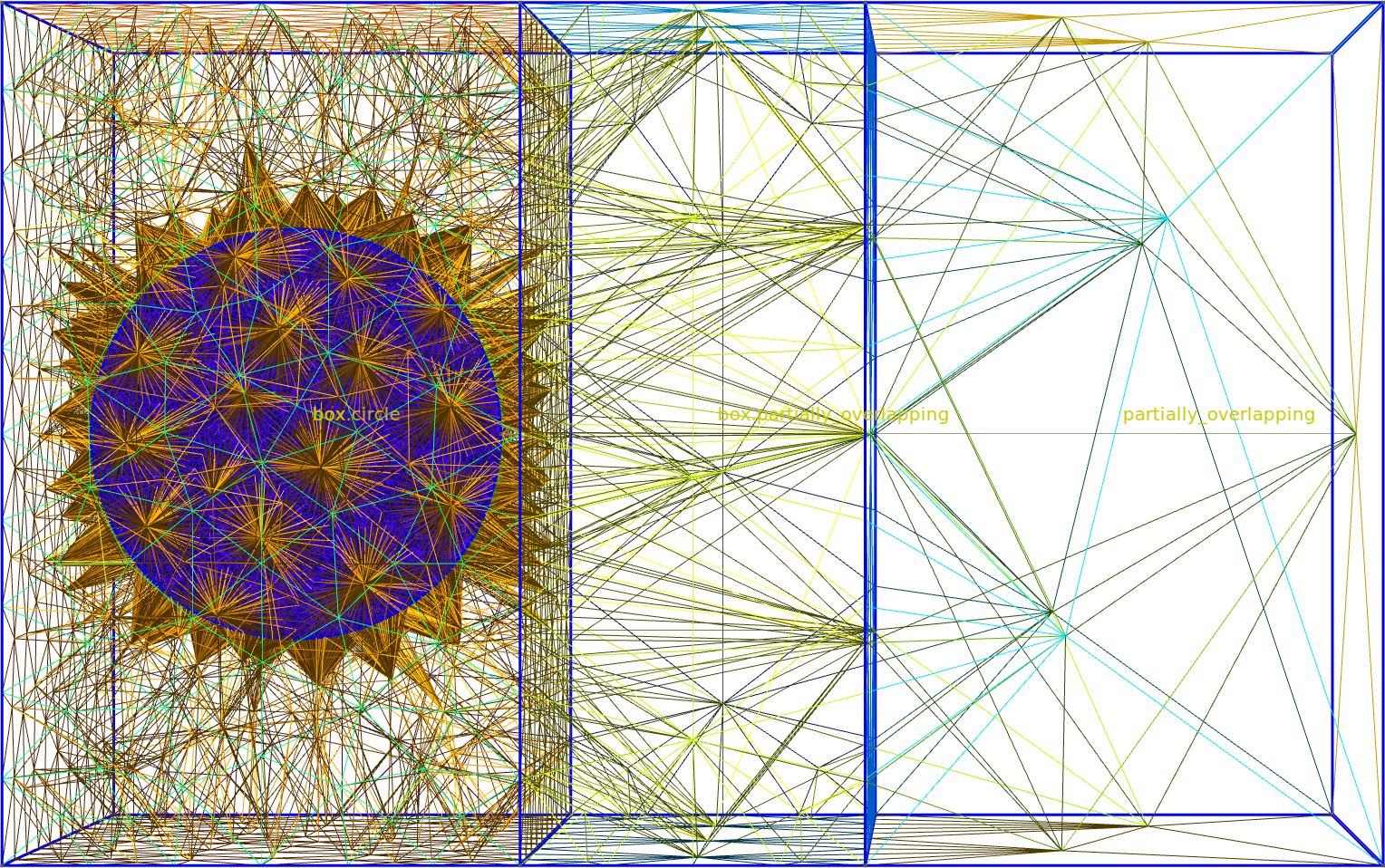
Fig. 9 The whole mesh.
           INFO     Selected shapes: [Polygon 0 'box']              _builder.py:880
           INFO     Extruding shape 0 from mask 'shapes' with name _builder.py:2895
                    'box' by 10 at z=0
           INFO     Creating new physical group of dimension 2     _builder.py:2679
                    with name 'box_bottom'
           INFO     Creating new physical group of dimension 2     _builder.py:2679
                    with name 'box_side'
           INFO     Creating new physical group of dimension 2     _builder.py:2679
                    with name 'box_top'
           INFO     Creating new physical group of dimension 3     _builder.py:2679
                    with name 'box'
           INFO     Setting z-coordinate to 10                      _builder.py:929
           INFO     Selected shapes: [Polygon 1                     _builder.py:880
                    'partially_overlapping']
           INFO     Setting z-coordinate to 0                       _builder.py:929
           INFO     Extruding shape 1 from mask 'shapes' with name _builder.py:2895
                    'partially_overlapping' by 10 at z=0
           INFO     Creating new physical group of dimension 2     _builder.py:2679
                    with name 'partially_overlapping_bottom'
           INFO     Creating new physical group of dimension 2     _builder.py:2679
                    with name 'partially_overlapping_side'
           INFO     Creating new physical group of dimension 2     _builder.py:2679
                    with name 'partially_overlapping_top'
           INFO     Creating new physical group of dimension 3     _builder.py:2679
                    with name 'partially_overlapping'
           INFO     Identifying potential intersections...        fragmenter.py:290
           INFO     Fragmenting...                                fragmenter.py:320
           INFO     Creating new physical group of dimension 2     _builder.py:2679
                    with name 'box.partially_overlapping_side'
           INFO     Creating new physical group of dimension 2     _builder.py:2679
                    with name
                    'box_side.partially_overlapping_side'
           INFO     Creating new physical group of dimension 3     _builder.py:2679
                    with name 'box.partially_overlapping'
           INFO     Creating new physical group of dimension 2     _builder.py:2679
                    with name 'box_side.shapes'
           INFO     Creating new physical group of dimension 2     _builder.py:2679
                    with name 'box_top.partially_overlapping_top'
           INFO     Creating new physical group of dimension 2     _builder.py:2679
                    with name
                    'box_bottom.partially_overlapping_bottom'
           INFO     Setting z-coordinate to 10                      _builder.py:929
           INFO     Setting z-coordinate to 4                       _builder.py:929
           INFO     Selected shapes: [Circle 2 'circle']            _builder.py:880
           INFO     Extruding shape 2 from mask 'shapes' with name _builder.py:2895
                    'circle' by 2 at z=4
           INFO     Creating new physical group of dimension 2     _builder.py:2679
                    with name 'circle_bottom'
           INFO     Creating new physical group of dimension 2     _builder.py:2679
                    with name 'circle_side'
           INFO     Creating new physical group of dimension 2     _builder.py:2679
                    with name 'circle_top'
           INFO     Creating new physical group of dimension 3     _builder.py:2679
                    with name 'circle'
           INFO     Identifying potential intersections...        fragmenter.py:290
           INFO     Fragmenting...                                fragmenter.py:320
           INFO     Creating new physical group of dimension 2     _builder.py:2679
                    with name 'box.circle_side'
           INFO     Creating new physical group of dimension 2     _builder.py:2679
                    with name 'box.circle_top'
           INFO     Creating new physical group of dimension 2     _builder.py:2679
                    with name 'box.circle_bottom'
           INFO     Creating new physical group of dimension 3     _builder.py:2679
                    with name 'box.circle'
           INFO     Setting z-coordinate to 6                       _builder.py:929
           INFO     Preparing to mesh                              _builder.py:1587
           INFO     Detecting appropriate random factor            _builder.py:3867
           INFO     Increased random factor from                   _builder.py:3885
                    1.4802974253785605e-08 to
                    2.2079189270212513e-07
[14:50:50] INFO     Random factor is now appropriate               _builder.py:3891
           INFO     Meshing                                        _builder.py:1603
[14:51:06] INFO     Saving figure                                  _builder.py:1994

<qtcad.builder.builder.Builder object at 0x7ff52105fc50>
We see that the right “partially_overlapping” uses the coarse mesh size of the right box, as does the “circle volume”. If we view those two volumes in isolation, this becomes clear:
builder.view(
    groups=["box.partially_overlapping", "box.circle"],
    save="figs/mesh_override_partially_overlapping.png",  # caption: The overlapping parts of the geometry retain their smaller mesh size.;
    angles=(-10, 0, 90),
    volume_labels=True,
)
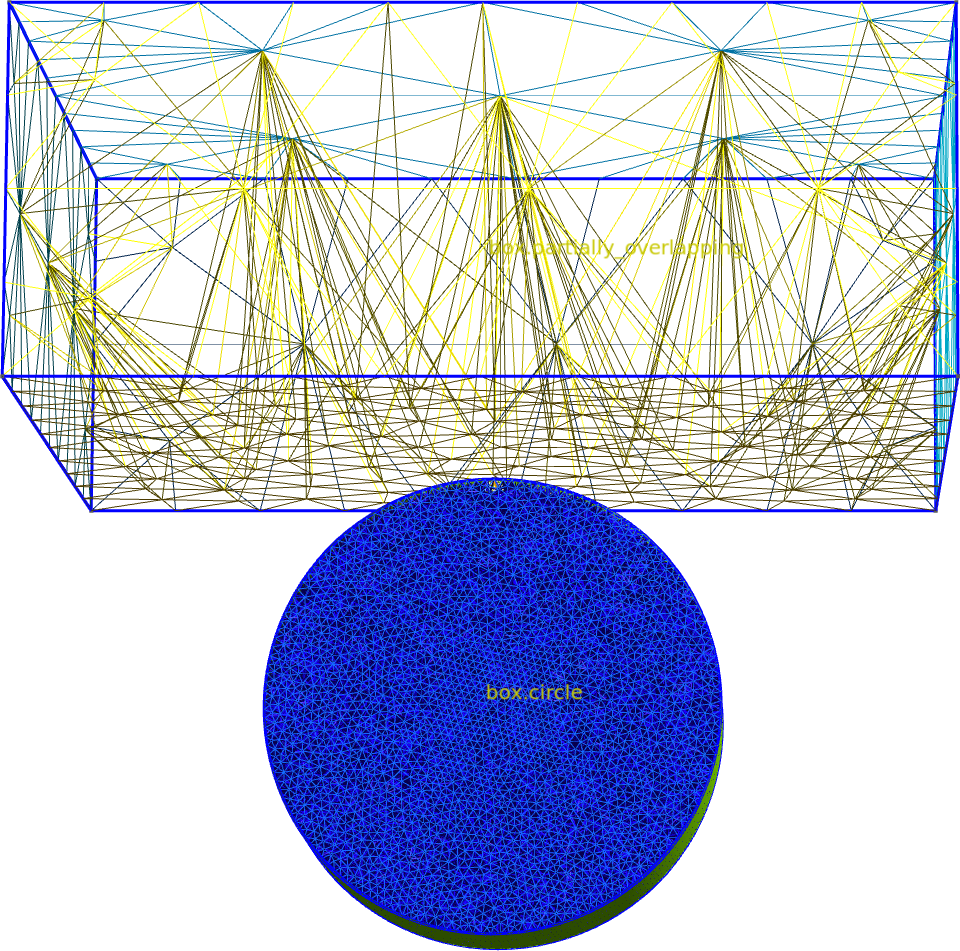
Fig. 10 The overlapping parts of the geometry retain their smaller mesh size.
[14:51:07] INFO     Saving figure                                  _builder.py:1994

<qtcad.builder.builder.Builder object at 0x7ff52105fc50>
Inheriting the mesh size
On the other hand, in inherit mode, newly created volumes will inherit the mesh size of the volume they intersect with.
- Builder.inherit_mesh_size() Self
[🔧 Modifier] For all subsequently generated entities, inherit the mesh size of the existing intersecting entity of the same dimension with the smallest mesh size. If there are no intersecting elements, the mesh size set with
set_mesh_sizeis used.
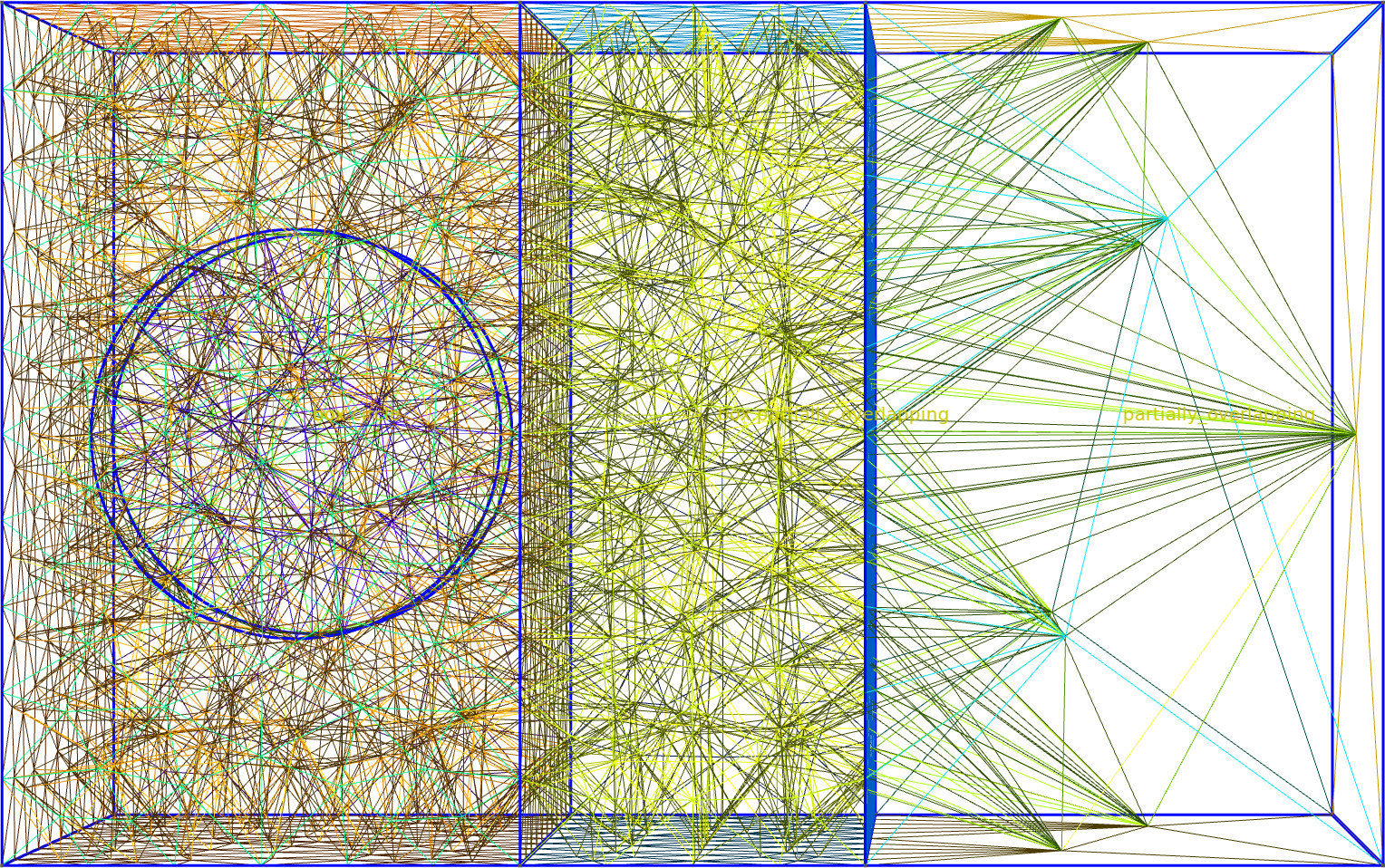
Fig. 11 The whole mesh.
           INFO     Selected shapes: [Polygon 0 'box']              _builder.py:880
           INFO     Extruding shape 0 from mask 'shapes' with name _builder.py:2895
                    'box' by 10 at z=0
           INFO     Creating new physical group of dimension 2     _builder.py:2679
                    with name 'box_bottom'
           INFO     Creating new physical group of dimension 2     _builder.py:2679
                    with name 'box_side'
           INFO     Creating new physical group of dimension 2     _builder.py:2679
                    with name 'box_top'
           INFO     Creating new physical group of dimension 3     _builder.py:2679
                    with name 'box'
           INFO     Setting z-coordinate to 10                      _builder.py:929
           INFO     Selected shapes: [Polygon 1                     _builder.py:880
                    'partially_overlapping']
           INFO     Setting z-coordinate to 0                       _builder.py:929
           INFO     Extruding shape 1 from mask 'shapes' with name _builder.py:2895
                    'partially_overlapping' by 10 at z=0
           INFO     Creating new physical group of dimension 2     _builder.py:2679
                    with name 'partially_overlapping_bottom'
           INFO     Creating new physical group of dimension 2     _builder.py:2679
                    with name 'partially_overlapping_side'
           INFO     Creating new physical group of dimension 2     _builder.py:2679
                    with name 'partially_overlapping_top'
           INFO     Creating new physical group of dimension 3     _builder.py:2679
                    with name 'partially_overlapping'
           INFO     Identifying potential intersections...        fragmenter.py:290
           INFO     Fragmenting...                                fragmenter.py:320
           INFO     Creating new physical group of dimension 2     _builder.py:2679
                    with name 'box.partially_overlapping_side'
           INFO     Creating new physical group of dimension 2     _builder.py:2679
                    with name
                    'box_side.partially_overlapping_side'
           INFO     Creating new physical group of dimension 3     _builder.py:2679
                    with name 'box.partially_overlapping'
           INFO     Creating new physical group of dimension 2     _builder.py:2679
                    with name 'box_side.shapes'
           INFO     Creating new physical group of dimension 2     _builder.py:2679
                    with name 'box_top.partially_overlapping_top'
           INFO     Creating new physical group of dimension 2     _builder.py:2679
                    with name
                    'box_bottom.partially_overlapping_bottom'
           INFO     Setting z-coordinate to 10                      _builder.py:929
           INFO     Setting z-coordinate to 4                       _builder.py:929
           INFO     Selected shapes: [Circle 2 'circle']            _builder.py:880
           INFO     Extruding shape 2 from mask 'shapes' with name _builder.py:2895
                    'circle' by 2 at z=4
           INFO     Creating new physical group of dimension 2     _builder.py:2679
                    with name 'circle_bottom'
           INFO     Creating new physical group of dimension 2     _builder.py:2679
                    with name 'circle_side'
           INFO     Creating new physical group of dimension 2     _builder.py:2679
                    with name 'circle_top'
           INFO     Creating new physical group of dimension 3     _builder.py:2679
                    with name 'circle'
[14:51:08] INFO     Identifying potential intersections...        fragmenter.py:290
           INFO     Fragmenting...                                fragmenter.py:320
           INFO     Creating new physical group of dimension 2     _builder.py:2679
                    with name 'box.circle_side'
           INFO     Creating new physical group of dimension 2     _builder.py:2679
                    with name 'box.circle_top'
           INFO     Creating new physical group of dimension 2     _builder.py:2679
                    with name 'box.circle_bottom'
           INFO     Creating new physical group of dimension 3     _builder.py:2679
                    with name 'box.circle'
           INFO     Setting z-coordinate to 6                       _builder.py:929
           INFO     Preparing to mesh                              _builder.py:1587
           INFO     Detecting appropriate random factor            _builder.py:3867
           INFO     Random factor is now appropriate               _builder.py:3891
           INFO     Meshing                                        _builder.py:1603
           INFO     Saving figure                                  _builder.py:1994

<qtcad.builder.builder.Builder object at 0x7ff520ffd950>
Above we see that in the overlapping regions the mesh size is medium, as the “partially_overlapping” box inherits the mesh size of the “box” volume. The “circle” volume also inherits the mesh size of the left box, so that its mesh becomes coarser compared to the previous case.
builder.view(
    groups=["box.partially_overlapping", "box.circle"],
    save="figs/mesh_inherit_partially_overlapping.png",  # caption: The overlapping parts of the geometry inherit the coarser mesh size.;
    angles=(-10, 0, 90),
    volume_labels=True,
)
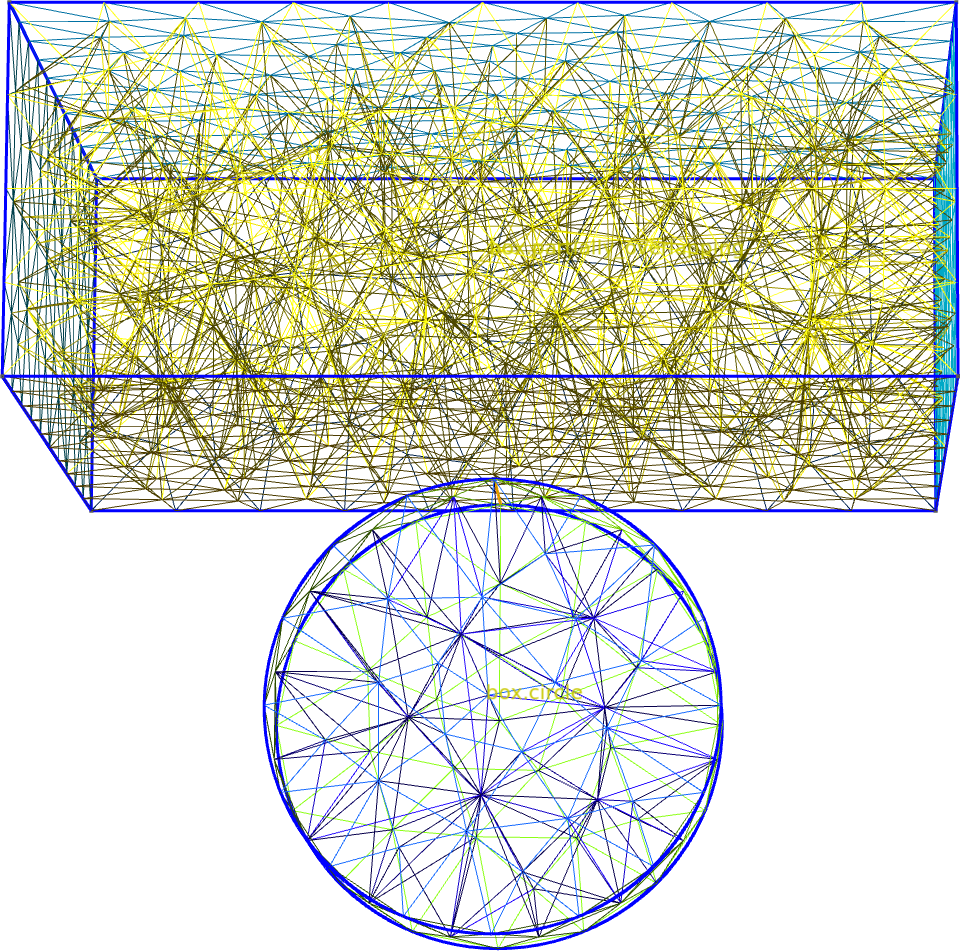
Fig. 12 The overlapping parts of the geometry inherit the coarser mesh size.
[14:51:09] INFO     Saving figure                                  _builder.py:1994

<qtcad.builder.builder.Builder object at 0x7ff520ffd950>
Note however that boundary surfaces will always inherit the finer
mesh size of the two intersecting volumes, irrespective of the mesh
size mode. To override this behavior, use
qtcad.builder.Builder.assign_mesh_size.
Minimum mesh size
In minimum mode, newly created volumes will inherit the mesh size of the volume they intersect with only if that mesh size is smaller than the currently set size.
- Builder.minimum_mesh_size() Self
[🔧 Modifier] For all subsequently generated entities, use the mesh size set with
set_mesh_sizeand take the minimum of the set mesh size and the existing mesh size in the intersections with the existing geometry.
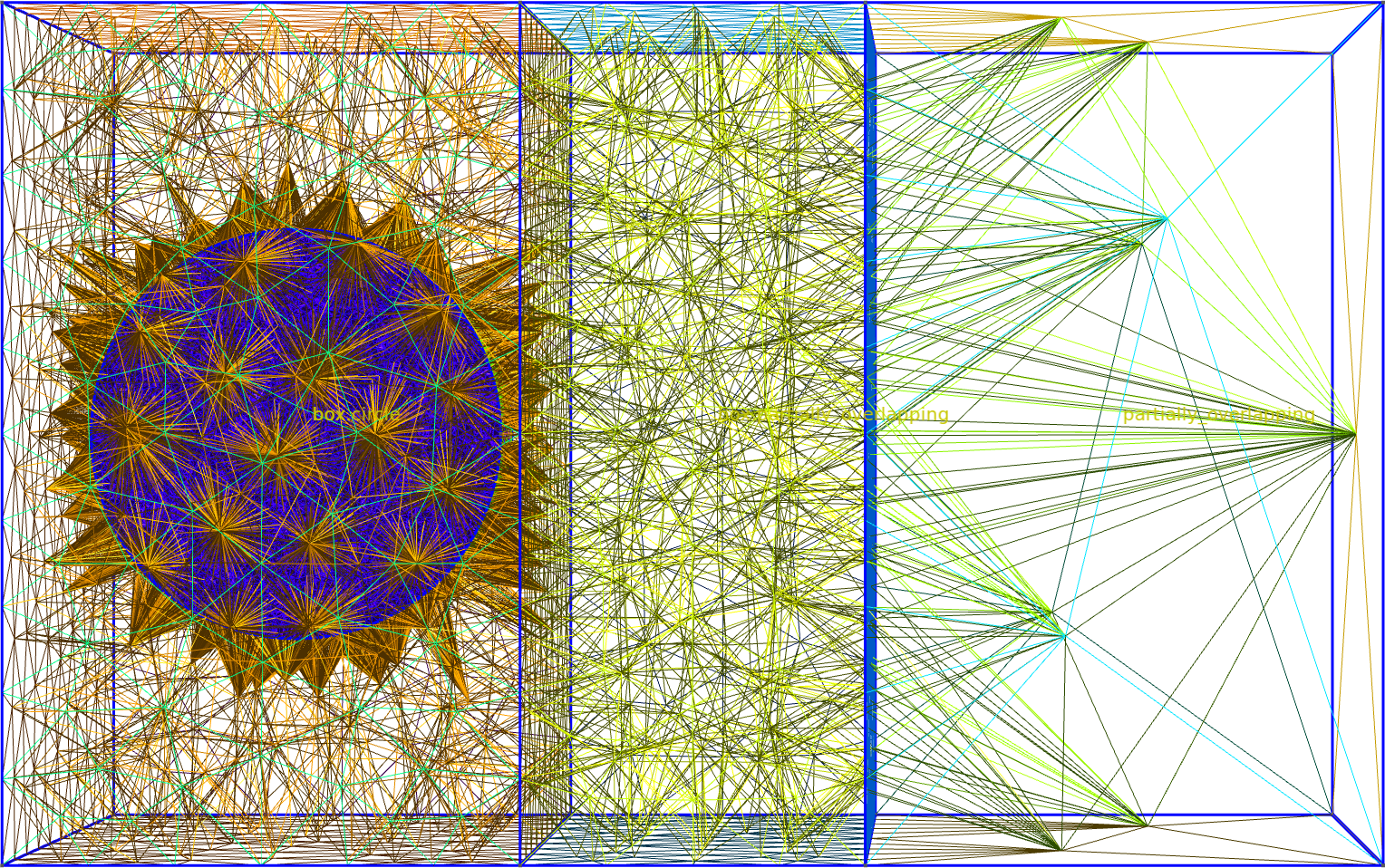
Fig. 13 The whole mesh.
[14:51:10] INFO     Selected shapes: [Polygon 0 'box']              _builder.py:880
           INFO     Extruding shape 0 from mask 'shapes' with name _builder.py:2895
                    'box' by 10 at z=0
           INFO     Creating new physical group of dimension 2     _builder.py:2679
                    with name 'box_bottom'
           INFO     Creating new physical group of dimension 2     _builder.py:2679
                    with name 'box_side'
           INFO     Creating new physical group of dimension 2     _builder.py:2679
                    with name 'box_top'
           INFO     Creating new physical group of dimension 3     _builder.py:2679
                    with name 'box'
           INFO     Setting z-coordinate to 10                      _builder.py:929
           INFO     Selected shapes: [Polygon 1                     _builder.py:880
                    'partially_overlapping']
           INFO     Setting z-coordinate to 0                       _builder.py:929
           INFO     Extruding shape 1 from mask 'shapes' with name _builder.py:2895
                    'partially_overlapping' by 10 at z=0
           INFO     Creating new physical group of dimension 2     _builder.py:2679
                    with name 'partially_overlapping_bottom'
           INFO     Creating new physical group of dimension 2     _builder.py:2679
                    with name 'partially_overlapping_side'
           INFO     Creating new physical group of dimension 2     _builder.py:2679
                    with name 'partially_overlapping_top'
           INFO     Creating new physical group of dimension 3     _builder.py:2679
                    with name 'partially_overlapping'
           INFO     Identifying potential intersections...        fragmenter.py:290
           INFO     Fragmenting...                                fragmenter.py:320
           INFO     Creating new physical group of dimension 2     _builder.py:2679
                    with name 'box.partially_overlapping_side'
           INFO     Creating new physical group of dimension 2     _builder.py:2679
                    with name
                    'box_side.partially_overlapping_side'
           INFO     Creating new physical group of dimension 3     _builder.py:2679
                    with name 'box.partially_overlapping'
           INFO     Creating new physical group of dimension 2     _builder.py:2679
                    with name 'box_side.shapes'
           INFO     Creating new physical group of dimension 2     _builder.py:2679
                    with name 'box_top.partially_overlapping_top'
           INFO     Creating new physical group of dimension 2     _builder.py:2679
                    with name
                    'box_bottom.partially_overlapping_bottom'
           INFO     Setting z-coordinate to 10                      _builder.py:929
           INFO     Setting z-coordinate to 4                       _builder.py:929
           INFO     Selected shapes: [Circle 2 'circle']            _builder.py:880
           INFO     Extruding shape 2 from mask 'shapes' with name _builder.py:2895
                    'circle' by 2 at z=4
           INFO     Creating new physical group of dimension 2     _builder.py:2679
                    with name 'circle_bottom'
           INFO     Creating new physical group of dimension 2     _builder.py:2679
                    with name 'circle_side'
           INFO     Creating new physical group of dimension 2     _builder.py:2679
                    with name 'circle_top'
           INFO     Creating new physical group of dimension 3     _builder.py:2679
                    with name 'circle'
           INFO     Identifying potential intersections...        fragmenter.py:290
           INFO     Fragmenting...                                fragmenter.py:320
           INFO     Creating new physical group of dimension 2     _builder.py:2679
                    with name 'box.circle_side'
           INFO     Creating new physical group of dimension 2     _builder.py:2679
                    with name 'box.circle_top'
           INFO     Creating new physical group of dimension 2     _builder.py:2679
                    with name 'box.circle_bottom'
           INFO     Creating new physical group of dimension 3     _builder.py:2679
                    with name 'box.circle'
           INFO     Setting z-coordinate to 6                       _builder.py:929
           INFO     Preparing to mesh                              _builder.py:1587
           INFO     Detecting appropriate random factor            _builder.py:3867
           INFO     Random factor is now appropriate               _builder.py:3891
           INFO     Meshing                                        _builder.py:1603
[14:51:31] INFO     Saving figure                                  _builder.py:1994

<qtcad.builder.builder.Builder object at 0x7ff52105fc50>
Above we see that in the overlapping regions the mesh size is now medium instead of coarse, as the “partially_overlapping” box does not inherit the mesh size of the right box. The cylinder retains its very fine mesh.
builder.view(
    groups=["box.partially_overlapping", "box.circle"],
    save="figs/mesh_min_partially_overlapping.png",  # caption: The overlapping parts of the geometry do not inherit the coarser mesh size.;
    angles=(-10, 0, 90),
    volume_labels=True,
)
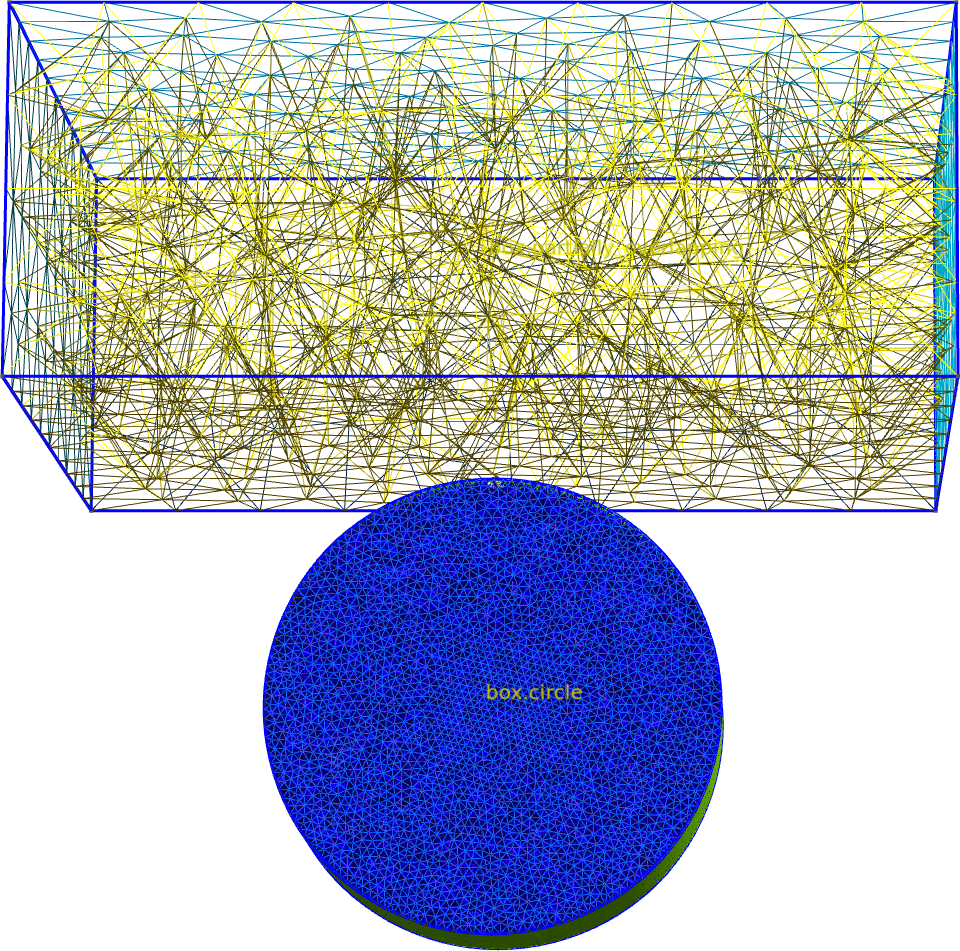
Fig. 14 The overlapping parts of the geometry do not inherit the coarser mesh size.
[14:51:32] INFO     Saving figure                                  _builder.py:1994

<qtcad.builder.builder.Builder object at 0x7ff52105fc50>
Setting the minimal number of elements
Irrespective of the mesh size mode, we can also set the minimum
number of mesh elements along the shortest dimension of a volume
using qtcad.builder.Builder.set_min_elements. This allows to
automatically create more refined meshes in small structures.
- Builder.set_min_elements(min_elements: int | None) Self
[🔧 Modifier] Ensure that all subsequently created volumes will have at least
min_elementsmesh elements (triangles, tetrahedra) along their narrowest dimension. If set toNone, the mesh size set byset_mesh_sizewill be used.
Below, we set a very large mesh size, but also set the minimum number of elements to 5. We then extrude a box once by 1 and once by 3, resulting in two volumes with different heights. These different heights will result in different mesh sizes.
builder = (
    Builder()
    .overlay_mode()
    .set_mesh_size(1000)
    .set_min_elements(5)
    .add_mask(mask)
    .use_shape("box")
    .set_group_name("first")
    .extrude(3)
    .set_group_name("second")
    .extrude(1)
    .mesh(2, algorithm3d=MeshAlgorithm3D.HXT)
    .view(
        save="figs/mesh_min_elements.png",  # caption: The whole mesh with a very large mesh size but a minimum of 5 elements along the shortest dimension.;
        orthographic=True,
        angles=(-90, 0, 0),
    )
)
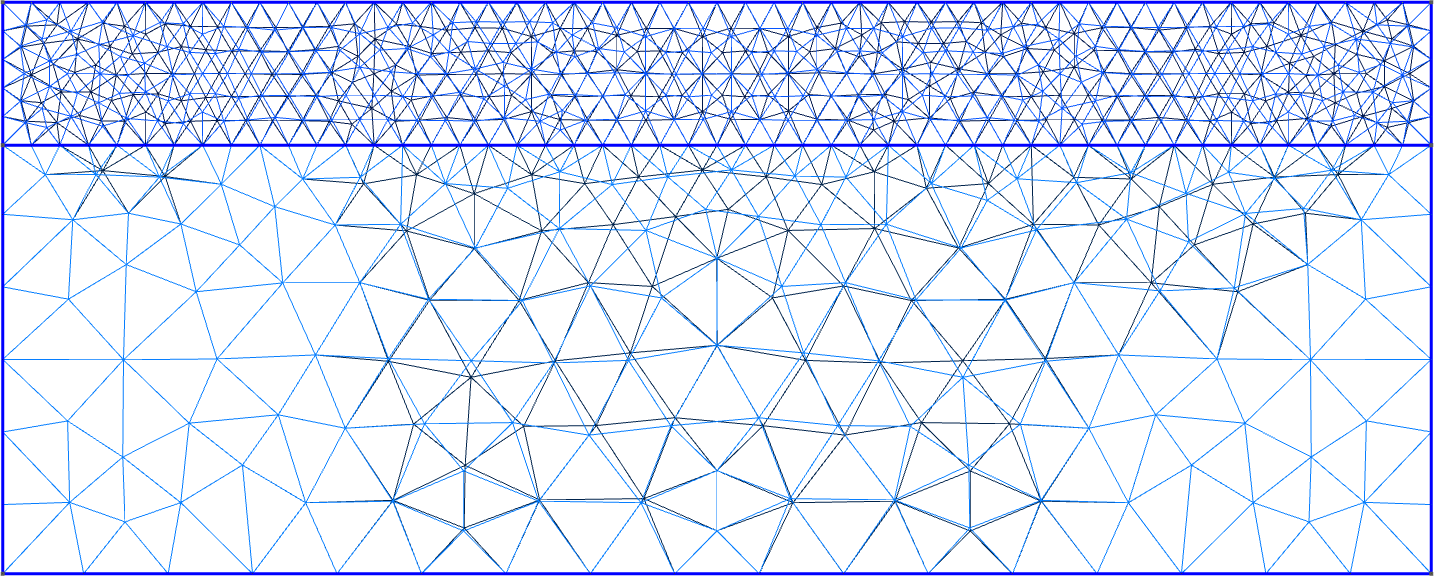
Fig. 15 The whole mesh with a very large mesh size but a minimum of 5 elements along the shortest dimension.
[14:51:33] INFO     Selected shapes: [Polygon 0 'box']              _builder.py:880
           INFO     Extruding shape 0 from mask 'shapes' with name _builder.py:2895
                    'box' by 3 at z=0
           INFO     Creating new physical group of dimension 2     _builder.py:2679
                    with name 'first_bottom'
           INFO     Creating new physical group of dimension 2     _builder.py:2679
                    with name 'first_side'
           INFO     Creating new physical group of dimension 2     _builder.py:2679
                    with name 'first_top'
           INFO     Creating new physical group of dimension 3     _builder.py:2679
                    with name 'first'
           INFO     Setting z-coordinate to 3                       _builder.py:929
           INFO     Extruding shape 0 from mask 'shapes' with name _builder.py:2895
                    'box' by 1 at z=3
           INFO     Creating new physical group of dimension 2     _builder.py:2679
                    with name 'second_bottom'
           INFO     Creating new physical group of dimension 2     _builder.py:2679
                    with name 'second_side'
           INFO     Creating new physical group of dimension 2     _builder.py:2679
                    with name 'second_top'
           INFO     Creating new physical group of dimension 3     _builder.py:2679
                    with name 'second'
           INFO     Identifying potential intersections...        fragmenter.py:290
           INFO     Fragmenting...                                fragmenter.py:320
           INFO     Creating new physical group of dimension 2     _builder.py:2679
                    with name 'first_top.second_bottom'
           INFO     Setting z-coordinate to 4                       _builder.py:929
           INFO     Preparing to mesh                              _builder.py:1587
           INFO     Detecting appropriate random factor            _builder.py:3867
           INFO     Random factor is now appropriate               _builder.py:3891
           INFO     Meshing                                        _builder.py:1603
           INFO     Saving figure                                  _builder.py:1994
Using qtcad.builder.Builder.assign_mesh_size we can override the
automatically assigned mesh size.
- Builder.assign_mesh_size(group: str, size: float, force: bool = False, force_with_lease: bool = False) Self
[⚡ Utility] Assign a mesh size
sizeto all entities (and their boundaries) in the physical group namedgrouprespecting the mesh size mode (seeoverride_mesh_sizeandinherit_mesh_size). IfforceisTrue, the size will override any existing sizes. Ifforce_with_leaseisTrue, the size will override any existing sizes, but only if the new size is smaller.
builder.clear_mesh().assign_mesh_size("first", 0.1, force=True).mesh(
    2, algorithm3d=MeshAlgorithm3D.HXT
).view(
    save="figs/mesh_assigned.png",  # caption: The same mesh as above, but with the mesh size of the first volume set to 1.;
    orthographic=True,
    angles=(-90, 0, 0),
)
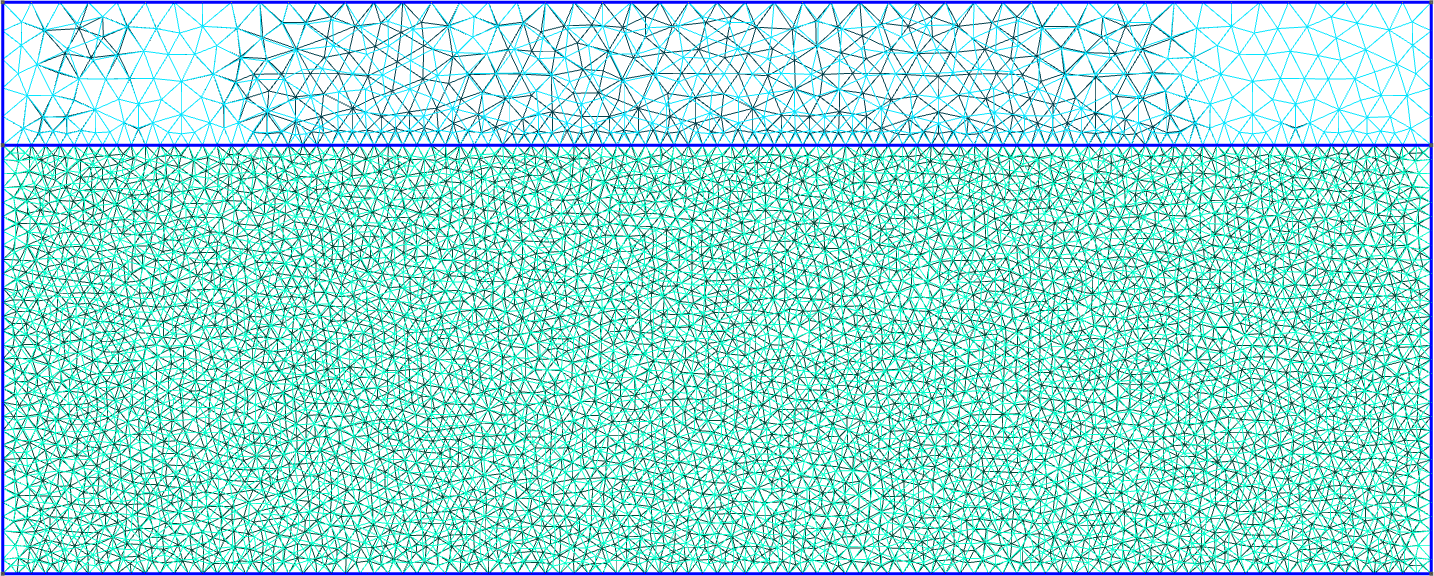
Fig. 16 The same mesh as above, but with the mesh size of the first volume set to 1.
[14:51:34] INFO     Clearing mesh                                  _builder.py:1548
           INFO     Preparing to mesh                              _builder.py:1587
           INFO     Detecting appropriate random factor            _builder.py:3867
           INFO     Random factor is now appropriate               _builder.py:3891
           INFO     Meshing                                        _builder.py:1603
[14:51:35] INFO     Saving figure                                  _builder.py:1994

<qtcad.builder.builder.Builder object at 0x7ff520ffd950>
Above we uset the force=True option to completely override the mesh size.
Total running time of the script: (0 minutes 46.961 seconds)