Note
Go to the end to download the full example code.
Advanced features
This tutorial walks through the creation of an imaginary device with
overlapping gates to demonstrate some more advanced features like
qtcad.builder.Builder.grow and qtcad.builder.Builder.pad_group.
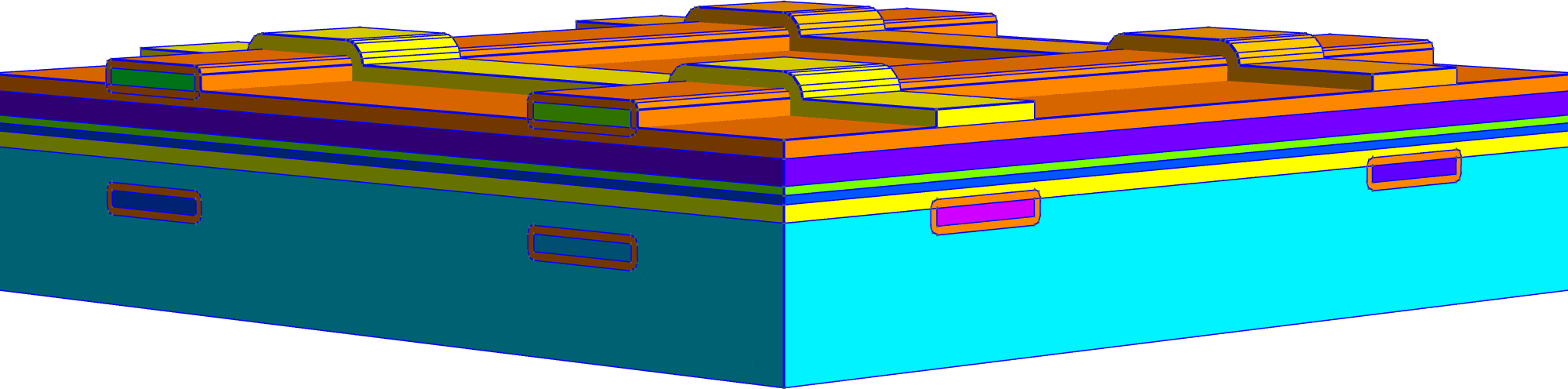
Fig. 24 The device that will be created in this tutorial.
We begin by importing the necessary modules and defining some characteristic lengths and layer thicknesses.
# sphinx_gallery_thumbnail_path = 'auto_examples/tutorials/images/sphx_glr_advanced_features_010.png'

from qtcad.builder import Builder, MeshAlgorithm3D
from pathlib import Path
import sys

script_dir = Path(sys.argv[0]).resolve().parent


# Mesh characteristic lengths
char_len = 50  # Note that this is very low and for demonstration purposes only
dot_char_len = char_len / 2

# Thickness of each material layer
cap_thick = 10
barrier_thick = 15
dopant_thick = 5
spacer_thick = 5
two_deg_thick = 10
substrate_thick = 100 - two_deg_thick

dot_height = substrate_thick + two_deg_thick + spacer_thick

gate_thick = 10
gate_padding = 5
Next, we initialize a new instance of qtcad.builder.Builder and load our
photomask layout from an oasis file
(demo_dot.oas).
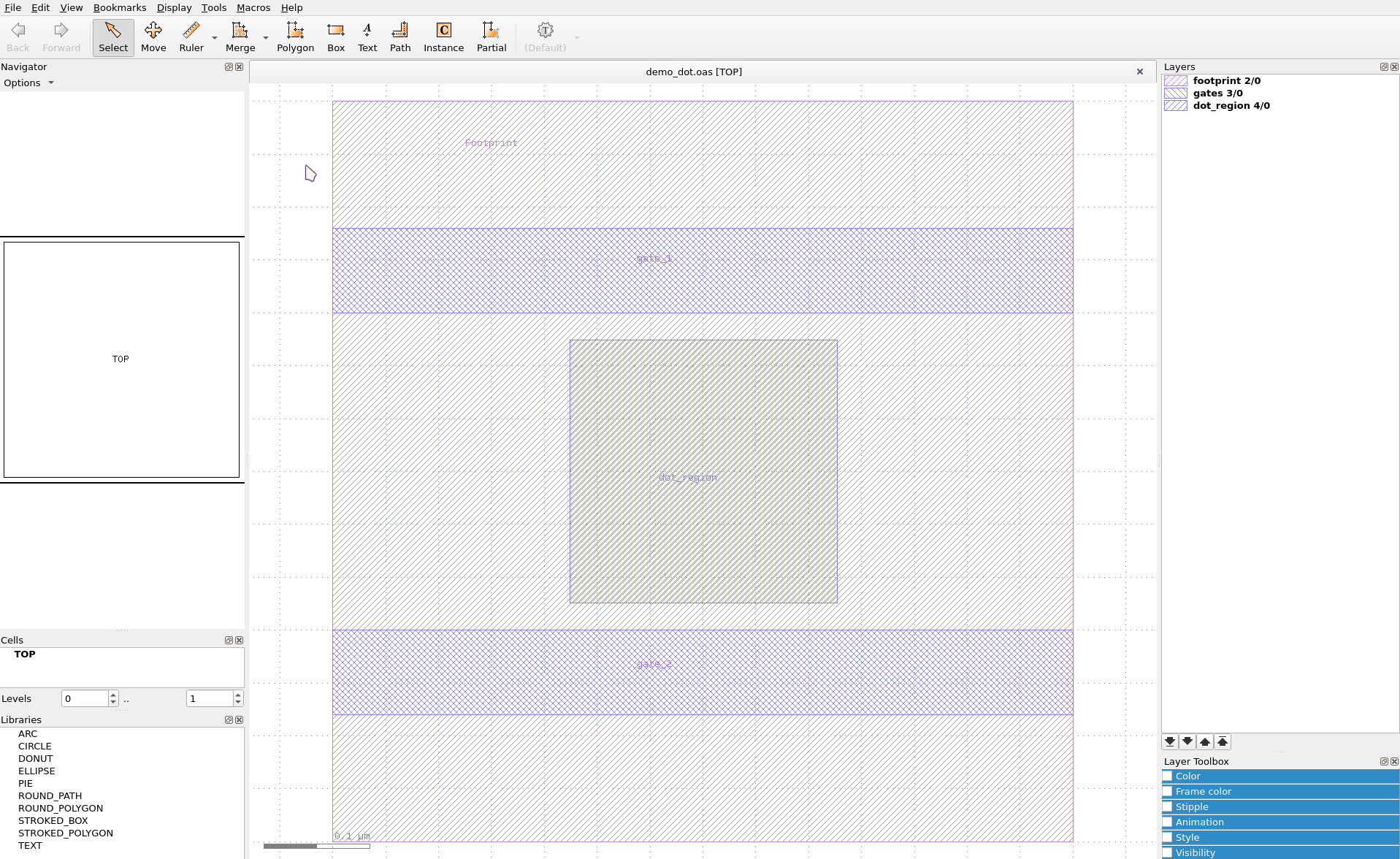
Fig. 25 The photomask layout for the device.
Note
In contrast to Gated Quantum Dot the shape names are defined
through text labels in the layout file. For layers containing
only one shape, it might be simpler to use
qtcad.builder.Builder.group_from_mask and omit naming the shapes.
builder = (
    Builder(name="Demo")
    .load_layout(script_dir / "layouts" / "demo_dot.oas")
    .print_mask_tree()
)
[17:37:35] INFO     Loading layout from cache                           misc.py:266
                    /home/hiro/.cache/qtcad/builder/layout_e0c8531ef967
                    00b82a123ac19191a7d7fece40782812929eed5f780e81526e1
                    9_None_name_None_-9.pkl
           INFO     Adding mask 'dot_region' from cache                masks.py:776
           INFO     Adding mask 'footprint' from cache                 masks.py:776
           INFO     Adding mask 'gates' from cache                     masks.py:776
Layout
├── Mask 4 "dot_region"
│   └── 0  Polygon  "dot_region" (4)
├── Mask 2 "footprint"
│   └── 0  Polygon  "footprint" (4)
└── Mask 3 "gates"
    ├── 0  Polygon  "gate_2" (4)
    └── 1  Polygon  "gate_1" (4)
Above, we see that the layout contains three masks. The “footprint” mask defines the overall device footprint which we will later use to clip the volumes we create. The “gates” mask contains two rectangles which we will use as a basis to create gates later on. Finally, there is the “dot_region” mask which we will use to identify a region of the device that’s going to contain the quantum dot, i.e. charges confined in three dimensions, and in which all classical charges are excluded.
Next, we set the mesh size we are going to use for the subsequent operations.
<qtcad.builder.builder.Builder object at 0x7b72b2f09160>
Bottom Gates
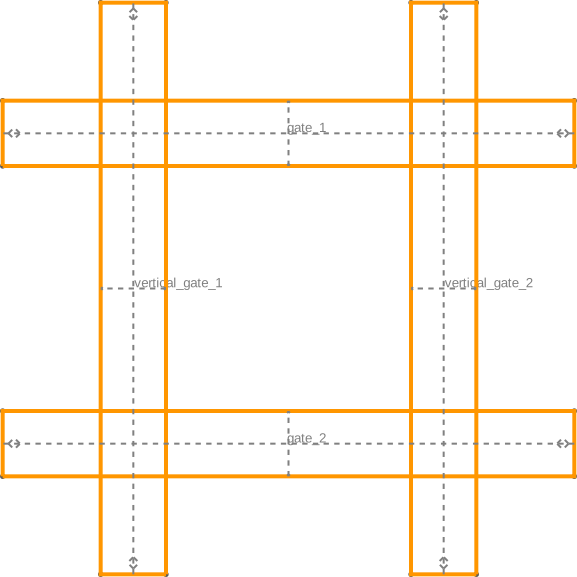
Now that the masks have been added, we are ready to create the gate volumes and surfaces. We will create four sets of gates in total. Horizontal and vertical lower gates, and horizontal and vertical upper gates.
To that end, we copy the “gates” mask and transform the shapes contained therein by rotating them 90 degrees and renaming them to “vertical_<original_name>”.
(
    builder.use_mask("gates")
    .copy_mask(
        "vertical",
        transformer=lambda shape: shape.named("vertical_" + shape.name),
        rotate=90,
    )
    .print_mask_tree()
    .use_mask(["gates", "vertical"])
    .view_shapes(save="figs/advanced_features_gates_shapes.svg")
)
           INFO     Using mask 'gates' (implicitly selecting shapes _builder.py:827
                    [Polygon 0 'gate_2', Polygon 1 'gate_1'])
Layout
├── Mask 4 "dot_region"
│   └── 0  Polygon  "dot_region" (4)
├── Mask 2 "footprint"
│   └── 0  Polygon  "footprint" (4)
├── Mask 3 "gates"
│   ├── 0  Polygon  "gate_2" (4)
│   └── 1  Polygon  "gate_1" (4)
└── Mask 5 "vertical"
    ├── 0  Polygon  "vertical_gate_2" (4)
    └── 1  Polygon  "vertical_gate_1" (4)
           INFO     Using mask 'gates-vertical' (implicitly         _builder.py:827
                    selecting shapes [Polygon 0 'vertical_gate_2',
                    Polygon 1 'vertical_gate_1'])
           INFO     Viewing shapes: [Polygon 0 'gate_2', Polygon 1 _builder.py:2083
                    'gate_1', Polygon 2 'vertical_gate_2', Polygon
                    3 'vertical_gate_1'] using a temporary builder
                    instance

<qtcad.builder.builder.Builder object at 0x7b72b2f09160>
Next, we create the bottom set of horizontal gates, again by copying and renaming the “gates” mask.
(
    builder.use_mask("gates")
    .copy_mask(
        "bottom_horizontal",
        transformer=lambda shape: shape.named("bottom_" + shape.name),
    )
    .set_z(substrate_thick - 2 * (gate_padding + gate_thick))
    .extrude(gate_thick)
    .view(
        volume_labels=True,
        surfaces=True,
        save="figs/advanced_features_gates.svg",
    )
)

           INFO     Using mask 'gates' (implicitly selecting shapes _builder.py:827
                    [Polygon 0 'gate_2', Polygon 1 'gate_1'])
           INFO     Setting z-coordinate to 60                      _builder.py:929
           INFO     Extruding shape 0 from mask                    _builder.py:2923
                    'bottom_horizontal' with name 'bottom_gate_2'
                    by 10 at z=60
           INFO     Creating new physical group of dimension 2     _builder.py:2707
                    with name 'bottom_gate_2_bottom'
           INFO     Creating new physical group of dimension 2     _builder.py:2707
                    with name 'bottom_gate_2_side'
           INFO     Creating new physical group of dimension 2     _builder.py:2707
                    with name 'bottom_gate_2_top'
           INFO     Creating new physical group of dimension 3     _builder.py:2707
                    with name 'bottom_gate_2'
           INFO     Extruding shape 1 from mask                    _builder.py:2923
                    'bottom_horizontal' with name 'bottom_gate_1'
                    by 10 at z=60
           INFO     Creating new physical group of dimension 2     _builder.py:2707
                    with name 'bottom_gate_1_bottom'
           INFO     Creating new physical group of dimension 2     _builder.py:2707
                    with name 'bottom_gate_1_side'
           INFO     Creating new physical group of dimension 2     _builder.py:2707
                    with name 'bottom_gate_1_top'
           INFO     Creating new physical group of dimension 3     _builder.py:2707
                    with name 'bottom_gate_1'
           INFO     Setting z-coordinate to 70                      _builder.py:929
           INFO     Saving figure                                  _builder.py:2022

<qtcad.builder.builder.Builder object at 0x7b72b2f09160>
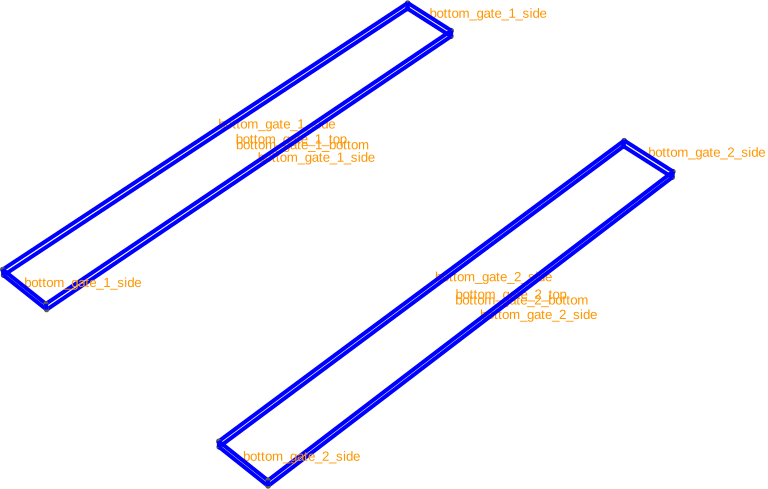
If we show the surface labels, we see that the bottom, side and top of the created volumes receive distinct labels.
builder.view(
    volume_labels=False,
    surface_labels=True,
    angles=(-45, 0, 45),
    save="figs/advanced_features_gates_surfs.svg",
)
[17:37:36] INFO     Saving figure                                  _builder.py:2022

<qtcad.builder.builder.Builder object at 0x7b72b2f09160>
Now, we create the vertical set of gates.
(
    builder.use_mask("vertical")
    .copy_mask(
        "bottom_vertical",
        transformer=lambda shape: shape.named("bottom_" + shape.name),
    )
    .set_z(offset=1.99 * gate_padding)
    .extrude(gate_thick)
    .view(
        volume_labels=True,
        surfaces=True,
        angles=(-85, 0, 45),
        save="figs/advanced_features_gates_vertical_raw.png",  # caption: The gates before adding padding.;
        show_volume_faces=True,
    )
    .view(
        volume_labels=True,
        surfaces=True,
        angles=(-90, 0, 45),
        save="figs/advanced_features_gates_vertical.png",  # caption: Side view showing the gap between the vertical and horizontal gates.;
        show_volume_faces=True,
    )
)

Fig. 26 The gates before adding padding.

Fig. 27 Side view showing the gap between the vertical and horizontal gates.
           INFO     Using mask 'vertical' (implicitly selecting     _builder.py:827
                    shapes [Polygon 0 'bottom_gate_2', Polygon 1
                    'bottom_gate_1'])
           INFO     Setting z-coordinate to 79.95                   _builder.py:929
           INFO     Extruding shape 0 from mask 'bottom_vertical'  _builder.py:2923
                    with name 'bottom_vertical_gate_2' by 10 at
                    z=79.95
           INFO     Creating new physical group of dimension 2     _builder.py:2707
                    with name 'bottom_vertical_gate_2_bottom'
           INFO     Creating new physical group of dimension 2     _builder.py:2707
                    with name 'bottom_vertical_gate_2_side'
           INFO     Creating new physical group of dimension 2     _builder.py:2707
                    with name 'bottom_vertical_gate_2_top'
           INFO     Creating new physical group of dimension 3     _builder.py:2707
                    with name 'bottom_vertical_gate_2'
           INFO     Extruding shape 1 from mask 'bottom_vertical'  _builder.py:2923
                    with name 'bottom_vertical_gate_1' by 10 at
                    z=79.95
           INFO     Creating new physical group of dimension 2     _builder.py:2707
                    with name 'bottom_vertical_gate_1_bottom'
           INFO     Creating new physical group of dimension 2     _builder.py:2707
                    with name 'bottom_vertical_gate_1_side'
           INFO     Creating new physical group of dimension 2     _builder.py:2707
                    with name 'bottom_vertical_gate_1_top'
           INFO     Creating new physical group of dimension 3     _builder.py:2707
                    with name 'bottom_vertical_gate_1'
           INFO     Identifying potential intersections...        fragmenter.py:290
[17:37:37] INFO     Setting z-coordinate to 89.95                   _builder.py:929
           INFO     Quick meshing with 2D algorithm                _builder.py:1690
                    FrontalDelaunay, 3D algorithm Delaunay and 12
                    threads
           INFO     Saving figure                                  _builder.py:2022
           INFO     Quick meshing with 2D algorithm                _builder.py:1690
                    FrontalDelaunay, 3D algorithm Delaunay and 12
                    threads
           INFO     Saving figure                                  _builder.py:2022

<qtcad.builder.builder.Builder object at 0x7b72b2f09160>
Above, show_volume_faces=True to highlight the faces of the
volumes. The colors indicate the physical group of the volumes.
Next, we’ll add an “oxide” padding layer around the gates. We will
use qtcad.builder.Builder.fill_mode to ensure that the
padding does not affect the groups the surfaces of the gates are
assigned to. The qtcad.builder.Builder.use_mask method
selects the “footprint” mask and the shape contained therein which
will be used to clip the padding volumes (see also Padding).
- Builder.pad_group(group: str | list[str] | Callable[[PhysicalGroup], bool], thickness: float, padding_suffix: str = '_padding', noclip: bool = False, grow_complexity: float = 10.0, grow_accuracy: int = 100, min_curve_nodes: int = 20) Self
[🏗️ Operation] Add a padding layer of
thicknessaround the volumes in volume group with namegroup_name. The newly created padding volume will be namedgroup_name + padding_suffixand clipped horizontally by the currently selected shapes unlessnoclipisTrue.- Parameters:
group – The group(s) to pad. See
get_groupfor details on the allowed types.thickness – The padding thickness.
padding_suffix – Suffix to append to the group name for the new volume.
noclip – If
True, no horizontal clipping will occur. Default isFalse.grow_complexity – See
grow().grow_accuracy – See
grow().min_curve_nodes – See
grow().
Below, we are enlarging the padding with by 1% to avoid shapes that almost but not quite touch.
(
    builder.use_mask("footprint")
    .fill_mode()
    .pad_group(
        lambda group: "gate" in group.name and group.dim == 3,
        gate_padding * 1.01,
        padding_suffix="_padding",
        grow_complexity=10,
        grow_accuracy=400,
    )
    .view()
    .view(
        volume_labels=True,
        surfaces=True,
        angles=(-85, 0, 45),
        save="figs/advanced_features_gates_padding_raw.png",
        show_volume_faces=True,
    )
)

[17:37:38] INFO     Using mask 'footprint' (implicitly selecting    _builder.py:827
                    shapes [Polygon 0 'bottom_vertical_gate_2',
                    Polygon 1 'bottom_vertical_gate_1'])
           INFO     Padding Physical Group 'bottom_gate_2' of       _builder.py:486
                    dimension 3 with a layer of thickness 5.05
                    (clipping with shapes with shapes: [Polygon 0
                    'footprint'])
           INFO     Growing volume (3, 5)...                       _builder.py:3492
[17:37:41] INFO     Creating new physical group of dimension 2     _builder.py:2707
                    with name 'bottom_gate_2_padding_bottom'
           INFO     Creating new physical group of dimension 2     _builder.py:2707
                    with name 'bottom_gate_2_padding_side'
           INFO     Creating new physical group of dimension 2     _builder.py:2707
                    with name 'bottom_gate_2_padding_top'
           INFO     Creating new physical group of dimension 3     _builder.py:2707
                    with name 'bottom_gate_2_padding'
           INFO     Identifying potential intersections...        fragmenter.py:290
           INFO     Fragmenting...                                fragmenter.py:320
           INFO     Padding Physical Group 'bottom_gate_1' of       _builder.py:486
                    dimension 3 with a layer of thickness 5.05
                    (clipping with shapes with shapes: [Polygon 0
                    'footprint'])
           INFO     Growing volume (3, 8)...                       _builder.py:3492
[17:37:45] INFO     Creating new physical group of dimension 2     _builder.py:2707
                    with name 'bottom_gate_1_padding_bottom'
           INFO     Creating new physical group of dimension 2     _builder.py:2707
                    with name 'bottom_gate_1_padding_side'
           INFO     Creating new physical group of dimension 2     _builder.py:2707
                    with name 'bottom_gate_1_padding_top'
           INFO     Creating new physical group of dimension 3     _builder.py:2707
                    with name 'bottom_gate_1_padding'
           INFO     Identifying potential intersections...        fragmenter.py:290
           INFO     Fragmenting...                                fragmenter.py:320
           INFO     Padding Physical Group 'bottom_vertical_gate_2' _builder.py:486
                    of dimension 3 with a layer of thickness 5.05
                    (clipping with shapes with shapes: [Polygon 0
                    'footprint'])
           INFO     Growing volume (3, 11)...                      _builder.py:3492
[17:37:49] INFO     Creating new physical group of dimension 2     _builder.py:2707
                    with name
                    'bottom_vertical_gate_2_padding_bottom'
           INFO     Creating new physical group of dimension 2     _builder.py:2707
                    with name
                    'bottom_vertical_gate_2_padding_side'
           INFO     Creating new physical group of dimension 2     _builder.py:2707
                    with name 'bottom_vertical_gate_2_padding_top'
           INFO     Creating new physical group of dimension 3     _builder.py:2707
                    with name 'bottom_vertical_gate_2_padding'
           INFO     Identifying potential intersections...        fragmenter.py:290
           INFO     Fragmenting...                                fragmenter.py:320
/home/hiro/Documents/roam_code/code/qtcad_flake/qtcad/packages/builder/src/qtcad/builder/core/util/misc.py:122: RuntimeWarning: invalid value encountered in scalar divide
  elevation = math.acos(normal[2] / np.linalg.norm(normal))
           INFO     Padding Physical Group 'bottom_vertical_gate_1' _builder.py:486
                    of dimension 3 with a layer of thickness 5.05
                    (clipping with shapes with shapes: [Polygon 0
                    'footprint'])
           INFO     Growing volume (3, 18)...                      _builder.py:3492
[17:37:53] INFO     Creating new physical group of dimension 2     _builder.py:2707
                    with name
                    'bottom_vertical_gate_1_padding_bottom'
           INFO     Creating new physical group of dimension 2     _builder.py:2707
                    with name
                    'bottom_vertical_gate_1_padding_side'
           INFO     Creating new physical group of dimension 2     _builder.py:2707
                    with name 'bottom_vertical_gate_1_padding_top'
           INFO     Creating new physical group of dimension 3     _builder.py:2707
                    with name 'bottom_vertical_gate_1_padding'
           INFO     Identifying potential intersections...        fragmenter.py:290
           INFO     Fragmenting...                                fragmenter.py:320
           INFO     Quick meshing with 2D algorithm                _builder.py:1690
                    FrontalDelaunay, 3D algorithm Delaunay and 12
                    threads
[17:37:54] INFO     Saving figure                                  _builder.py:2022

<qtcad.builder.builder.Builder object at 0x7b72b2f09160>
The above operation generates a lot of groups (all ending in
_padding as configured above). To reduce clutter and make the
assignment of materials easier, we will merge all padding groups
groups using qtcad.builder.Builder.merge_groups.
- Builder.merge_groups(groups: str | list[str] | Callable[[PhysicalGroup], bool], into: str) Self
[⚡ Utility] Merge multiple physical groups
groupsinto the (potentially new) groupnew.- Parameters:
groups – Group(s) to merge. See
get_groupfor details.into – The name of a new or existing group to merge into.
(
    builder.merge_groups(
        lambda group: "padding" in group.name and group.dim == 3, "padding"
    )
    .merge_groups(
        lambda group: "padding" in group.name and group.dim == 2, "padding_surfaces"
    )
    .view(
        volume_labels=True,
        surfaces=True,
        angles=(-85, 0, 45),
        save="figs/advanced_features_gates_padding.png",
        show_volume_faces=True,
    )
)

[17:37:55] INFO     Merging groups ['bottom_gate_2_padding',       _builder.py:1465
                    'bottom_gate_1_padding',
                    'bottom_vertical_gate_2_padding',
                    'bottom_vertical_gate_1_padding'] into
                    'padding'
           INFO     Creating new physical group of dimension 3     _builder.py:2707
                    with name 'padding'
           INFO     Merging groups                                 _builder.py:1465
                    ['bottom_gate_2_padding_bottom',
                    'bottom_gate_2_padding_side',
                    'bottom_gate_2_padding_top',
                    'bottom_gate_1_padding_bottom',
                    'bottom_gate_1_padding_side',
                    'bottom_gate_1_padding_top',
                    'bottom_vertical_gate_2_padding_bottom',
                    'bottom_vertical_gate_2_padding_side',
                    'bottom_vertical_gate_2_padding_top',
                    'bottom_vertical_gate_1_padding_bottom',
                    'bottom_vertical_gate_1_padding_side',
                    'bottom_vertical_gate_1_padding_top'] into
                    'padding_surfaces'
           INFO     Creating new physical group of dimension 2     _builder.py:2707
                    with name 'padding_surfaces'
           INFO     Quick meshing with 2D algorithm                _builder.py:1690
                    FrontalDelaunay, 3D algorithm Delaunay and 12
                    threads
           INFO     Saving figure                                  _builder.py:2022

<qtcad.builder.builder.Builder object at 0x7b72b2f09160>
Heterostructure
Next we will create the heterostructure layers that confine
particles in the quantum dot along the growth direction, similar
to Gated Quantum Dot. We will use qtcad.builder.Builder.fill_mode to create
the volume around the gates without altering them. We also use
qtcad.builder.Builder.set_min_elements to make sure the final mesh will be
fine enough to resolve the layer structure. In actual applications
the argument should be larger than two.
(
    builder.use_mask("footprint")
    .fill_mode()
    .set_z(0)
    # .set_min_elements(2)
    .use_mask("footprint")
    #
    # Substrate
    #
    .set_group_name("substrate")
    .extrude(substrate_thick)
    #
    # Electron confinement region
    #
    .set_group_name("two_deg")
    .extrude(two_deg_thick)
    #
    # Spacer
    #
    .set_group_name("spacer")
    .extrude(spacer_thick)
    #
    # Dopant
    #
    .set_group_name("dopant")
    .extrude(dopant_thick)
    #
    # Barrier
    #
    .set_group_name("barrier")
    .extrude(barrier_thick)
    #
    # Caps
    #
    .set_group_name("cap")
    .extrude(cap_thick)
    .view(
        volume_labels=True,
        surfaces=True,
        angles=(-85, 0, 45),
        show_volume_faces=True,
    )
)
[17:37:56] INFO     Using mask 'footprint' (implicitly selecting    _builder.py:827
                    shapes [Polygon 0 'footprint'])
           INFO     Setting z-coordinate to 0                       _builder.py:929
           INFO     Using mask 'footprint' (implicitly selecting    _builder.py:827
                    shapes [Polygon 0 'footprint'])
           INFO     Extruding shape 0 from mask 'footprint' with   _builder.py:2923
                    name 'footprint' by 90 at z=0
           INFO     Creating new physical group of dimension 2     _builder.py:2707
                    with name 'substrate_bottom'
           INFO     Creating new physical group of dimension 2     _builder.py:2707
                    with name 'substrate_side'
           INFO     Creating new physical group of dimension 2     _builder.py:2707
                    with name 'substrate_top'
           INFO     Creating new physical group of dimension 3     _builder.py:2707
                    with name 'substrate'
           INFO     Identifying potential intersections...        fragmenter.py:290
           INFO     Fragmenting...                                fragmenter.py:320
           INFO     Creating new physical group of dimension 2     _builder.py:2707
                    with name 'padding_bottom'
           INFO     Creating new physical group of dimension 2     _builder.py:2707
                    with name 'padding_top'
           INFO     Setting z-coordinate to 90                      _builder.py:929
           INFO     Extruding shape 0 from mask 'footprint' with   _builder.py:2923
                    name 'footprint' by 10 at z=90
           INFO     Creating new physical group of dimension 2     _builder.py:2707
                    with name 'two_deg_bottom'
           INFO     Creating new physical group of dimension 2     _builder.py:2707
                    with name 'two_deg_side'
           INFO     Creating new physical group of dimension 2     _builder.py:2707
                    with name 'two_deg_top'
           INFO     Creating new physical group of dimension 3     _builder.py:2707
                    with name 'two_deg'
           INFO     Identifying potential intersections...        fragmenter.py:290
           INFO     Fragmenting...                                fragmenter.py:320
           INFO     Setting z-coordinate to 100                     _builder.py:929
           INFO     Extruding shape 0 from mask 'footprint' with   _builder.py:2923
                    name 'footprint' by 5 at z=100
           INFO     Creating new physical group of dimension 2     _builder.py:2707
                    with name 'spacer_bottom'
           INFO     Creating new physical group of dimension 2     _builder.py:2707
                    with name 'spacer_side'
           INFO     Creating new physical group of dimension 2     _builder.py:2707
                    with name 'spacer_top'
           INFO     Creating new physical group of dimension 3     _builder.py:2707
                    with name 'spacer'
           INFO     Identifying potential intersections...        fragmenter.py:290
           INFO     Fragmenting...                                fragmenter.py:320
           INFO     Setting z-coordinate to 105                     _builder.py:929
           INFO     Extruding shape 0 from mask 'footprint' with   _builder.py:2923
                    name 'footprint' by 5 at z=105
           INFO     Creating new physical group of dimension 2     _builder.py:2707
                    with name 'dopant_bottom'
           INFO     Creating new physical group of dimension 2     _builder.py:2707
                    with name 'dopant_side'
           INFO     Creating new physical group of dimension 2     _builder.py:2707
                    with name 'dopant_top'
           INFO     Creating new physical group of dimension 3     _builder.py:2707
                    with name 'dopant'
           INFO     Identifying potential intersections...        fragmenter.py:290
           INFO     Fragmenting...                                fragmenter.py:320
[17:37:57] INFO     Setting z-coordinate to 110                     _builder.py:929
           INFO     Extruding shape 0 from mask 'footprint' with   _builder.py:2923
                    name 'footprint' by 15 at z=110
           INFO     Creating new physical group of dimension 2     _builder.py:2707
                    with name 'barrier_bottom'
           INFO     Creating new physical group of dimension 2     _builder.py:2707
                    with name 'barrier_side'
           INFO     Creating new physical group of dimension 2     _builder.py:2707
                    with name 'barrier_top'
           INFO     Creating new physical group of dimension 3     _builder.py:2707
                    with name 'barrier'
           INFO     Identifying potential intersections...        fragmenter.py:290
           INFO     Fragmenting...                                fragmenter.py:320
           INFO     Setting z-coordinate to 125                     _builder.py:929
           INFO     Extruding shape 0 from mask 'footprint' with   _builder.py:2923
                    name 'footprint' by 10 at z=125
           INFO     Creating new physical group of dimension 2     _builder.py:2707
                    with name 'cap_bottom'
           INFO     Creating new physical group of dimension 2     _builder.py:2707
                    with name 'cap_side'
           INFO     Creating new physical group of dimension 2     _builder.py:2707
                    with name 'cap_top'
           INFO     Creating new physical group of dimension 3     _builder.py:2707
                    with name 'cap'
           INFO     Identifying potential intersections...        fragmenter.py:290
           INFO     Fragmenting...                                fragmenter.py:320
           INFO     Setting z-coordinate to 135                     _builder.py:929
           INFO     Quick meshing with 2D algorithm                _builder.py:1690
                    FrontalDelaunay, 3D algorithm Delaunay and 12
                    threads

<qtcad.builder.builder.Builder object at 0x7b72b2f09160>
Dot region
Finally, we will create the quantum dot region. We will use
qtcad.builder.Builder.set_z_from_group to position the bottom of the dot
region at the bottom of the substrate layer. We then use
qtcad.builder.Builder.overlay_mode to create the dot region while
maintaining the layer structure (see Extrusion and fragmentation modes).
We use qtcad.builder.Builder.group_from_mask to name the shape contained
in the “dot_region” mask accordingly.
(
    builder.set_z_from_group("substrate", bottom=True)
    .overlay_mode()
    .set_mesh_size(dot_char_len)
    .minimum_mesh_size()
    .use_mask("dot_region")
    .group_from_mask()
    .extrude(dot_height)
    .view(
        volume_labels=True,
        surfaces=True,
        angles=(-45, 0, 45),
        save="figs/advanced_features_dot_region.png",  # caption: The dot region;
        show_volume_faces=True,
        groups=lambda g: "dot_region" in g.name,
    )
)
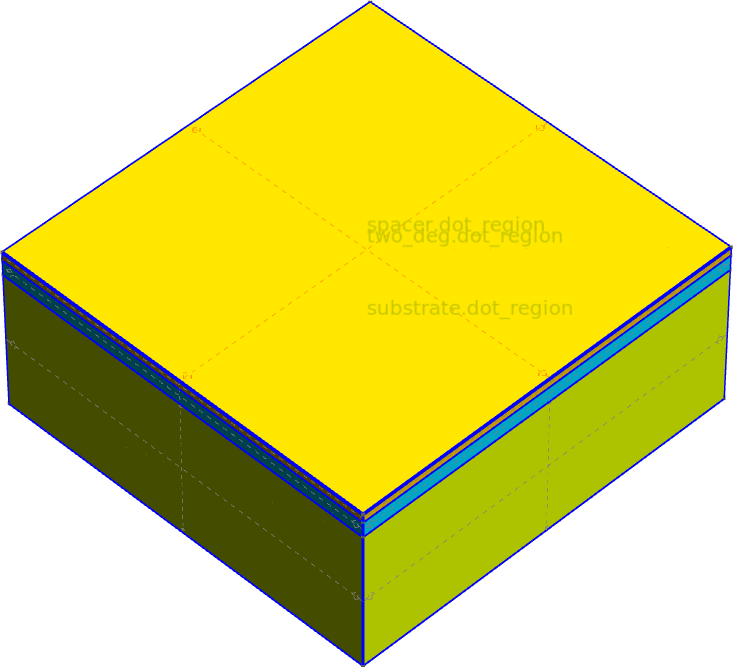
Fig. 28 The dot region
           INFO     Setting z-coordinate to 0.0                     _builder.py:929
           INFO     Using mask 'dot_region' (implicitly selecting   _builder.py:827
                    shapes [Polygon 0 'dot_region'])
           INFO     Extruding shape 0 from mask 'dot_region' with  _builder.py:2923
                    name 'dot_region' by 105 at z=0.0
           INFO     Creating new physical group of dimension 2     _builder.py:2707
                    with name 'dot_region_bottom'
           INFO     Creating new physical group of dimension 2     _builder.py:2707
                    with name 'dot_region_side'
           INFO     Creating new physical group of dimension 2     _builder.py:2707
                    with name 'dot_region_top'
           INFO     Creating new physical group of dimension 3     _builder.py:2707
                    with name 'dot_region'
           INFO     Identifying potential intersections...        fragmenter.py:290
           INFO     Fragmenting...                                fragmenter.py:320
           INFO     Creating new physical group of dimension 2     _builder.py:2707
                    with name 'substrate_top.dot_region'
           INFO     Creating new physical group of dimension 2     _builder.py:2707
                    with name 'spacer_top.dot_region_top'
           INFO     Creating new physical group of dimension 2     _builder.py:2707
                    with name 'two_deg.dot_region_side'
           INFO     Creating new physical group of dimension 2     _builder.py:2707
                    with name 'spacer.dot_region_side'
           INFO     Creating new physical group of dimension 3     _builder.py:2707
                    with name 'spacer.dot_region'
           INFO     Creating new physical group of dimension 2     _builder.py:2707
                    with name 'substrate.dot_region_side'
           INFO     Creating new physical group of dimension 2     _builder.py:2707
                    with name 'two_deg_top.dot_region'
           INFO     Creating new physical group of dimension 3     _builder.py:2707
                    with name 'two_deg.dot_region'
           INFO     Creating new physical group of dimension 2     _builder.py:2707
                    with name 'substrate_bottom.dot_region_bottom'
           INFO     Creating new physical group of dimension 3     _builder.py:2707
                    with name 'substrate.dot_region'
           INFO     Setting z-coordinate to 105.0                   _builder.py:929
           INFO     Quick meshing with 2D algorithm                _builder.py:1690
                    FrontalDelaunay, 3D algorithm Delaunay and 12
                    threads
[17:37:58] INFO     Saving figure                                  _builder.py:2022

<qtcad.builder.builder.Builder object at 0x7b72b2f09160>
Top gates
Now we will add the upper set of gates. These are similar to the
bottom gates, but we will position them on top of the cap layer. To
achieve this, we will copy the mask containing the shapes of the
Horizontal gates and use qtcad.builder.Builder.deposit to create the gate
volumes atop the device. (Note that extrude would have the same
effect in this case.) We are using qtcad.builder.Builder.displace_mode to
make sure the bottom surfaces of the created volumes retain their
names.
- Builder.deposit(height: float, noclip: bool = False) Self
[🏗️ Operation] Deposit the currently selected shape(s) into the model up from the current z coordinate by
heightlength units. This is done by adding new material atop the topmost surfaces of the model. Ifnoclip=True, the new material is deposited on the whole top surface of the model, rather than clipped by the currently selected shapes.- Parameters:
height – The distance by which to deposit the shape(s) up into the model.
noclip – Whether to deposit the shape without horizontally clipping to the current shapes.
(
    builder.use_mask("gates")
    .set_mesh_size(char_len)
    .displace_mode()
    .group_from_shape()
    .copy_mask(
        "top_horizontal",
        transformer=lambda shape: shape.named("top_horizontal_" + shape.name),
    )
    .deposit(gate_thick)
    .view(
        volume_labels=True,
        surfaces=True,
        angles=(-45, 0, 45),
        save="figs/advanced_features_top_gates_raw.png",  # caption: The top gates before adding padding.;
        show_volume_faces=True,
    )
)
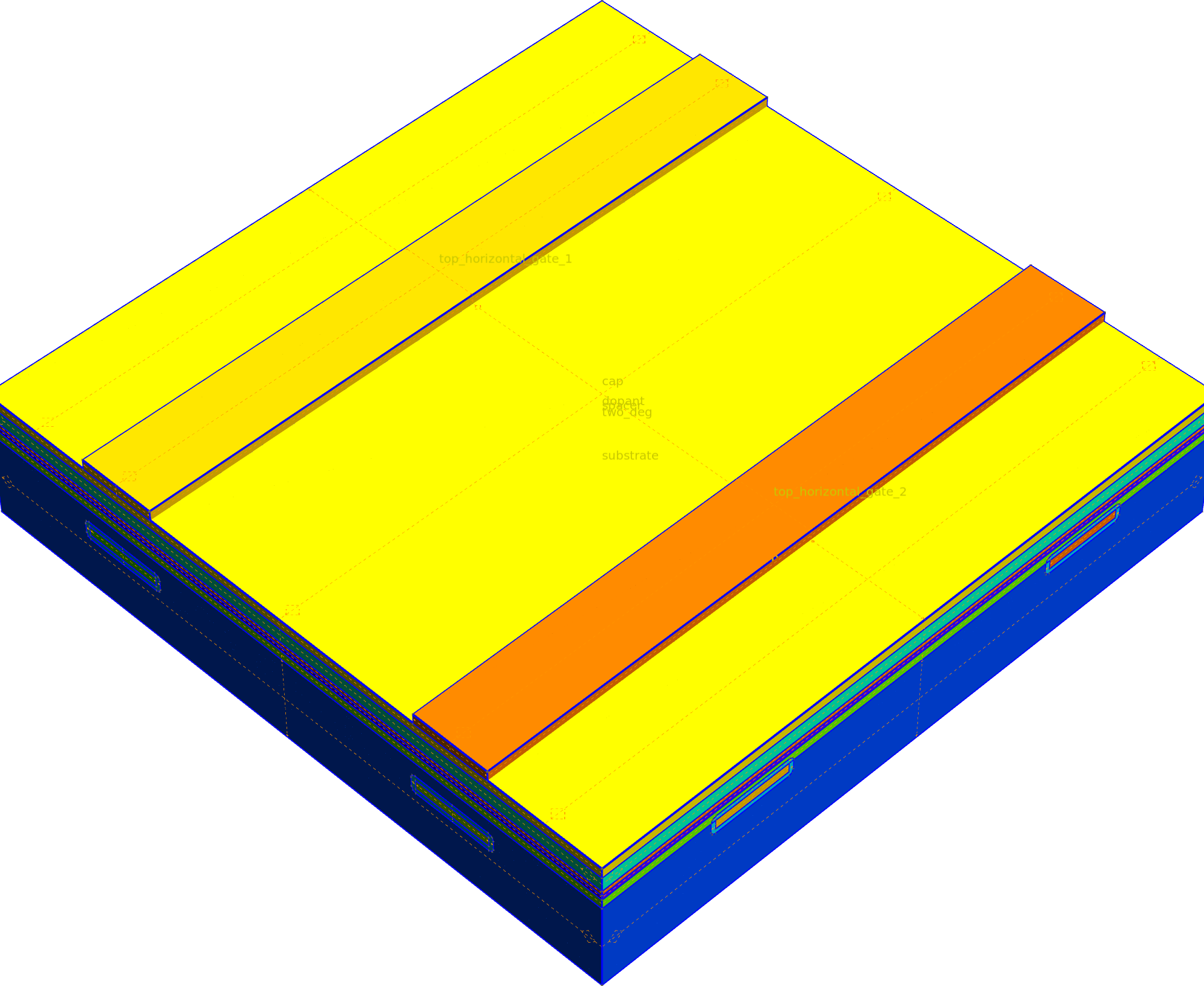
Fig. 29 The top gates before adding padding.
           INFO     Using mask 'gates' (implicitly selecting shapes _builder.py:827
                    [Polygon 0 'gate_2', Polygon 1 'gate_1'])
           INFO     Depositing on top surfaces clipped to shape 0   _builder.py:341
                    with name 'top_horizontal_gate_2' by 10
           INFO     Creating new physical group of dimension 2     _builder.py:2707
                    with name 'top_horizontal_gate_2_bottom'
           INFO     Creating new physical group of dimension 2     _builder.py:2707
                    with name 'top_horizontal_gate_2_side'
           INFO     Creating new physical group of dimension 2     _builder.py:2707
                    with name 'top_horizontal_gate_2_top'
           INFO     Creating new physical group of dimension 3     _builder.py:2707
                    with name 'top_horizontal_gate_2'
           INFO     Depositing on top surfaces clipped to shape 1   _builder.py:341
                    with name 'top_horizontal_gate_1' by 10
           INFO     Creating new physical group of dimension 2     _builder.py:2707
                    with name 'top_horizontal_gate_1_bottom'
           INFO     Creating new physical group of dimension 2     _builder.py:2707
                    with name 'top_horizontal_gate_1_side'
           INFO     Creating new physical group of dimension 2     _builder.py:2707
                    with name 'top_horizontal_gate_1_top'
           INFO     Creating new physical group of dimension 3     _builder.py:2707
                    with name 'top_horizontal_gate_1'
           INFO     Identifying potential intersections...        fragmenter.py:290
           INFO     Fragmenting...                                fragmenter.py:320
[17:37:59] INFO     Quick meshing with 2D algorithm                _builder.py:1690
                    FrontalDelaunay, 3D algorithm Delaunay and 12
                    threads
           INFO     Saving figure                                  _builder.py:2022

<qtcad.builder.builder.Builder object at 0x7b72b2f09160>
As before, we add a padding layer around the horizontal top gates
using qtcad.builder.Builder.pad_group.
(
    builder.use_mask("footprint")
    .fill_mode()
    .pad_group(
        lambda group: group.dim == 3 and "top_horizontal" in group.name,
        thickness=gate_padding * 1.01,
        grow_accuracy=400,
    )
    .merge_groups(lambda group: "padding" in group.name and group.dim == 3, "padding")
    .merge_groups(
        lambda group: "padding" in group.name and group.dim == 2, "padding_surfaces"
    )
    .view(
        volume_labels=True,
        surfaces=True,
        angles=(-85, 0, 45),
        save="figs/advanced_features_top_gates.png",  # caption: The top gates with padding.;
        show_volume_faces=True,
    )
)
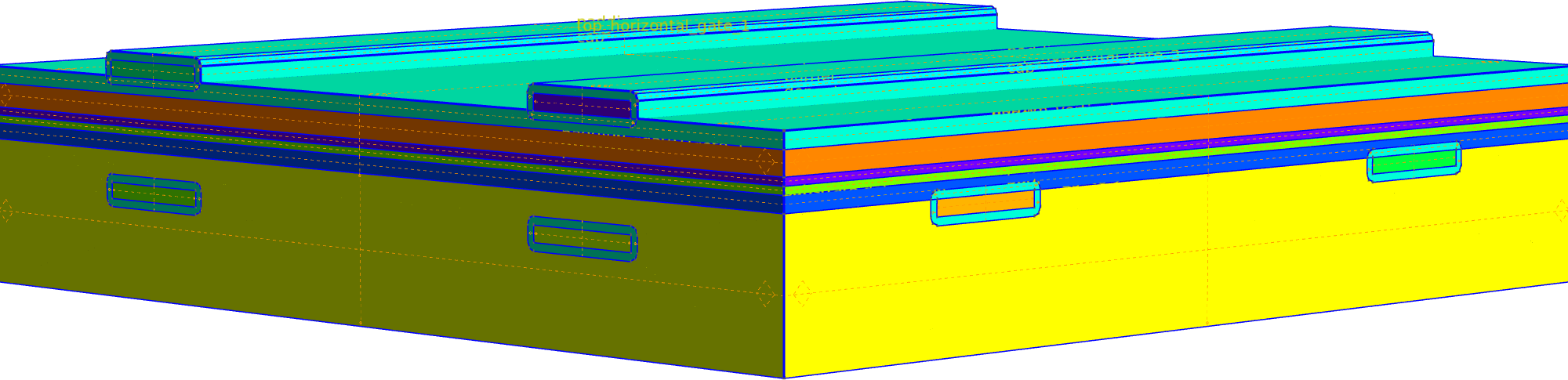
Fig. 30 The top gates with padding.
[17:38:00] INFO     Using mask 'footprint' (implicitly selecting    _builder.py:827
                    shapes [Polygon 0 'top_horizontal_gate_2',
                    Polygon 1 'top_horizontal_gate_1'])
           INFO     Padding Physical Group 'top_horizontal_gate_2'  _builder.py:486
                    of dimension 3 with a layer of thickness 5.05
                    (clipping with shapes with shapes: [Polygon 0
                    'footprint'])
           INFO     Growing volume (3, 57)...                      _builder.py:3492
[17:38:04] INFO     Creating new physical group of dimension 2     _builder.py:2707
                    with name
                    'top_horizontal_gate_2_padding_bottom'
           INFO     Creating new physical group of dimension 2     _builder.py:2707
                    with name 'top_horizontal_gate_2_padding_side'
           INFO     Creating new physical group of dimension 2     _builder.py:2707
                    with name 'top_horizontal_gate_2_padding_top'
           INFO     Creating new physical group of dimension 3     _builder.py:2707
                    with name 'top_horizontal_gate_2_padding'
           INFO     Identifying potential intersections...        fragmenter.py:290
           INFO     Fragmenting...                                fragmenter.py:320
           INFO     Creating new physical group of dimension 2     _builder.py:2707
                    with name 'cap_bottom'
           INFO     Padding Physical Group 'top_horizontal_gate_1'  _builder.py:486
                    of dimension 3 with a layer of thickness 5.05
                    (clipping with shapes with shapes: [Polygon 0
                    'footprint'])
           INFO     Growing volume (3, 62)...                      _builder.py:3492
[17:38:08] INFO     Creating new physical group of dimension 2     _builder.py:2707
                    with name
                    'top_horizontal_gate_1_padding_bottom'
           INFO     Creating new physical group of dimension 2     _builder.py:2707
                    with name 'top_horizontal_gate_1_padding_side'
           INFO     Creating new physical group of dimension 2     _builder.py:2707
                    with name 'top_horizontal_gate_1_padding_top'
           INFO     Creating new physical group of dimension 3     _builder.py:2707
                    with name 'top_horizontal_gate_1_padding'
           INFO     Identifying potential intersections...        fragmenter.py:290
           INFO     Fragmenting...                                fragmenter.py:320
           INFO     Merging groups ['padding',                     _builder.py:1465
                    'top_horizontal_gate_2_padding',
                    'top_horizontal_gate_1_padding'] into
                    'padding'
           INFO     Merging groups ['padding_surfaces',            _builder.py:1465
                    'padding_top',
                    'top_horizontal_gate_2_padding_bottom',
                    'top_horizontal_gate_2_padding_side',
                    'top_horizontal_gate_2_padding_top',
                    'top_horizontal_gate_1_padding_bottom',
                    'top_horizontal_gate_1_padding_side',
                    'top_horizontal_gate_1_padding_top'] into
                    'padding_surfaces'
[17:38:09] INFO     Quick meshing with 2D algorithm                _builder.py:1690
                    FrontalDelaunay, 3D algorithm Delaunay and 12
                    threads
           INFO     Saving figure                                  _builder.py:2022

<qtcad.builder.builder.Builder object at 0x7b72b2f09160>
Finally, we use qtcad.builder.Builder.grow (see Deposition and Growth) to create
the top vertical gates.
- Builder.grow(thickness: float, noclip: bool = False, grow_complexity: float = 3.0, grow_accuracy: int = 100, min_curve_nodes: int = 20, polygonize: bool = False) Self
[🏗️ Operation] Emulate a physical ‘growth’ operation to add material to the current topmost volumes. In contrast to
deposit, this will not only add material to the top of the volumes but also to their sides. The currently active shapes are used to horizontally clip the new volumes unlessnoclipisTrue.The resulting surfaces are labelled similar to the
extrudecommand. However, there is some ambiguity as to what surfaces are to be considered to be on top and what surfaces are on the side. Here, we choose surfaces whose (average) normal vector projected on the x-y plane is 10% larger than its projection on the z-axis to be on the “side”. Surfaces can be created/renamed usingassign_to_group,add_surfaceordeposit_surface.- Parameters:
thickness – The distance by which to grow the selected shapes. Must be positive.
noclip – If
True, do not clip the created volumes horizontally.grow_complexity – Controls the geometric detail of the resulting CAD object. A value of 10 means the resulting object will have at most roughly 10 times the number of nodes (points) of the original object. Higher values preserve more detail but increase the number of faces and edges, which can slow down subsequent CAD operations.
grow_accuracy – Controls how closely the growth follows the fine details of the original shape. A higher value captures sharp corners and small crevices more precisely. Lower values “smooth over” these details, creating a simpler and rounder wrap around the original object.
min_curve_nodes – Minimum number of nodes to use for discretizing curves when approximating the shapes for growth.
polygonize – Deprecated.
(
    builder.use_mask("vertical")
    .displace_mode()
    .copy_mask(
        "top_vertical",
        transformer=lambda shape: shape.named("top_" + shape.name),
    )
    .grow(
        gate_thick,
        grow_accuracy=300,
    )
    .view(
        volume_labels=False,
        surfaces=False,
        angles=(-85, 0, 45),
        save="figs/advanced_features_top_gates_vertical.png",  # caption: The top vertical gates created using the grow operation.;
        show_volume_faces=True,
    )
)
Fig. 31 The top vertical gates created using the grow operation.
[17:38:10] INFO     Using mask 'vertical' (implicitly selecting     _builder.py:827
                    shapes [Polygon 0 'vertical_gate_2', Polygon 1
                    'vertical_gate_1'])
           INFO     Growing top surfaces clipped to shape 0 with   _builder.py:3534
                    name 'top_vertical_gate_2' by 10
           INFO     Growing volume (3, 67)...                      _builder.py:3492
[17:38:14] INFO     Creating new physical group of dimension 2     _builder.py:2707
                    with name 'top_vertical_gate_2_bottom'
           INFO     Creating new physical group of dimension 2     _builder.py:2707
                    with name 'top_vertical_gate_2_side'
           INFO     Creating new physical group of dimension 2     _builder.py:2707
                    with name 'top_vertical_gate_2_top'
           INFO     Creating new physical group of dimension 3     _builder.py:2707
                    with name 'top_vertical_gate_2'
           INFO     Identifying potential intersections...        fragmenter.py:290
           INFO     Fragmenting...                                fragmenter.py:320
           INFO     Growing top surfaces clipped to shape 1 with   _builder.py:3534
                    name 'top_vertical_gate_1' by 10
[17:38:15] INFO     Growing volume (3, 74)...                      _builder.py:3492
[17:38:18] INFO     Creating new physical group of dimension 2     _builder.py:2707
                    with name 'top_vertical_gate_1_bottom'
           INFO     Creating new physical group of dimension 2     _builder.py:2707
                    with name 'top_vertical_gate_1_side'
           INFO     Creating new physical group of dimension 2     _builder.py:2707
                    with name 'top_vertical_gate_1_top'
           INFO     Creating new physical group of dimension 3     _builder.py:2707
                    with name 'top_vertical_gate_1'
           INFO     Identifying potential intersections...        fragmenter.py:290
           INFO     Fragmenting...                                fragmenter.py:320
[17:38:19] INFO     Quick meshing with 2D algorithm                _builder.py:1690
                    FrontalDelaunay, 3D algorithm Delaunay and 12
                    threads
           INFO     Saving figure                                  _builder.py:2022

<qtcad.builder.builder.Builder object at 0x7b72b2f09160>
Mesh generation
We create the final mesh using the default Delaunay algorithm with
qtcad.builder.Builder.mesh, enabling output from Gmsh and conformity
checking. Due to the complexity of the geometry, we will see some
warnings “ill shaped tets”. For applications, the HXT algorithm is
preferable, but takes considerably more time on this model.
(
    builder.mesh(
        algorithm3d=MeshAlgorithm3D.Delaunay,
        show_gmsh_output=True,
        check_connectivity=True,
    )
    .view(
        volume_labels=True,
        surfaces=True,
        angles=(-45, 0, 45),
        save="figs/advanced_features_final_mesh.png",  # caption: The final mesh of the device.;
    )
    .view(
        volume_labels=True,
        surfaces=True,
        angles=(-45, 0, 45),
        save="figs/advanced_features_final_mesh_dot_region.png",  # caption: The final mesh highlighting the dot region.;
        groups=lambda g: "dot_region" in g.name,
    )
)
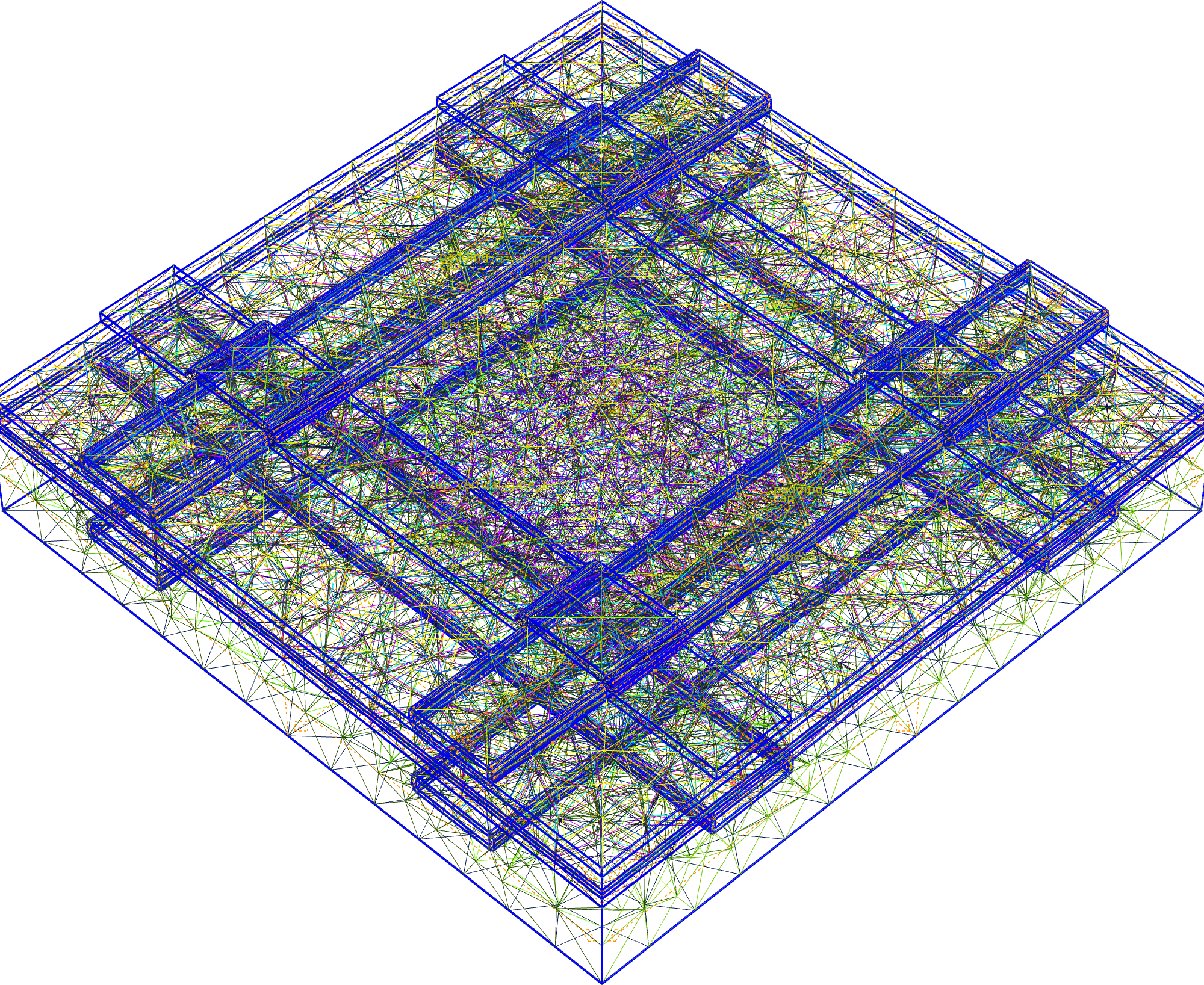
Fig. 32 The final mesh of the device.
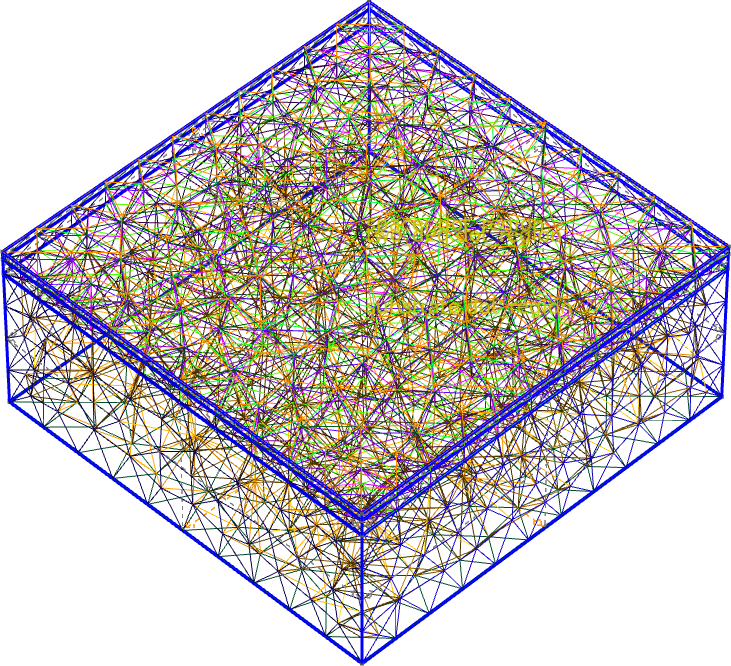
Fig. 33 The final mesh highlighting the dot region.
[17:38:20] INFO     Preparing to mesh                              _builder.py:1587
           INFO     Detecting appropriate random factor            _builder.py:3895
           INFO     Increased random factor from 1e-09 to          _builder.py:3913
                    0.9675361243597713
[17:38:21] INFO     Random factor is now appropriate               _builder.py:3919
           INFO     Meshing                                        _builder.py:1603
/home/hiro/Documents/roam_code/code/qtcad_flake/qtcad/packages/builder/src/qtcad/builder/core/_builder.py:1624: UserWarning: 37 ill-shaped tets are still in the mesh
  self._model.mesh.generate(dimension)
/home/hiro/Documents/roam_code/code/qtcad_flake/qtcad/packages/builder/src/qtcad/builder/core/_builder.py:1624: UserWarning: 30 ill-shaped tets are still in the mesh
  self._model.mesh.generate(dimension)
/home/hiro/Documents/roam_code/code/qtcad_flake/qtcad/packages/builder/src/qtcad/builder/core/_builder.py:1624: UserWarning: 40 ill-shaped tets are still in the mesh
  self._model.mesh.generate(dimension)
/home/hiro/Documents/roam_code/code/qtcad_flake/qtcad/packages/builder/src/qtcad/builder/core/_builder.py:1624: UserWarning: 39 ill-shaped tets are still in the mesh
  self._model.mesh.generate(dimension)
/home/hiro/Documents/roam_code/code/qtcad_flake/qtcad/packages/builder/src/qtcad/builder/core/_builder.py:1624: UserWarning: 92 ill-shaped tets are still in the mesh
  self._model.mesh.generate(dimension)
/home/hiro/Documents/roam_code/code/qtcad_flake/qtcad/packages/builder/src/qtcad/builder/core/_builder.py:1624: UserWarning: 79 ill-shaped tets are still in the mesh
  self._model.mesh.generate(dimension)
/home/hiro/Documents/roam_code/code/qtcad_flake/qtcad/packages/builder/src/qtcad/builder/core/_builder.py:1624: UserWarning: 234 ill-shaped tets are still in the mesh
  self._model.mesh.generate(dimension)
/home/hiro/Documents/roam_code/code/qtcad_flake/qtcad/packages/builder/src/qtcad/builder/core/_builder.py:1624: UserWarning: 253 ill-shaped tets are still in the mesh
  self._model.mesh.generate(dimension)
/home/hiro/Documents/roam_code/code/qtcad_flake/qtcad/packages/builder/src/qtcad/builder/core/_builder.py:1624: UserWarning: 42 ill-shaped tets are still in the mesh
  self._model.mesh.generate(dimension)
/home/hiro/Documents/roam_code/code/qtcad_flake/qtcad/packages/builder/src/qtcad/builder/core/_builder.py:1624: UserWarning: 76 ill-shaped tets are still in the mesh
  self._model.mesh.generate(dimension)
/home/hiro/Documents/roam_code/code/qtcad_flake/qtcad/packages/builder/src/qtcad/builder/core/_builder.py:1624: UserWarning: 108 ill-shaped tets are still in the mesh
  self._model.mesh.generate(dimension)
/home/hiro/Documents/roam_code/code/qtcad_flake/qtcad/packages/builder/src/qtcad/builder/core/_builder.py:1624: UserWarning: 28 ill-shaped tets are still in the mesh
  self._model.mesh.generate(dimension)
/home/hiro/Documents/roam_code/code/qtcad_flake/qtcad/packages/builder/src/qtcad/builder/core/_builder.py:1624: UserWarning: 1 ill-shaped tets are still in the mesh
  self._model.mesh.generate(dimension)
/home/hiro/Documents/roam_code/code/qtcad_flake/qtcad/packages/builder/src/qtcad/builder/core/_builder.py:1624: UserWarning: 7 ill-shaped tets are still in the mesh
  self._model.mesh.generate(dimension)
/home/hiro/Documents/roam_code/code/qtcad_flake/qtcad/packages/builder/src/qtcad/builder/core/_builder.py:1624: UserWarning: 12 ill-shaped tets are still in the mesh
  self._model.mesh.generate(dimension)
/home/hiro/Documents/roam_code/code/qtcad_flake/qtcad/packages/builder/src/qtcad/builder/core/_builder.py:1624: UserWarning: 35 ill-shaped tets are still in the mesh
  self._model.mesh.generate(dimension)
/home/hiro/Documents/roam_code/code/qtcad_flake/qtcad/packages/builder/src/qtcad/builder/core/_builder.py:1624: UserWarning: 126 ill-shaped tets are still in the mesh
  self._model.mesh.generate(dimension)
/home/hiro/Documents/roam_code/code/qtcad_flake/qtcad/packages/builder/src/qtcad/builder/core/_builder.py:1624: UserWarning: 14 ill-shaped tets are still in the mesh
  self._model.mesh.generate(dimension)
/home/hiro/Documents/roam_code/code/qtcad_flake/qtcad/packages/builder/src/qtcad/builder/core/_builder.py:1624: UserWarning: 53 ill-shaped tets are still in the mesh
  self._model.mesh.generate(dimension)
/home/hiro/Documents/roam_code/code/qtcad_flake/qtcad/packages/builder/src/qtcad/builder/core/_builder.py:1624: UserWarning: 65 ill-shaped tets are still in the mesh
  self._model.mesh.generate(dimension)
[17:38:22] INFO     Checking mesh conformity                       _builder.py:3981
           INFO     Writing                                        _builder.py:1753
                    ../../../../../../../../../../../tmp/tmpruymkg
                    oi/mesh.msh
           INFO     Checking connectivity                          _builder.py:4008

nodes:   0%|          | 0/7039 [00:00<?, ?it/s]
nodes:   0%|          | 0/7039 [00:00<?, ?it/s]
nodes: 100%|██████████| 7039/7039 [00:00<00:00, 2444015.39it/s]
nodes: 100%|██████████| 7039/7039 [00:00<00:00, 2353049.00it/s]
nodes: 100%|██████████| 7039/7039 [00:00<00:00, 2284409.30it/s]
           INFO     Saving figure                                  _builder.py:2022
[17:38:25] INFO     Saving figure                                  _builder.py:2022

<qtcad.builder.builder.Builder object at 0x7b72b2f09160>
We also export the mesh and geometry to disk in the msh and xao formats, respectively, for later use.
builder.write(script_dir / "meshes" / "demo.msh")
builder.write(script_dir / "meshes" / "demo.xao")
           INFO     Writing meshes/demo.msh                        _builder.py:1753
[17:38:26] INFO     Writing meshes/demo.xao                        _builder.py:1753

<qtcad.builder.builder.Builder object at 0x7b72b2f09160>
Total running time of the script: (0 minutes 51.025 seconds)