7. Interactive commands
You talk to LatticeMind in plain language. Every command below is optional — there is nothing here you cannot also ask for in a sentence. The commands exist for the few things a sentence cannot do, such as answering a pending permission request or leaving the program.
Tip
/help lists them inside the app, and /examples shows ready-to-run
prompts.
7.1. In a research conversation
These are the commands of the default runtime. /help prints the short list:
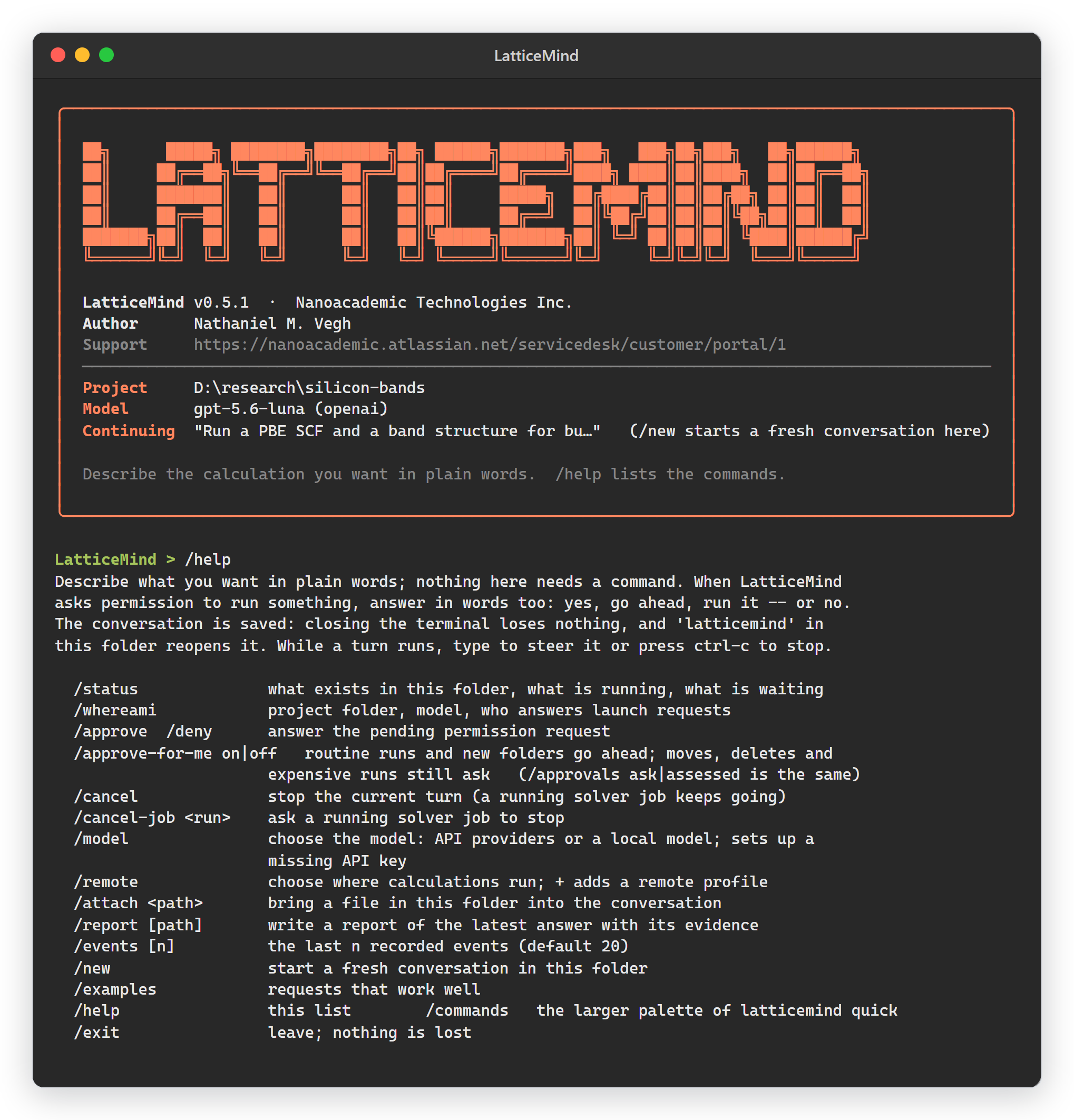
Fig. 7.1.1 /help in a research conversation.
Command |
What it does |
|---|---|
|
This session: its projects, the active turn, any pending permission. |
|
Project folder, provider, model, approval mode, solver configuration. |
|
The last n recorded events, newest last. |
|
Introduce a file — a paper, a structure, a data file — as reference material. |
|
Answer the pending permission request. |
|
Stop the active turn. A solver job already submitted keeps running. |
|
Ask a submitted job to stop. |
|
Let a fixed set of rules answer routine requests ( |
|
The approvals approve-for-me gave, with the rule behind each. |
|
Choose the model. Lists current models from the OpenAI, Claude, Gemini
and Qwen APIs and a local Ollama, each labelled configured or
unconfigured, and asks for a missing API key. |
|
Choose where calculations run: saved profiles and hosts found in
|
|
Write an evidence report (HTML and Markdown) for the latest answer under
|
|
Start a fresh conversation in this folder. |
|
Short, ready-to-run example prompts. |
|
The command list. |
|
Leave LatticeMind. |
7.2. Changing the model
/model shows a numbered list:
Current model: gpt-5.6-luna (OpenAI API)

API providers
  OpenAI API                  configured - OPENAI_API_KEY is set
     1  gpt-5.6-sol           (configured)          latest frontier model
     ...
  Claude API                  unconfigured - needs CLAUDE_API_KEY
     7  claude-fable-5-1      (unconfigured)        most capable
     ...
Local models
  Ollama (on this machine)    configured - running at http://127.0.0.1:11434
     ...
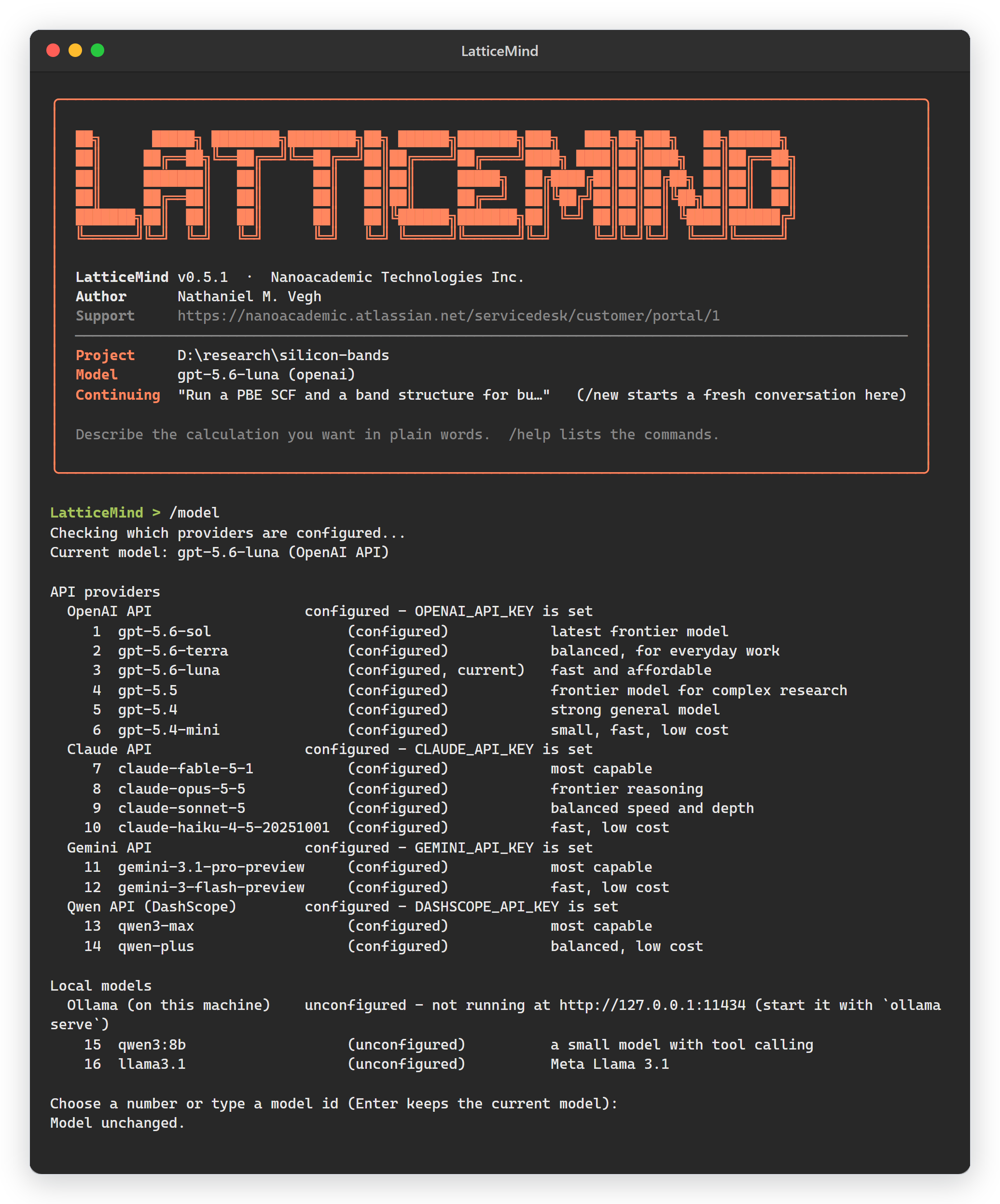
Fig. 7.2.1 /model in the terminal: every provider, whether it is configured, and
the model in use. Enter keeps the current model.
Type a number or a model id. Choosing an unconfigured API model asks for its key
(the input is hidden) and saves it to the .env file you are using: the
project folder’s own .env when there is one, otherwise
~/.latticemind/.env. A key that a file already sets is updated in that file.
The provider and the model are saved too, so the next conversation and the next
start of LatticeMind use them; each provider remembers its own model
(LATTICEMIND_<PROVIDER>_MODEL).
A conversation stays on the model it began with, so switching after the first
message starts a fresh conversation in the same folder. The earlier one and its
projects are kept. In the browser, click Model in the top bar, or type
/model; the same list opens with a key field for an unconfigured provider.
7.3. Choosing where calculations run
/remote lists your saved remote profiles and the hosts in
~/.ssh/config, each labelled configured (a saved profile) or found (a
host you could add):
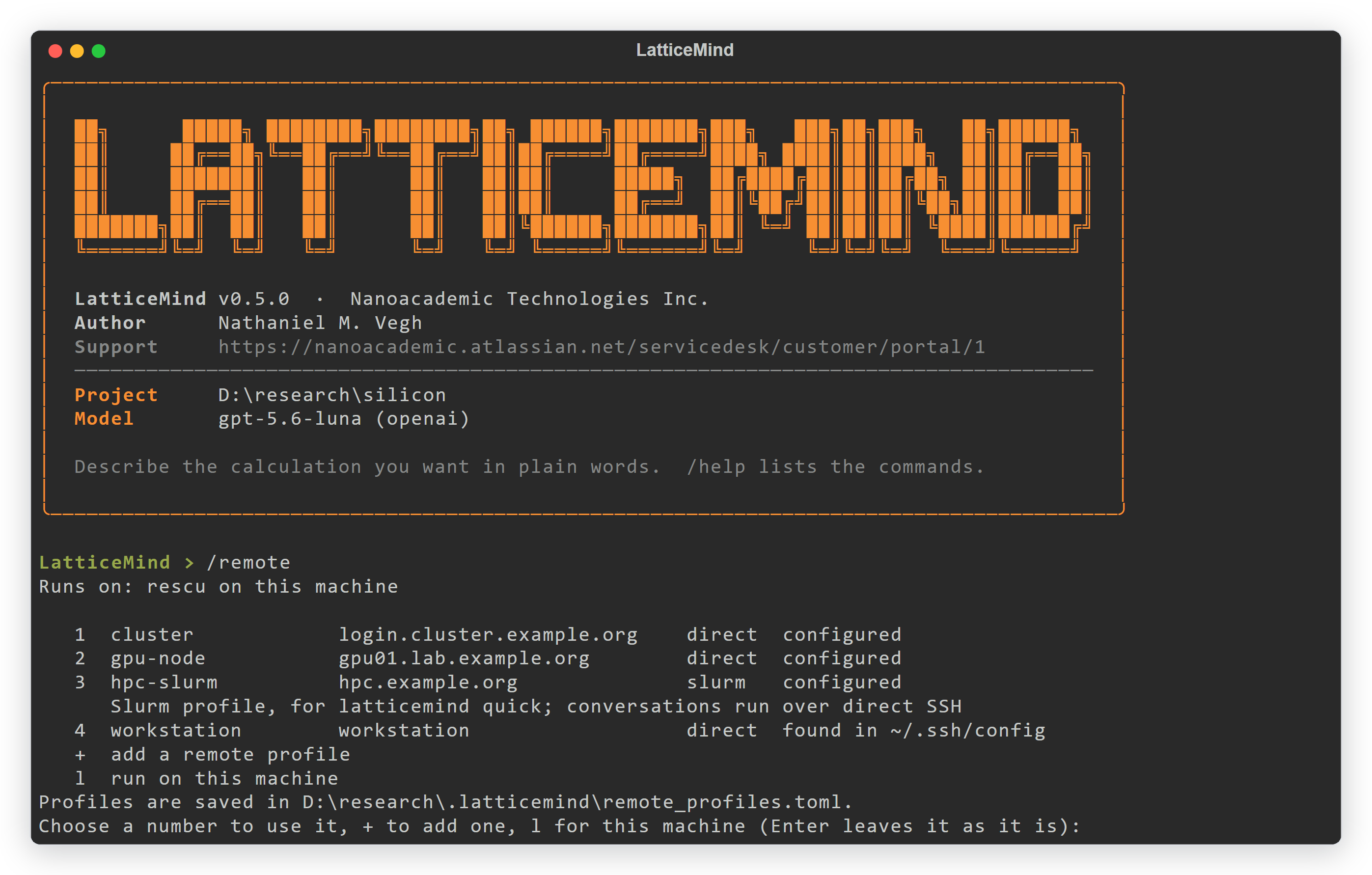
Fig. 7.3.1 /remote in the terminal: saved profiles and SSH hosts, + to add one,
l for this machine.
/remote                  list, choose, + add, l for this machine
/remote add              a short wizard: name, host, work folder, transfer
                         tool, solver commands, shell setup
/remote test office      check SSH, file transfer and the solver command;
                         nothing is uploaded
/remote office           send this conversation's calculations there
/remote local            run on this machine again
/remote setup office     add SSH session reuse (for two-factor login)
/remote warm office      open one reusable SSH session; approve 2FA once
The conversation and the model stay on this machine; only the solver runs on
the remote host. Choosing a profile launches nothing, and each launch still asks
for your permission unless approve-for-me covers it. To start with a profile
already chosen, run latticemind --remote-profile office. Conversations
launch over direct SSH; Slurm profiles are for latticemind quick. See
Remote & HPC execution for the profile fields.
7.4. Answering a permission request
Before a solver runs, LatticeMind shows exactly what will run and where, and offers:
1. yes 2. yes, always 3. no
Type the number, or answer in words — yes, go ahead, run it, approve, or
no, don’t, cancel. /approve and /deny are the same answers written
as commands.
7.4.1. Approve-for-me
/approve-for-me on (or /approvals assessed) lets a fixed set of rules answer
routine requests for the rest of the session:
Goes ahead without asking |
Always asks you |
|---|---|
A prepared solver run (RESCU, NanoDCAL, VASP) of low or medium estimated cost, on this machine or on a saved remote profile, with validation clean — one run or a batch. |
A high-cost run on this machine, or one whose size cannot be estimated. |
Creating folders or empty files inside the project ( |
Moving, renaming, copying or deleting files and folders, writing into a file, and reorganising the project folder. |
Running a program or a generated analysis script, and anything outside the project folder. |
Every approval it gives is recorded with the rule that allowed it;
/approvals-log lists them. After twelve runs or twenty folder creations
since your last message, the next request asks you, so a turn that keeps
repeating itself cannot run on unattended; your next message resets the count.
/approve-for-me off returns to answering everything yourself.
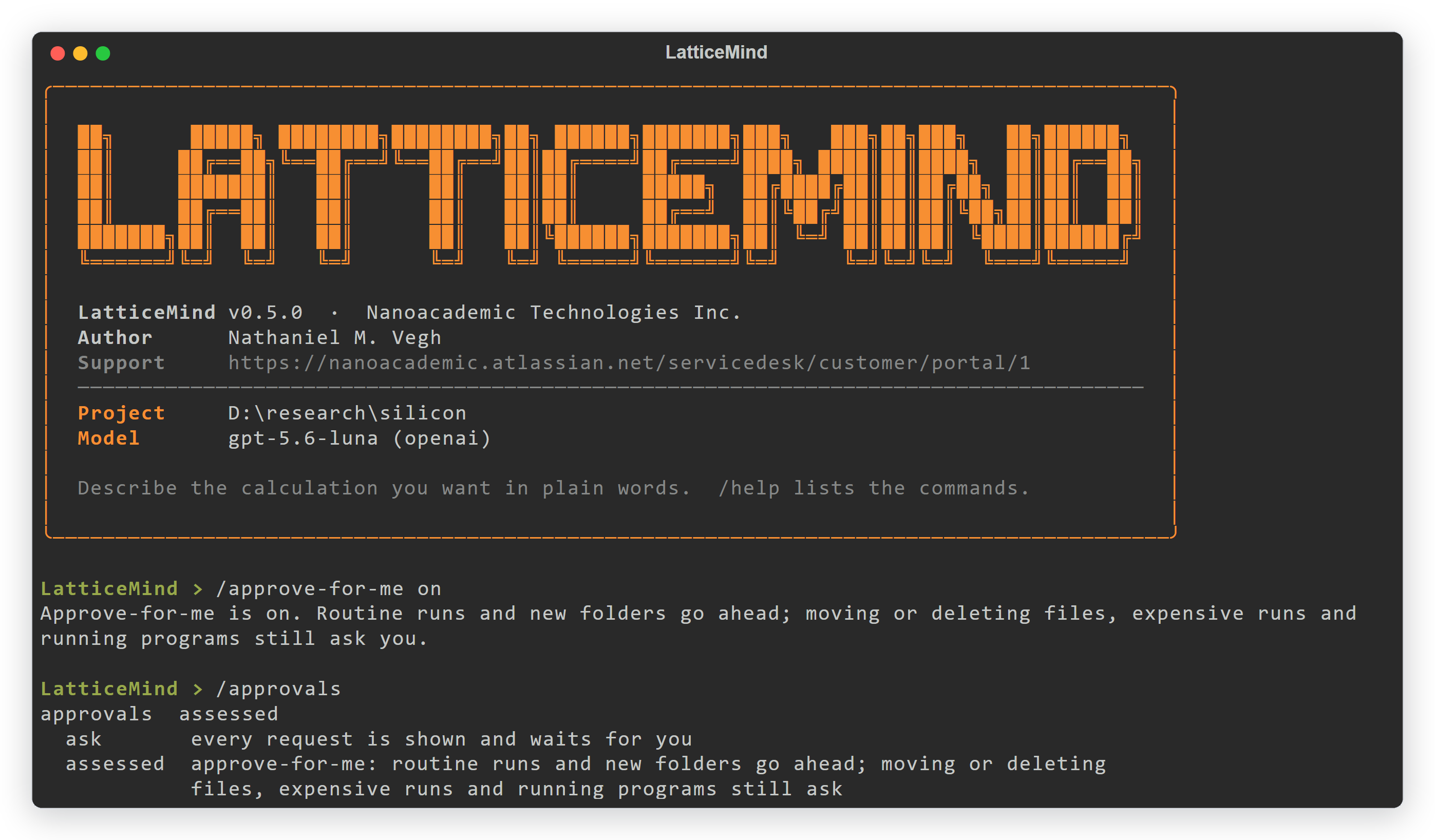
Fig. 7.4.1 /approve-for-me on in the terminal, with what goes ahead and what still
asks.
In the browser, the Approvals fact in the top bar shows who answers; click
it to switch. The Control room’s Permissions card has the same switch. To start
a terminal session in approve-for-me, run latticemind --approvals assessed.
7.5. Steering the work
You do not need a command to change what LatticeMind is doing — say it, either at the prompt or while a turn is running:
Use a denser 8x8x8 k-grid for the SCF.
Add a DOS step after the SCF.
Relax the structure before the band structure.
Redo the band structure along L-Γ-X-W-K.
Prepare the inputs but do not run anything.
A message typed while a turn runs is read at its next step. ctrl-c offers
s to stop, d to leave the work running, and w to keep watching.
7.6. The latticemind quick palette
The one-shot pipeline (Two runtimes) has a larger set of commands, listed
inside it with /commands. They control a pipeline run rather than a
conversation.
Command |
What it does |
|---|---|
|
Show the full pipeline command palette. |
|
Start, list, or continue a pipeline project. |
|
Adopt the current folder, or inspect it before deciding. |
|
Whether LatticeMind may use structure files it finds in the current directory. Files you attach by name are always used. |
|
Name a project; copy one before experimenting. |
|
Allow the solver to run after validation passes. |
|
Preview the exact commands and inputs; estimate the resource risk. |
|
Choose where calculations run. |
|
Point LatticeMind at your RESCU executable. |
|
Whether a released calculation still holds the project’s execution lease;
|
|
Show or switch the AI model provider and model. |
|
Workflow and per-calculation status. |
|
The generated input decks; results, logs and reports; figures; extracted quantities. |
|
Calculations that failed or became stale, with suggested reruns. |
|
Resume a failed or stale step. |
7.7. Where to go deeper
The complete pipeline palette, with every command and alias, is in The latticemind quick command palette.
Remote/HPC commands (
/remote …) are covered in Remote & HPC execution.Cloud/proxy commands (
/qbraid,/cloud status) are in Cloud & headless deployment.