Introduction
LatticeMind is an AI agent for computational materials science. You describe the calculation you want in plain language — “compute the band structure and density of states of silicon” — and LatticeMind does the work with you: it builds the structure, chooses the numerical settings, writes and checks the solver inputs, asks your permission, runs the calculation on your machine or on a remote cluster, reads the results and answers with the numbers it found.
LatticeMind’s main solver is RESCU, and it knows RESCU well. You can run self-consistent field (SCF), band structure, density of states, structural relaxation, DFT+U and density functional perturbation theory (DFPT) phonons, among others. LatticeMind also drives NanoDCAL for electronic structure and quantum transport, and VASP in preview.
What makes LatticeMind different from a template generator is that it reasons about the science. It connects multi-step workflows correctly (a band structure reads the converged density of its SCF, for example), checks its inputs before anything runs, and keeps what a calculation established separate from what it did not.
How LatticeMind works
Working with LatticeMind is a conversation. You start it in a folder, and that folder is the project.
You describe what you want, in a sentence.
LatticeMind prepares and checks. It looks at what already exists in the folder, builds the structure, chooses the settings and writes the solver inputs, checking them as it goes.
You approve. Before any solver runs, LatticeMind shows what it will run and where, and asks. Nothing starts until you answer yes.
The solver runs, here or on a remote machine. Its own output streams into the conversation so you can watch it converge.
LatticeMind reads the results and answers. Every number in the answer is tied to a recorded result, and
/reportwrites the full evidence record.
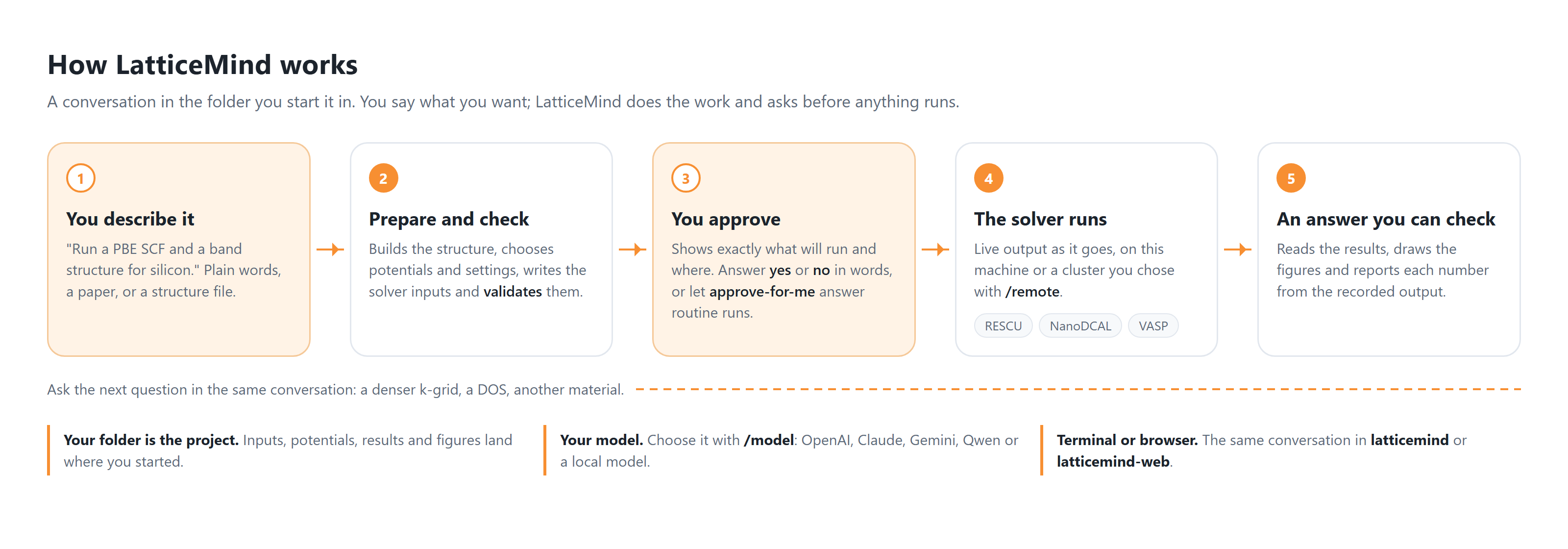
Fig. 1 A LatticeMind conversation. You describe the calculation, LatticeMind prepares and checks the inputs, you approve the launch, the solver runs on this machine or a remote one, and LatticeMind reads the results and answers.
You can correct LatticeMind at any point — “use a denser k-grid”, “do not run anything yet” — and come back tomorrow: starting LatticeMind in the same folder reopens the conversation. For a closer look, see How LatticeMind works.
Supported solvers
LatticeMind binds one project to one solver. The three backends and their current maturity are:
Solver |
Status |
What it covers |
|---|---|---|
RESCU |
Primary, stable |
SCF, band structure, density of states, projected/local DOS, structural relaxation, DFT+U, DFPT phonons and dielectric response, spin-polarized and non-collinear magnetism, alloys and defects, surface slabs and work functions, and two-dimensional sheets. |
NanoDCAL |
Supported |
Ground state and energetics, electronic structure (including spin, DFT+U and complex bands), finite-displacement phonons, and two-probe quantum transport — transmission, conductance, I–V, scattering states, AC response, thermoelectrics and photocurrent. See NanoDCAL support. |
VASP |
Preview (beta) |
SCF, relaxation (including variable-cell), band structure and DOS, with spin-polarized band edges. |
Note
You ask for NanoDCAL calculations the same way as RESCU ones, in plain language, and they run on your own machine or on a remote server. You can also build a transport project up over several requests — adding an I–V curve or a Seebeck coefficient to a device you have already computed. This manual covers RESCU first and treats NanoDCAL as an advanced topic.
Key features
Plain-language interface. No input-file syntax to memorize. Prompts can be as terse as “SCF for fcc nickel” or as detailed as you like.
You approve every launch. A solver runs only after you answer the permission question. If you prefer,
/approve-for-me onlets routine, modestly sized runs go ahead while anything that could lose work still asks.Correct multi-step chaining. Densities and geometries are handed from one calculation to the next, each with its own result path.
Answers tied to results. Numbers in an answer come from the recorded output of a run, and a redone calculation marks the older run as superseded.
Reproduce a paper. Attach a PDF and ask for one of its figures; LatticeMind reads the structure and settings from the paper and compares its own results with the reported values.
Two interfaces. The terminal (
latticemind) and the browser (latticemind-web) run the same conversation. See Terminal and browser.Bring your own AI model. Works with OpenAI, Anthropic Claude, Google Gemini, Qwen, or a local Ollama model;
/modelswitches between them. See Choosing a provider.Local or remote execution. Run on your machine, or send calculations to a remote workstation with
/remotewhile the conversation stays on your machine. LatticeMind never sends your API key to the remote host. See Remote & HPC execution.Multilingual. Prompts in English, French, or Chinese are understood.
Self-contained projects. A project is a folder of inputs, pseudopotentials, results, figures and reports, plus a hidden record of the conversation — portable and reproducible.
Who this manual is for
This manual is written for users — materials scientists, chemists, and engineers who want results, not build systems. You do not need to know RESCU’s input syntax or how to compile anything. If you can describe a calculation, you can run it.
Ready? Continue to Installation to get LatticeMind installed, then to Getting started for your first project.