1. Running on a remote machine or cluster
LatticeMind prepares and checks inputs on your machine, then sends the heavy
calculation to a remote workstation or cluster and fetches the results back.
This tutorial has two parts: a remote workstation from a conversation, over
direct SSH, and a Slurm cluster with latticemind quick. For the settings
reference, see Remote & HPC execution.
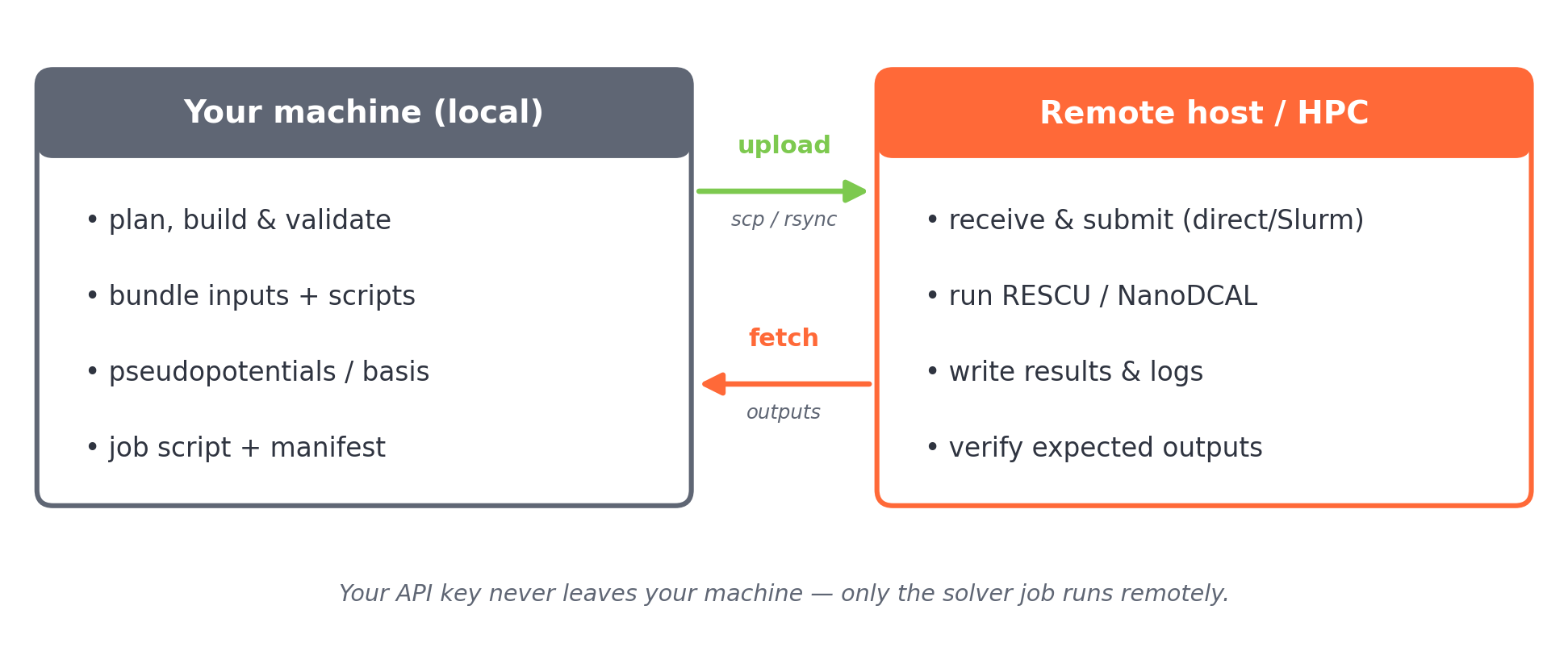
Fig. 1.1 The local-prepare / remote-run / fetch-back cycle.
1.1. Before you start
Confirm plain SSH already works to your host — LatticeMind uses your existing SSH configuration:
ssh my-research-host true
1.2. Part 1 — A remote workstation from a conversation
Start LatticeMind in your project folder and type /remote. The list shows
your saved profiles and the hosts in ~/.ssh/config:
/remote
Type + (or /remote add) to add a profile. The wizard asks for a name,
the SSH host, the scheduler (choose direct), the work folder on the host, the
transfer tool, the solver command there (for example rescu) and any shell
setup such as module load rescu. Then test it:
/remote test office       # SSH, file transfer and the solver command; nothing is uploaded
/remote office            # send this conversation's calculations there
If your host uses two-factor login, /remote setup office and /remote warm
office let you approve it once for the session.
Now ask for the calculation as usual:
Do an SCF and band structure calculation for silicon.
LatticeMind prepares and checks the inputs on your machine, then asks permission
with the host and remote folder named in the question. After yes, it uploads
the inputs and pseudopotentials, runs RESCU on the host, streams its output into
the conversation, fetches the results into results/ and answers. The
conversation and the model stay on your machine throughout.
You can close the terminal while the job runs; latticemind in the same folder
reopens the conversation and collects the results. /remote local sends later
calculations to this machine again.
1.3. Part 2 — A Slurm cluster with latticemind quick
A conversation launches over direct SSH only. For a Slurm cluster, use the
one-shot pipeline, latticemind quick. The rest of this tutorial uses its
commands.
1.3.1. Step 1 — Define the cluster profile
Add a Slurm profile to ~/.latticemind/remote_profiles.toml:
[profiles.cluster]
host = "my-cluster-login"
scheduler = "slurm"
remote_root = "/scratch/myuser/latticemind_runs"
transfer = "rsync"
rescu_command = "rescu"
shell_preamble = "module load rescu"
account = "my-account"
partition = "short"
time = "02:00:00"
nodes = 1
ntasks = 4
cpus_per_task = 1
mem = "8G"
1.3.2. Step 2 — Select and test it
Inside latticemind quick:
/remote profile cluster
/remote setup cluster      # install SSH session-reuse settings
/remote warm cluster       # approve 2FA once, if your cluster uses it
/remote test cluster       # preflight: SSH, transfer, scheduler, solver
/compute slurm
/remote test verifies the connection, the transfer tool, the scheduler, and
that the solver command exists on the remote host — catching problems before you
submit.
1.3.3. Step 3 — Build, preview, and submit
Describe your calculation as usual, for example:
Do an SCF and band structure calculation for silicon.
latticemind quick plans and validates locally. Before it submits anything,
preview the job:
/launch-preview
This shows the exact remote directory, upload method, the generated Slurm job script, the input files, and the requested resources. When it looks right:
/execute on
run it
LatticeMind packages the validated job (inputs, scripts, pseudopotentials and the job script), uploads it, and submits it.
1.3.4. Step 4 — Track and fetch
/remote status         # queued / running / complete
/remote logs 80        # tail the remote log
/remote fetch          # bring verified outputs back into the project
/remote workdir        # show the remote and local bundle paths
Once fetched, the results land in your local project exactly as if they had run locally — post-processing, plots, and the report follow.
1.3.5. Recovering an interrupted job
If a job is interrupted (wall-time limit, node failure), you do not start over. LatticeMind preserves the inputs and save paths, so you can:
/remote status
/failed                # see which steps need attention
/continue <target>     # resume the interrupted or downstream steps
Because inputs are unchanged, RESCU restarts cleanly, and only the affected and downstream steps are recomputed.
Note
LatticeMind automatically applies serial-only guardrails to certain RESCU post-analysis stages (phonon band structure/DOS, optics, Raman), stripping MPI launchers for them. See Remote & HPC execution.
1.4. Safety and cost
LatticeMind never sends your API key to the cluster and never runs the AI agent remotely — only the solver job.
Read the permission question (in a conversation) or
/cost(inlatticemind quick) before launching dense k/q grids, relaxations, DFPT, or large-cell workflows, and start with a cheap validation run.